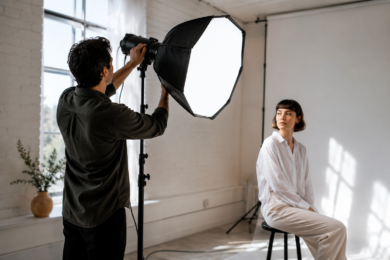
A Studio Lighter can change the entire look of your photos and videos without changing your camera, room, or editing app. Good lighting makes skin look cleaner, products look sharper, and videos feel more professional. Bad lighting does the opposite. It creates harsh shadows, dull colors, shiny faces, and that “cheap webcam” look nobody wants.
The good thing is, you do not need a huge production studio to get better results. A small creator desk, bedroom corner, home office, salon, shop counter, or podcast setup can look polished when the light is placed properly.
A Studio Lighter is not just about brightness. It is about control. Direction, softness, distance, color temperature, and background separation all matter. Once you understand those basics, even a simple light can make your content look like it was planned with care.
What Is a Studio Lighter?
A Studio Lighter is a lighting tool used to brighten and shape a photo or video scene. It can be an LED panel, softbox, ring light, tube light, umbrella light, or compact video light.
Its main job is to help the camera see the subject clearly. Cameras do not handle poor lighting as well as the human eye. A room may look fine to you, but on camera it can appear dark, grainy, yellow, blue, or flat.
That is where controlled studio lighting helps. It gives your subject enough light while reducing shadows and improving detail.
For creators, a Studio Lighter is useful for:
- YouTube videos
- TikTok and Instagram reels
- Product photography
- Talking-head videos
- Makeup and beauty content
- Online teaching
- Zoom meetings
- Podcast recording
- Food photography
- Small business product shoots
Lighting is one of the fastest upgrades for visual content. Many beginners buy a better camera first, but often the real problem is not the camera. It is the light.
Why Studio Lighter Quality Matters
A cheap light can still help, but not every bright light gives a good image. Quality matters because cameras capture more than brightness. They also capture color, shadows, skin texture, glare, and background detail.
A strong but harsh light pointed directly at the face can make someone look tired or uncomfortable. A soft, well-placed light can make the same person look natural and confident.
Good lighting also saves editing time. When the scene is exposed properly, you do not need to fix everything later. The video looks cleaner. The photo has better color. The face or product stands out naturally.
The U.S. Department of Energy explains that Color Rendering Index, or CRI, is commonly used to describe how accurately a light source renders colors compared with a reference source, with higher values generally meaning better color appearance.
For photos and videos, that matters a lot. If a Studio Lighter has poor color accuracy, white clothing may look strange, skin may look washed out, and product colors may not match real life.
Best Studio Lighter Ideas for Better Photos and Videos
The best lighting setup depends on what you are shooting. A product photo needs different lighting from a talking-head video. A beauty tutorial needs a different look from a dramatic podcast interview.
Still, the core idea is simple. Place light where it flatters the subject and supports the mood.
Use One Main Light First
Before adding multiple lights, start with one strong main light. This is usually called the key light. It should be your most important light source.
Place the Studio Lighter slightly to one side of the subject, around 30 to 45 degrees from the camera. Raise it a little above eye level and angle it down gently.
This creates natural-looking shadows and gives the face shape. If the light is directly in front of the subject, the image can look flat. If it is too far to the side, the shadows may become too strong.
A good starting point:
- Put the light in front and slightly to the left or right
- Keep it above eye level
- Angle it toward the face
- Move it closer for softer light
- Move it farther away for stronger contrast
This setup works well for YouTube videos, interviews, online courses, and social media reels.
Soften the Light for a Cleaner Look
Soft light is usually more flattering than hard light. It reduces harsh shadows, softens skin texture, and makes the image feel more polished.
A bare LED can be too direct. To soften it, use:
- A softbox
- A diffuser panel
- A white curtain
- A bounce board
- A white wall
- An umbrella modifier
The larger the light source appears to the subject, the softer the light becomes. That is why softboxes are popular. They spread the light over a larger surface.
For example, if you record beauty videos, a soft Studio Lighter placed close to your face will usually look better than a tiny harsh LED placed far away.
For product photos, soft light helps reduce ugly reflections. It also makes surfaces look smoother, especially on glass, plastic, skincare bottles, jewelry, and tech accessories.
Use a Fill Light to Reduce Harsh Shadows
Sometimes one light creates too much contrast. One side of the face looks bright while the other side looks too dark. This can work for dramatic content, but not always for clean everyday videos.
A fill light solves this problem. It is usually placed on the opposite side of the main light and set to a lower brightness.
You do not always need a second Studio Lighter. A white foam board, reflector, or wall can bounce light back into the shadow side.
Here is a simple setup:
| Lighting Element | Placement | Purpose |
|---|---|---|
| Key light | Front left or front right | Main brightness and shape |
| Fill light | Opposite side | Softens shadows |
| Back light | Behind subject | Adds separation |
| Background light | Behind or beside subject | Adds mood and depth |
Do not make the fill light as bright as the key light unless you want a very flat, shadow-free look. A little shadow gives the image depth.
Add a Back Light for a Professional Feel
A back light, also called a rim light or hair light, sits behind the subject and points toward the back of the head, shoulders, or outline.
This creates separation between the subject and background. It is one of the easiest ways to make videos look more professional.
For example, if you sit in front of a dark wall wearing dark clothing, you may blend into the background. A small back light can create a thin glow around your outline and make you stand out.
This is especially useful for:
- Podcast videos
- Talking-head YouTube videos
- Online course recordings
- Interview setups
- Gaming streams
- Cinematic portraits
Keep the back light subtle. If it is too bright, it can look distracting or artificial.
Choosing the Right Studio Lighter for Your Content
The right Studio Lighter depends on your space, budget, content type, and how much control you need.
A big softbox is great for home video setups but may be hard to move. A compact LED panel is portable but may need diffusion. A ring light is easy for beginners but can create circular reflections in glasses or eyes.
LED Panel Lights
LED panels are popular because they are slim, adjustable, and easy to use. Many allow brightness and color temperature control.
They work well for:
- Desk videos
- Product shots
- Interviews
- Online meetings
- Small studio spaces
Look for a panel with adjustable brightness, good color accuracy, and a stable stand. A cheap stand can ruin the experience because the light may wobble or fall.
Softbox Lights
Softbox lights are excellent for soft, flattering light. They are common in photography and video because they create a larger light source.
They work well for:
- Portrait photography
- YouTube videos
- Clothing photos
- Beauty content
- Product photography
The downside is size. A softbox needs more room than a small LED panel. But if you have a fixed shooting corner, it can be one of the best choices.
Ring Lights
Ring lights became popular with beauty creators, vloggers, and online teachers. They are simple and beginner-friendly.
They work well for:
- Makeup tutorials
- Face-focused videos
- Livestreams
- Short-form content
- Mobile video recording
However, a ring light can make the face look flat if it is the only light. It may also create bright circles in reflective surfaces. For a more natural look, place it slightly off-center instead of directly around the camera.
Tube Lights and Accent Lights
Tube lights are often used for background color and creative effects. They are not always the best main light, but they can make a scene look stylish.
Use them behind a desk, near a wall, beside shelves, or in the background of a video. They add personality without overpowering the subject.
A Studio Lighter used as an accent light can turn a plain room into a more interesting filming space.
Color Temperature: Warm, Neutral, or Cool?
Color temperature controls whether your light looks warm, neutral, or cool. It is measured in Kelvin.
ENERGY STAR notes that lower Kelvin values such as 2700K to 3000K appear warmer and more yellow, while 4000K and higher appears cooler or bluer.
For creators, here is a simple way to think about it:
| Kelvin Range | Look | Best For |
|---|---|---|
| 2700K to 3000K | Warm, cozy | Lifestyle, home scenes, evening mood |
| 3500K to 4500K | Neutral, balanced | Talking videos, product shots, office setups |
| 5000K to 6500K | Cool, daylight-like | Clean product photos, tech content, crisp visuals |
For most video creators, 4000K to 5600K is a safe range. It feels clean without looking too yellow or too blue.
The most important thing is consistency. Do not mix warm ceiling lights with a cool Studio Lighter unless you are doing it on purpose. Mixed lighting can make skin tones look strange and difficult to edit.
Brightness: How Much Light Do You Really Need?
Brightness depends on your camera, lens, room, and subject. More light is not always better. Controlled light is better.
If your light is too dim, the camera may increase ISO, which creates grain or noise. If the light is too bright, the face may look shiny and overexposed.
Start at medium brightness and adjust slowly. Watch the face, not just the room. The forehead, nose, cheeks, and white clothing usually show overexposure first.
A good Studio Lighter should let you dim the brightness. This gives you more control in small rooms.
Helpful brightness tips:
- Move the light closer before increasing power
- Use diffusion to soften strong brightness
- Avoid pointing light straight at shiny skin
- Keep the background slightly darker than the subject
- Check exposure on camera, not just with your eyes
For product photos, brightness should show detail without washing out labels, textures, or edges.
Studio Lighter Placement for Different Content Types
Lighting is not one-size-fits-all. A setup that looks great for a podcast may not work for a product photo.
For YouTube Talking Videos
Place the main light slightly above eye level and off to one side. Add a small fill light or reflector on the opposite side if shadows are too dark.
Keep the background darker or softly lit. This helps the viewer focus on your face.
A simple setup:
- Studio Lighter at 45 degrees
- Camera at eye level
- Small background light behind you
- Window light blocked or controlled
- Ceiling light turned off if it causes color issues
This setup feels natural and professional without looking too staged.
For Product Photography
Product lighting needs clean detail. Place the Studio Lighter at an angle rather than straight on. This helps show shape and texture.
For shiny products, avoid direct harsh light. Use diffusion and bounce cards.
Example: If you are photographing a skincare bottle, place one soft light to the side and use a white card on the opposite side. This adds shape while keeping the label readable.
For flat products, such as notebooks or accessories, overhead lighting can work well. Just make sure your hands, phone, or camera do not cast shadows on the item.
For Beauty and Makeup Videos
Soft, even lighting is important for beauty content. A large softbox or ring light can work well, but avoid making the light too harsh.
Place the Studio Lighter close enough to soften skin but not so close that the face becomes overexposed.
Use neutral color temperature so makeup shades look accurate. If the light is too warm, foundation may look more yellow than it really is. If it is too cool, skin may look pale.
For Food Photography
Food usually looks better with side light or back-side light. Front lighting can make food look flat.
Place the light near a window angle or use a softbox from one side. Add a white card to brighten shadows if needed.
Warm light can make food feel cozy, but be careful. Too much warmth can make white plates look yellow.
For restaurants, recipes, and home cooking content, a Studio Lighter with adjustable color temperature is very useful.
For Online Meetings and Webinars
You do not need a complex setup for meetings. One small LED panel or ring light can make a big difference.
Place the light slightly above your screen and angled toward your face. Avoid ceiling-only lighting because it creates shadows under the eyes.
Also avoid sitting with a bright window behind you. The camera will expose for the window, and your face will look dark.
Common Studio Lighter Mistakes to Avoid
Many people buy a Studio Lighter and still feel disappointed because the placement is wrong. The light itself may be fine. The setup is the issue.
Placing the Light Too Low
Lighting from below can look unnatural. It creates shadows that feel spooky or unflattering.
Keep the light at eye level or slightly above. This usually feels more natural because people are used to light coming from above.
Using Only Ceiling Lights
Ceiling lights are convenient, but they are not ideal for camera work. They often create shadows under the eyes, nose, and chin.
Turn off harsh ceiling lights when recording. Use controlled studio lighting instead.
Mixing Different Light Colors
Warm room bulbs and cool LED lights can fight each other. The camera may not know which color to correct.
Try to use one main color temperature. If your Studio Lighter is set to daylight, reduce warm lamps in the room.
Ignoring the Background
The subject may be lit well, but the background still matters. A messy or flat background can make the entire shot feel less professional.
Add depth with distance, soft background light, shelves, plants, curtains, or simple wall texture. Keep it clean, not empty.
Making Everything Too Bright
Bright does not always mean better. Overly bright videos can look harsh and uncomfortable.
Good lighting has balance. The subject should be clear, but shadows should still exist.
Studio Lighter Setup for Small Rooms
Small rooms are tricky because light bounces everywhere. Walls, ceilings, desks, and even clothing can reflect light.
If your room is small, do this:
- Move the subject away from the wall
- Use a soft light close to the face
- Lower brightness instead of blasting the light
- Use curtains to control window light
- Keep background light subtle
- Avoid shiny surfaces near the camera
A small room can still look great. In fact, smaller spaces are easier to control when you know where the light is going.
For example, a creator filming in a bedroom corner can use one softbox as the main light, one small LED behind the chair, and a tidy background. That is enough for a clean YouTube setup.
Studio Lighter Setup for Product Sellers
If you sell products online, lighting can affect trust. Buyers want to see color, size, texture, and details clearly.
A blurry or dark product photo can make even a good product look cheap. A clean, well-lit product image feels more reliable.
For small products, use:
- One soft main light
- One white bounce card
- A clean background
- A stable camera or phone
- Consistent color temperature
- Enough distance to avoid distortion
For clothing, use a larger light source. Fabric needs soft, even light to show texture and color.
For jewelry, use diffusion to control reflections. Bright spots can hide details if the light is too direct.
Natural Light vs Studio Lighter
Natural light is beautiful, but it changes constantly. Morning light, afternoon light, clouds, rain, and window direction all affect the look.
A Studio Lighter gives control. You can record at night, shoot on cloudy days, and keep your videos consistent.
Natural light is still useful. Many creators combine window light with artificial light. The key is balance. If the window is strong, use your light as fill. If the room is dark, use your light as the main source.
Do not place yourself half in sunlight and half in shadow unless you want a dramatic look. Cameras often struggle with that contrast.
How to Make Videos Look More Cinematic With Lighting
Cinematic lighting is not always about expensive gear. It is about intention.
Start by deciding the mood. Clean and bright? Warm and cozy? Dark and dramatic? Modern and techy?
Then light the scene to match that mood.
For a clean creator look, use soft front-side lighting and a simple background.
For a dramatic podcast look, use stronger side lighting, a darker background, and a subtle rim light.
For a cozy lifestyle look, use warmer tones, practical lamps in the background, and soft shadows.
For a modern tech look, use cooler light, crisp contrast, and controlled accent lighting.
The Studio Lighter should support the story of the video. A finance video may need clean and trustworthy lighting. A gaming setup may need colorful accents. A cooking video may need warm and appetizing light.
Best Lighting Ideas for Photos
Photos freeze every detail, so lighting mistakes become obvious. Harsh shadows, shiny skin, blown-out highlights, and dull colors can ruin a good shot.
For better photos:
- Use side light to show shape
- Use soft light for portraits
- Use back light for separation
- Use reflectors to brighten shadows
- Use diffusion for shiny products
- Keep the background simple
- Match the lighting mood to the subject
A portrait with soft side lighting feels natural. A product photo with controlled shadows feels premium. A food photo with warm side light feels appetizing.
The same Studio Lighter can create all of these looks if you move it and modify it properly.
Best Lighting Ideas for Videos
Video lighting must stay consistent because the viewer watches the scene over time. Flicker, shifting brightness, and mixed colors are more noticeable in video than in still photos.
Use a reliable continuous light. Avoid lights that flicker on camera. Many modern LED studio lights are designed for video, but very cheap lights may create flicker at certain shutter speeds.
For videos:
- Keep the main light stable
- Avoid changing daylight during recording
- Use manual camera settings if possible
- Keep skin tones natural
- Add separation from the background
- Reduce reflections on glasses
- Do a short test recording first
A test recording is important. What looks good in the room may look different on camera.
How to Use a Studio Lighter With a Phone
Many people shoot with phones, and that is completely fine. Phone cameras can produce strong results when the lighting is good.
Place the Studio Lighter slightly higher than the phone. Do not put it too close to the lens unless you want a flat look.
Tap on your face or product to set focus and exposure. If your phone allows exposure locking, use it. This prevents brightness from jumping while recording.
For vertical videos, keep the light close but out of frame. For horizontal videos, you have more room to place the light at an angle.
A phone with good lighting often looks better than an expensive camera in poor lighting.
Quick Real-World Lighting Scenarios
Scenario 1: Bedroom YouTube Setup
A creator records videos at a desk in a small bedroom. The room has one window and a plain wall.
Best setup:
- Softbox at 45 degrees
- Window curtain closed for consistency
- Small lamp or LED behind the creator
- Camera at eye level
- Background kept simple
Result: Clean face lighting, better depth, and fewer shadows.
Scenario 2: Small Business Product Shoot
A seller photographs handmade candles for an online store.
Best setup:
- Soft Studio Lighter from the side
- White card on the opposite side
- Neutral background
- Camera on tripod
- Warm but controlled color temperature
Result: Clear labels, soft shadows, and a more premium product look.
Scenario 3: Podcast Interview Corner
Two people sit at a table for a video podcast.
Best setup:
- One soft key light for each person
- Small back light behind both
- Dim background with warm accent lighting
- No harsh ceiling light
- Microphones kept clean and visible
Result: More depth, better faces, and a professional interview mood.
FAQs About Studio Lighter Use
Is a Studio Lighter worth it for beginners?
Yes, a Studio Lighter is worth it for beginners because lighting improves image quality immediately. Even a basic camera or phone can look much better with controlled light.
What is the best Studio Lighter for YouTube videos?
A softbox or adjustable LED panel is usually best for YouTube videos. A ring light can also work, especially for face-focused content, but a softbox often gives a more natural look.
Should I use warm or cool light for videos?
Neutral light is usually safest for videos. Around 4000K to 5600K works well for most creator setups. Warm light feels cozy, while cool light feels clean and modern.
How many lights do I need for good videos?
You can start with one light. Add a reflector if shadows are too dark. Later, add a back light or background light for more depth.
Why does my video still look bad with a Studio Lighter?
The light may be placed incorrectly. Try moving it higher, placing it to one side, softening it with diffusion, and turning off mixed room lights.
Can I use a Studio Lighter for product photography?
Yes, it is very useful for product photography. Use soft light, avoid harsh reflections, and keep the product background clean.
Final Thoughts on Using a Studio Lighter
A Studio Lighter is one of the smartest upgrades for anyone creating photos or videos. It helps your camera capture cleaner details, better colors, and a more professional-looking scene. You do not need a huge studio or expensive setup. You need the right placement, soft light, and a little patience.
Start simple. Use one main light. Move it around. Watch how the shadows change. Add a reflector. Try a back light. Test warm and cool tones. Over time, lighting starts to feel less confusing and more creative.
The real secret is not just owning a Studio Lighter. It is learning how to shape the light so your subject looks clear, natural, and intentional. Once you understand that, your videos feel more trustworthy and your photos look more polished.
Good lighting supports the story you are trying to tell. Whether you are filming a tutorial, shooting a product, recording a podcast, or creating social media content, your lighting helps viewers decide how professional your content feels. The basics of photographic lighting show how direction, contrast, and light quality can shape the final image.