You have been hearing a lot about IPTV boxes lately and you are thinking about buying one for your home but you have no idea where to even start. That is completely normal because the market is packed with different devices, different price points, and a lot of confusing technical terms that nobody really explains clearly.
An IPTV box can genuinely transform your TV-watching experience, giving you thousands of live channels, on-demand movies, and regional content all without a cable subscription, but picking the wrong one can leave you frustrated and out of pocket.
This guide breaks down everything a first-time buyer needs to know before making that decision.
What is an IPTV box?
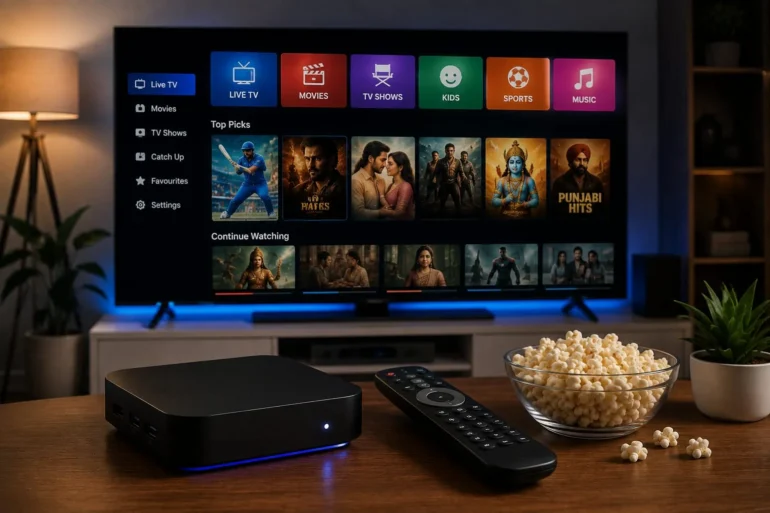
An IPTV box is a compact device that is connected to the television apparatus and then provides live television channels, movies and on-demand content via the internet in place of cable or satellite channels. Just plug it in, add your subscription information and begin enjoying thousands of channels without delay.
How Does an IPTV Box Work
The concept is honestly pretty simple: your IPTV box connects to the internet and receives a live video stream from your IPTV service providers’ servers. That stream gets delivered directly to your TV screen in real time so you watch live channels at the exact same moment they broadcast.
Most boxes run on Android or Linux operating systems and come with a pre-installed IPTV app or portal where you enter your login credentials. Once you log in, your full channel list loads automatically, and you are ready to watch.
Types of IPTV Boxes Available
Android IPTV Boxes
These are the most popular and flexible options they run on android so you can install multiple apps side load different IPTV players and customize your experience. They work great for families who want maximum control over their setup.
Linux IPTV Boxes
Linux-based boxes like MAG devices are specifically built for IPTV streaming. They are simpler to use with fewer customization options but they tend to be very stable and reliable for everyday viewing.
Hybrid Boxes
Some devices combine Android and Linux features, giving you both stability and flexibility; these are a solid middle ground option for most households.
IPTV Box vs Firestick vs Smart TV
| Feature | IPTV Box | Amazon Firestick | Smart TV |
| Dedicated IPTV Use | Yes | Partial | Partial |
| Picture Quality | HD and 4K | HD and 4K | HD and 4K |
| Ease of Setup | Simple | Very simple | Simple |
| App Flexibility | High | Medium | Low |
| Cost | One time purchase | One time purchase | Built in |
| Performance | Strong | Good | Varies |
| Best For | Serious IPTV users | Casual streamers | Occasional use |
Key Features to Look For in an IPTV Box
When choosing your first IPTV box, make sure it has these important features.
- 4K and HD support — ensures sharp picture quality on modern TVs.
- sufficient RAM — at least 2GB for smooth performance without freezing.
- Good processor — faster processor means better streaming and app loading.
- Storage space — at least 16GB so apps and data run without issues.
- Wifi and ethernet support—ethernet always gives more stable streaming.
- HDMI output — standard connection for modern TVs.
- Regular firmware updates — keeps the device secure and performing well.
Step-by-Step Setup Guide
Setting up your IPTV box for the first time is honestly pretty straightforward here is exactly how to do it.
Step 1 — Unbox your IPTV box and connect it to your TV using the included HDMI cable.
Step 2 — Plug in the power adapter and turn the device on
Step 3 — Connect to your home wifi network or use an ethernet cable for a more stable connection
Step 4 — Open the pre installed IPTV app or portal on the device
Step 5 — Enter your subscription login credentials that your IPTV provider sent you
Step 6 — Your full channel list loads automatically and you are ready to start watching
The entire process usually takes around 10 to 15 minutes from unboxing to watching your first channel
Benefits of Using an IPTV Box
There are a lot of genuinely good reasons why families across the usa are switching to IPTV boxes
- Access to thousands of live channels in multiple languages
- HD and 4k picture quality without cable subscription fees
- On-demand movies, web series, and catch-up TV all in one place
- Works perfectly for Indian regional language content: Hindi, Tamil, Telugu, Punjabi, and more
- A one-time hardware purchase with no ongoing equipment rental fees
- A dedicated device means better performance than using a phone or tablet
- Easy-to-use interface that even older family members can navigate comfortably
Pros and Cons of an IPTV Box
Pros
Dedicated streaming device built specifically for IPTV.
- Strong consistent performance during live events and sports.
- Supports multiple IPTV apps and players.
- 4K and HD quality on a big-screen TV.
- One-time purchase cost with no monthly hardware fees.
- Works with any reliable IPTV subscription.
Cons
- Requires a good internet connection for best results.
- Initial setup might feel unfamiliar for complete beginners.
- Quality varies significantly between different box brands.
- Needs a separate IPTV subscription to access content.
- Not as portable as a phone or firestick.
Common Mistakes First-Time Buyers Make
Buying the cheapest box available — A very cheap box often has weak hardware that causes freezing, lagging, and poor streaming performance. Always check the specs before buying.
Ignoring RAM and processor specs — Low RAM causes constant buffering and app crashes even with a fast internet connection.
Skipping the IPTV free trial — Never commit to a long subscription without testing the service first on your actual device during a proper free trial period.
Using WiFi instead of Ethernet—WiFi works fine but an Ethernet cable connection always gives you more stable and reliable streaming, especially during live sports.
Not checking device compatibility — Make sure your chosen IPTV box is compatible with your preferred IPTV service before purchasing.
IPTV Free Trial: Why It Matters for IPTV Box Buyers
One of the most significant things to know prior to the purchase of any device and subscription is the fact that without any of these, you will not be able to enjoy the video streaming. Knowing this is one of the most crucial things to know before going into any investment of money on any device and subscription.
A real IPTV free trial will give you the chance to experience the streaming quality, channel selection, and app functionality of your IPTV box before you pay for a subscription. It lets you know that your selected service is compatible with your device and offers the channels your family actually watches.
If a provider refuses to offer any kind of free trial that is a serious red flag because confident providers always let you test before you pay.
Conclusion
Buying your first IPTV box does not have to be overwhelming once you understand the key features to look for the common mistakes to avoid and the importance of testing with a proper IPTV free trial before committing to anything.
Focus on getting a device with solid hardware specs good ethernet support and compatibility with your preferred IPTV service and you will have a genuinely enjoyable streaming experience that delivers thousands of channels in sharp hd and 4k quality every single day.
Always test before you buy take the free trial seriously and choose a provider that stands behind their service with real responsive support from day one.