Have you ever used a website or app for years and never really thought about it?
Most people have.
You open it, do whatever you came there to do, and move on. Maybe you check a bank balance, order dinner, pay a bill, or book a flight. It works, so you do not spend any time thinking about the technology behind it.
Then one day something does not work.
A payment gets stuck. A page keeps refreshing. Information that should have been saved suddenly is not there.
What felt invisible a few minutes ago suddenly becomes impossible to ignore.
The tricky part is that what looks simple from the outside often is not. A login, a purchase, or a form submission can involve far more happening behind the scenes than most people would ever guess.
Most users only see the end result. They are not thinking about the systems, services, integrations, and processes working together in the background to make everything function the way it should.
On top of that, software is never really done.
Teams are always improving something, fixing something, replacing something, or building something new. Even applications that feel stable from the outside are usually changing behind the scenes on a regular basis.
Most of those changes happen without anyone noticing.
Occasionally one does not.
That is usually where testing enters the picture.
Not every issue looks the same, and not every issue is found the same way.
Some problems affect whether a feature works at all. Others affect performance, security, reliability, or the overall experience people have while using the application.
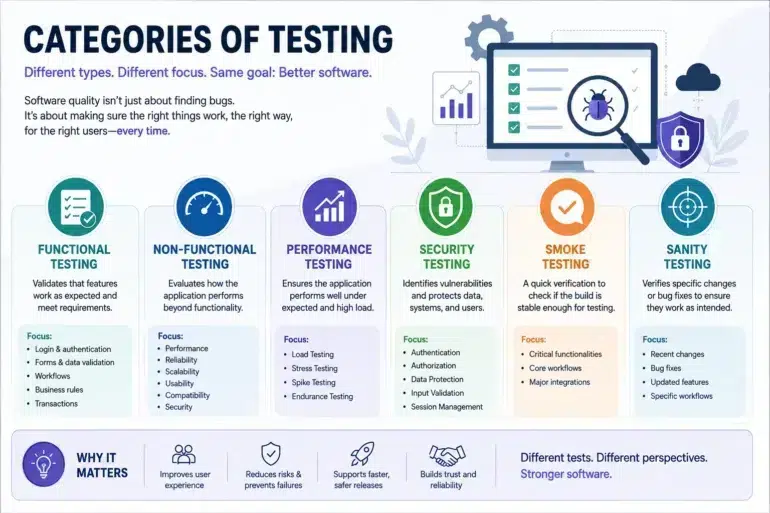
That is why there are different categories of testing. Each one exists to answer a different question about how software behaves and what users are likely to experience once a release goes live.
Functional Testing: Does the Feature Work?
A lot of testing starts with the basics.
Can users sign in successfully?
Can they place an order?
Can they update their information and trust that it was actually saved?
These are often the moments that matter most. Logging in. Checking out. Updating information. They are the kinds of things nobody thinks about until one of them suddenly stops working.
For example, a team might verify that:
- Users can create an account successfully
- Login functionality works correctly
- Password reset emails are delivered
- Forms save information properly
- Orders and transactions are processed correctly
- Search functionality returns the expected results
At its simplest, functional testing is trying to answer one question:
Can users successfully do what they came to the application to do?
When discussing functional vs non functional testing, this is the functional side of the conversation. It focuses on whether the software is doing what it was intended to do.

Non-Functional Testing: Looking Beyond the Feature
Of course, software quality is not only about whether something works.
Most people have used applications that technically worked but still felt frustrating. Maybe pages loaded slower than expected. Maybe things became unreliable during busy periods. Maybe everything seemed fine until a security issue surfaced later.
Nothing was completely broken, but the experience was not particularly good either.
That is where non-functional testing comes in.
Instead of focusing on the feature itself, it focuses on what it is actually like to use the application over time.
Is it responsive?
Can it handle increased demand?
Can users trust it with their information?
This includes areas such as:
- Performance
- Reliability
- Accessibility
- Scalability
- Compatibility
- Security
Users may never describe these things using technical terms, but they notice the results. They notice when software feels fast. They notice when it becomes unreliable. And they definitely notice when trust starts to disappear.
When discussing functional vs non functional testing, this is usually the difference. Functional testing focuses on whether something works. Non-functional testing focuses on how well it works.
Performance Testing: Before Users Feel the Impact
Performance issues have a habit of hiding until the worst possible moment.
An application can seem perfectly healthy during development and internal testing, only to struggle once real traffic begins flowing through it.
That is why teams spend time testing how software behaves under different conditions rather than waiting for customers to discover those limits first.
Common forms of performance testing include:
- Load Testing – What happens during a normal day when people are using the application the way they usually would?
- Stress Testing – What happens when usage goes beyond what was expected?
- Spike Testing – What happens when activity suddenly jumps with little warning?
- Endurance Testing – What happens when the system runs continuously over an extended period?
For many organizations, performance and security testing have become increasingly important because both have a direct impact on user experience and trust.
Security Testing: Protecting More Than Data
Most software issues create inconvenience.
Security issues can create much larger problems.
A broken feature may frustrate users for a while. A security incident can affect customer trust long after the technical problem has been fixed.
That is why security testing focuses on finding weaknesses before they become real-world problems.
Teams may evaluate areas such as:
- Authentication systems
- User permissions
- API security
- Data encryption
- Session management
- Input validation
As applications become more connected through APIs, cloud services, and third-party platforms, performance and security testing continue to play a larger role in maintaining software quality.
Smoke Testing: A Quick First Check
When a new build becomes available, teams usually are not looking to perform hours of detailed testing right away.
The first question is much simpler than that:
Does everything appear stable enough to continue?
That quick confidence check is the purpose of smoke testing.
A smoke test might verify that:
- Users can log in
- Key pages load correctly
- Core workflows are accessible
- Critical integrations appear to be working
If those basic checks fail, deeper testing often gets paused until the larger issues are resolved.
Sanity Testing: Focusing on Recent Changes
Sanity testing takes a different approach.
Instead of looking broadly across the application, it focuses on a specific change that was recently made.
Maybe a bug was fixed. Maybe a workflow was updated. Maybe a feature was adjusted.
The goal is simply to make sure that particular change behaves the way everyone expected it to.
For example, if a checkout issue was fixed, sanity testing may focus primarily on that checkout workflow rather than the entire application.
A simple way to think about smoke vs sanity testing is:
- Smoke testing: Does the build look stable enough to continue testing?
- Sanity testing: Did the recent change work?
Both approaches help teams avoid spending time on deeper testing before they have confidence that the basics are in place.
Why These Testing Categories Matter
Software today rarely operates on its own.
Most applications are connected to a long list of other systems and services that users never even think about. Payment providers, cloud platforms, APIs, authentication services, databases, and third-party tools all play a role in the experience. In many cases, even a single user action can trigger a chain of interactions across multiple systems, all of which need to function correctly for the experience to feel seamless.
As applications become more connected, it becomes harder to predict how changes in one area might affect something else. A small update in one place can sometimes create unexpected issues somewhere completely different. This is especially true in fast-moving environments where teams are releasing updates frequently and working across distributed architectures like microservices. Without structured testing, these hidden dependencies can quickly become a source of risk.
One challenge many teams run into is simply keeping track of everything. Testing can end up spread across different tools, teams, and environments, which makes visibility harder as applications continue to grow. Over time, this fragmentation can lead to gaps in coverage, duplicated efforts, or missed defects. Having a centralized view of testing activity not only improves coordination but also helps teams make better, data-informed decisions about release readiness.
That is one reason many organizations are exploring platforms like Qyrus. As testing expands across web, mobile, API, and other environments, having a clearer view of testing activities can help teams stay organized and maintain consistency across releases.
Nobody expects software to be perfect.
What most teams want before a release is not certainty. Software is too complex for that. What they want is enough confidence to know they are not sending obvious problems out into the world for customers to find first.
The different categories of testing all contribute to that goal. Each one helps answer a different question about quality, giving teams a better understanding of how an application is likely to behave once it reaches real users.