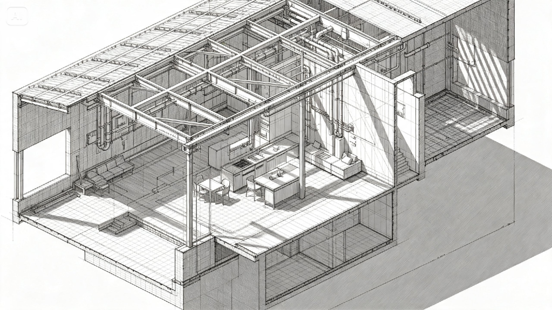
There’s something endlessly fascinating about a cutaway illustration – the moment a building’s exterior is sliced away to reveal the hidden staircases, rooms, and mechanisms working away inside. That reveal turns a static structure into a story, showing not just what a building looks like, but how it actually functions.
An AI image maker makes producing this kind of detailed, technical illustration far more approachable, and Dreamina is especially effective at rendering the layered internal detail a convincing cutaway genuinely requires.
Here’s how to slice open a structure and make its secrets worth studying.
Why a cutaway reveals more than any exterior photo could
An exterior photograph shows a building’s presence in the world, but a cutaway shows its actual logic – how spaces connect, how people move through it, how mechanical or structural systems fit together. That functional storytelling is what makes cutaway illustrations so consistently compelling.
Choosing which structure deserves the cutaway treatment
Not every building offers equally interesting internal detail. Strong candidates usually have some complexity or mystery to their interior – multiple levels, unusual mechanisms, a sense of hidden activity that a plain exterior view wouldn’t suggest.
- Structures with distinct, varied internal levels or rooms
- Buildings with visible mechanical or functional systems
- Structures where the interior tells a different story than the exterior
Deciding how deep to slice into the building
A cutaway doesn’t need to expose every single detail at once. Deciding whether to show a partial slice, revealing just one section, or a full cross-section showing the entire structure shapes how much visual information the final piece needs to organize clearly.
Show movement through the structure
A cutaway becomes more engaging when it suggests how the building is actually used. Add people moving between rooms, machinery operating, light entering through windows, or pathways connecting different levels. These details turn the illustration from a static cross-section into a visual explanation of how the structure works.
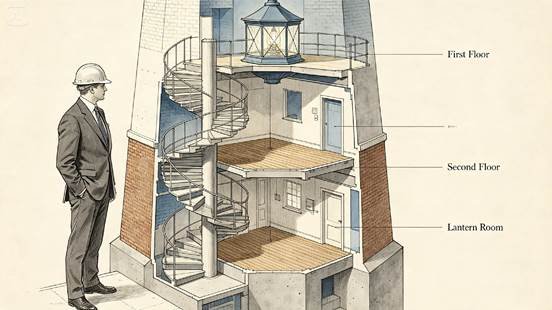
Use contrasting details to separate hidden spaces
Clear visual separation helps viewers understand a complex interior quickly. Vary materials, textures, lighting, or subtle tonal differences between rooms and structural elements while keeping the overall style consistent. This makes staircases, walls, machinery, and living spaces easier to distinguish without overcrowding the illustration.
Build your cutaway in three moves
Dreamina makes producing this kind of technically detailed illustration genuinely manageable.
Step 1: Write a detailed text prompt
Head to Dreamina and describe the structure you’re illustrating, specifying exactly what internal detail you want revealed and how deep the cutaway should go. Upload a reference image if you have an existing floor plan or similar structure to guide accuracy.
A sample prompt might be: An architectural cutaway illustration of a person dressed as an architect standing beside a detailed cross-section of an old windmill, revealing gears and interior chambers, highly detailed technical illustration style.
Step 2: Adjust parameters and generate
Select Image 5.0 Pro, powered by Seedream 5.0 Pro, for precise structural detail and consistent depth across complex internal layers, then set your aspect ratio, canvas size, and resolution – 1K for early concept passes, 2K for a fully detailed final illustration. Click the generate icon to render your piece.
Step 3: Customize and download
Refine the result using Dreamina’s tools: inpaint to adjust specific internal details or rooms, expand to reveal more of the structure’s full height or footprint, remove to simplify overly dense areas, and retouch for a final polished finish. Once it’s ready, click Download.
Illustrating with Dreamina and its various image generation models
Dreamina gives illustrators access to several distinct image generation models, and cutaway work in particular benefits from Seedream 5.0 Pro, the newest and most capable option currently available. Its precision with layered, detail-heavy compositions matters enormously here, since a convincing cutaway needs to maintain consistent scale, lighting, and material accuracy across many simultaneously visible internal spaces, not just one clean exterior view.
Nano Banana offers faster generation for testing a rough structural layout before committing to a fully detailed final pass, while GPT Image 2 handles prompts describing multiple specific internal rooms or systems at once closely, useful for structures with a lot of internal complexity to represent accurately.
Layering interior detail without losing visual clarity
The biggest challenge in cutaway illustration is balancing rich internal detail with overall readability. Using consistent lighting logic across every revealed level, along with clear separations between spaces, helps a viewer’s eye navigate a complex structure without feeling visually overwhelmed.
Using scale figures to ground the illustration
Including a small human figure within one or more of the revealed spaces gives viewers an immediate, intuitive sense of scale, making the entire structure feel more concrete and believable than dimensions or proportions alone could convey.
Balancing technical accuracy with artistic style
A cutaway can lean toward precise technical drafting or toward a warmer, more painterly illustration style, depending on its intended use. Deciding this direction early keeps the piece feeling cohesive rather than caught between two competing visual approaches.
Where cutaway illustrations get used
This detailed illustration style supports a range of creative and educational projects:
- Architecture portfolio and competition submissions
- Children’s educational books about how things work
- Game and film production design references
- Historical preservation and restoration documentation
Reveal the hidden life inside every structure
A building’s exterior only tells half the story, and a well-crafted cutaway finally shows the rest. With Dreamina and the layered precision of AI algorithms, slicing open a structure and revealing its inner workings takes far less time than traditional technical illustration, and it’s free to start exploring today.