In today’s content landscape, AI video enhancement has become a necessity, not a luxury. Yet, most tools create a new problem even as they solve an old one: you get an enhanced video file, only to face the daunting task of turning it into engaging content elsewhere. Media.io reimagines this process entirely. It’s not just another AI video enhancer; it positions itself as “the most comprehensive AI-powered audio-visual creation platform”—a claim that transforms enhancement from a final step into a powerful catalyst for your entire creative workflow.
This review examines Media.io’s AI video enhancer capabilities through a critical lens: how effectively does it bridge the gap between technical quality improvement and practical, ready-to-publish content creation? We’ll test its specialized models, explore its integrated ecosystem of templates and tools, and assess its value for creators who need results faster.
The Integrated Workflow Advantage
The true cost of a tool isn’t just its price tag; it’s the time spent switching between applications. While standalone enhancers excel in raw output quality, they operate in isolation. Media.io’s core advantage is its native integration. After using its video quality enhancer, you don’t just download a file. You immediately enter a connected workspace where that enhanced clip can be dropped into a trendy template, paired with AI-generated music, or combined with other assets. This all-in-one platform approach is designed for the modern creator’s need for speed and simplicity, making AI video enhancement a natural first step in a longer, more productive creative chain.
Smart Enhancement: Right Tool for the Right Problem
Media.io’s AI video enhancement suite adopts a personalized approach, avoiding a one-size-fits-all solution. Instead, it offers a toolbox of specialized models, each fine-tuned for specific, common video issues. This targeted strategy ensures higher quality results than a generic “enhance” button.
| Enhancement Model | Core Intelligence | Best Used For |
|---|---|---|
| Video Enhancer | Provides a balanced boost to overall clarity, sharpness, and stabilization. | The go-to video quality booster for quick polish on any everyday clip. |
| Video Denoise | Distinguishes between desirable film grain and unwanted digital noise, removing the latter. | Salvaging footage shot in low light or with high ISO settings. |
| Portrait Enhancer | A dedicated video portrait enhancer that sharpens eyes and features while preserving authentic skin texture. | Ensuring interviewees, vloggers, and spokespeople look crisp and natural. |
| Anime Enhancer | Specializes in restoring sharp lines, vibrant colors, and motion consistency in animated or stylized content. | Perfect for enhancing anime, cartoons, or AI-generated (AIGC) video clips. |
| Smart Color Correction | Automatically analyzes and corrects white balance, exposure, and saturation imbalances. | Instantly fixing the dull, washed-out colors common in amateur or archive video. |
| Video Upscale | Intelligently reconstructs detail for 4K upscale, moving beyond simple pixel stretching. | Modernizing old footage (DVD, 480p, 720p) for HD/4K displays. |
Key Features: Where Media.io Truly Stands Out
A Universe of Templates: Your 5,000+ Head Start
This is the flagship feature that changes the enhancement game. Once your video is enhanced, you’re not done—you’re inspired by our Explore community. Media.io grants direct access to a constantly updated library of over 5,000 professionally designed templates. Instantly transform your newly-upscaled product clip into a sleek ad, or drop your denoised vlog footage into a viral TikTok format. This seamless bridge from AI video enhancement to styled content is unparalleled, turning a utility into a creativity engine.
Powered by a Multimodal AI Ecosystem
Media.io’s enhancement models don’t operate in a vacuum. They are part of a sophisticated, interconnected family of large AI models spanning video, audio, image, and language. This multimodal intelligence is key. When the Portrait Enhancer refines a face, it benefits from the platform’s deep understanding of human features learned across its image and avatar tools. This shared knowledge leads to more natural, context-aware improvements that feel less like a filter and more like true restoration.
Your All-in-One AI Creative Studio
The platform’s identity as a comprehensive creation hub means the video quality enhancer is just the beginning. Within the same browser tab, you can access a full suite of AI tools: generate voiceovers for your enhanced explainer video, create background music, or design thumbnails. This eliminates the chaotic, multi-app workflow and consolidates production into a single, streamlined AI enhancer environment, saving immense time and frustration.
Free Daily Credits: Test-Drive the Entire Pipeline
Media.io strongly encourages hands-on experimentation. Logged-in users receive free daily credits, allowing you to fully test the AI video enhancement models and, crucially, explore the template library and other AI tools without any initial payment. This generous approach lets you validate the entire integrated workflow’s value for your projects, making it a truly accessible video enhancer free online to start with.
How to Use Media.io AI Video Enhancer
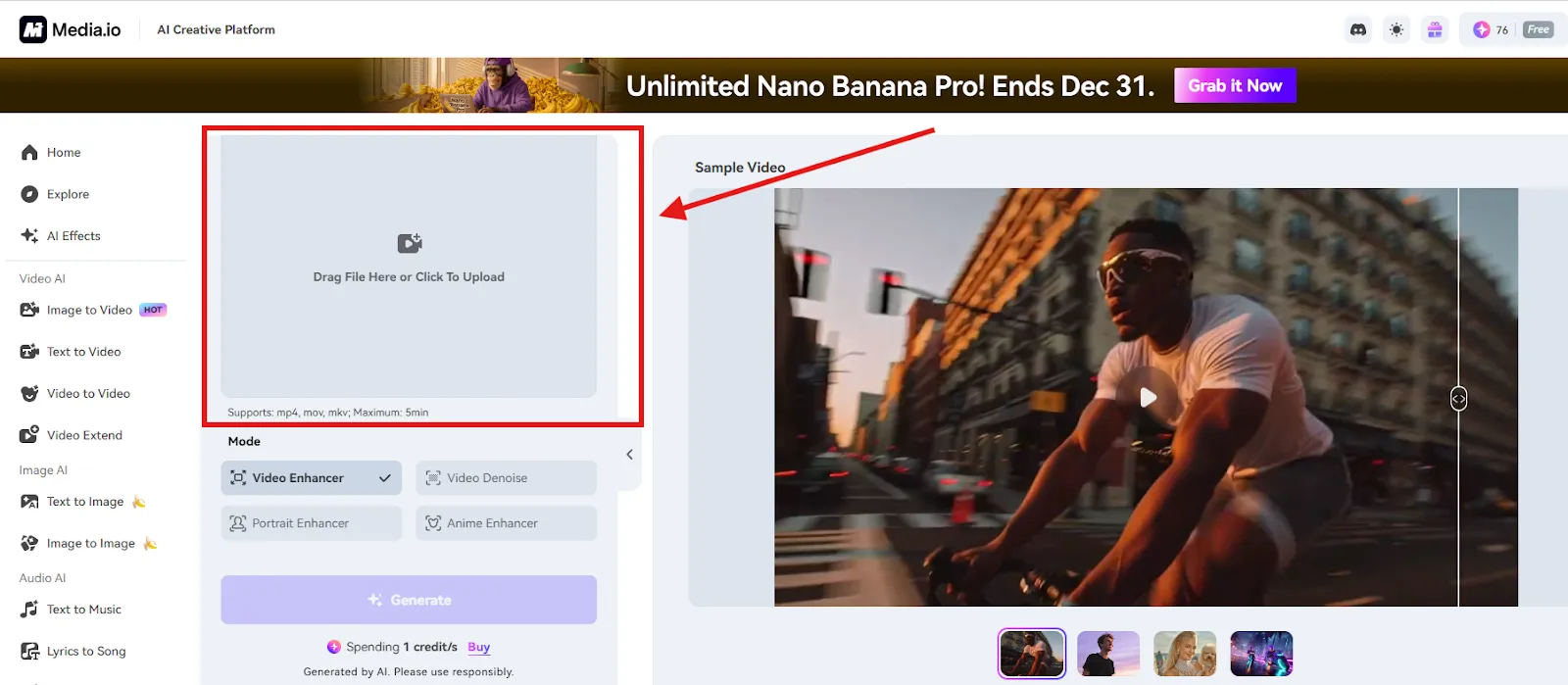
Step 1. Upload Your Video
Launch the AI Video Enhancer tool and simply drag and drop, or upload your video file into the workspace. Media.io supports a wide range of common formats like MP4, MOV, and MKV, and works effectively even with older, lower-quality clips.
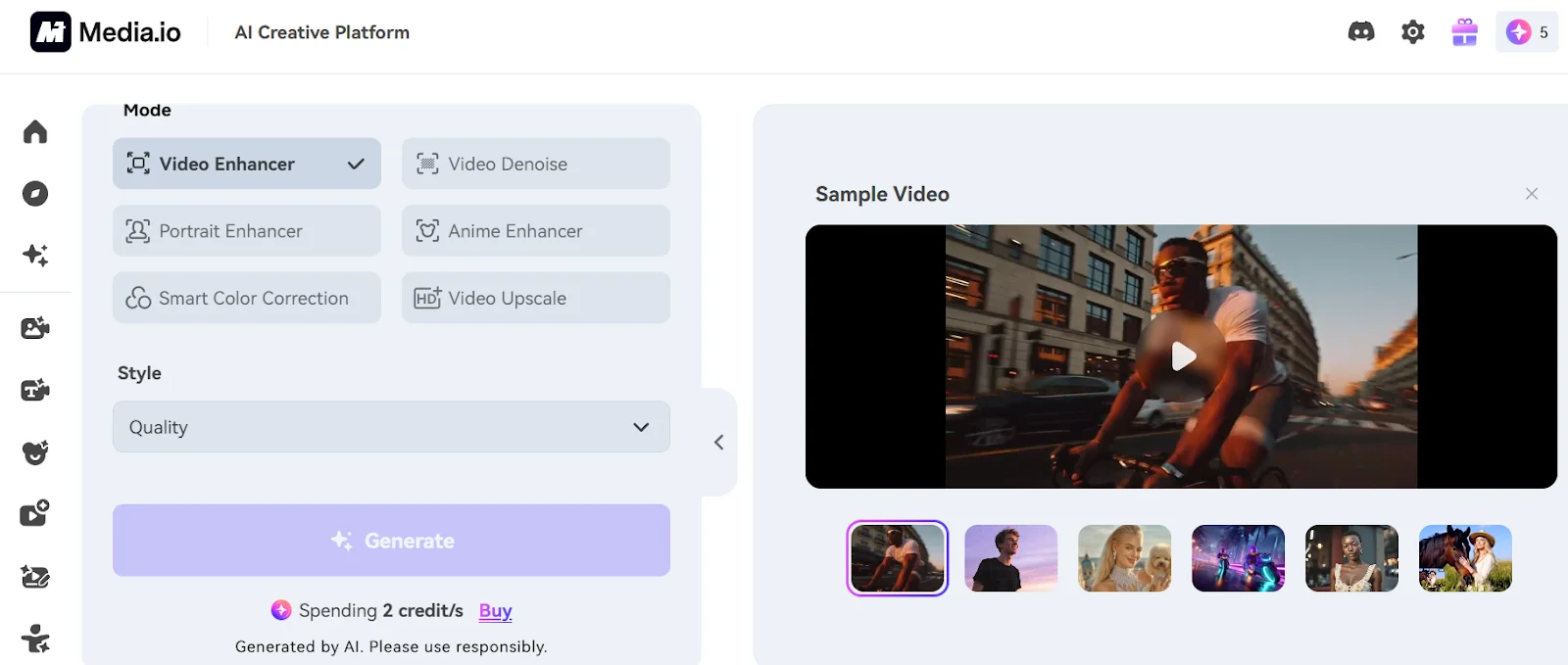
Step 2. Choose an Enhancement Mode
Once your video is loaded, select the AI model best suited for your content. You can choose from various options such as General Video Enhancer, Video Denoise, Portrait Enhancer, Anime Enhancer, Smart Color Correction, and AI Video Upscaler (offering 1x, 2x, or 4x resolution scaling). Picking the appropriate model is crucial for achieving optimal results.
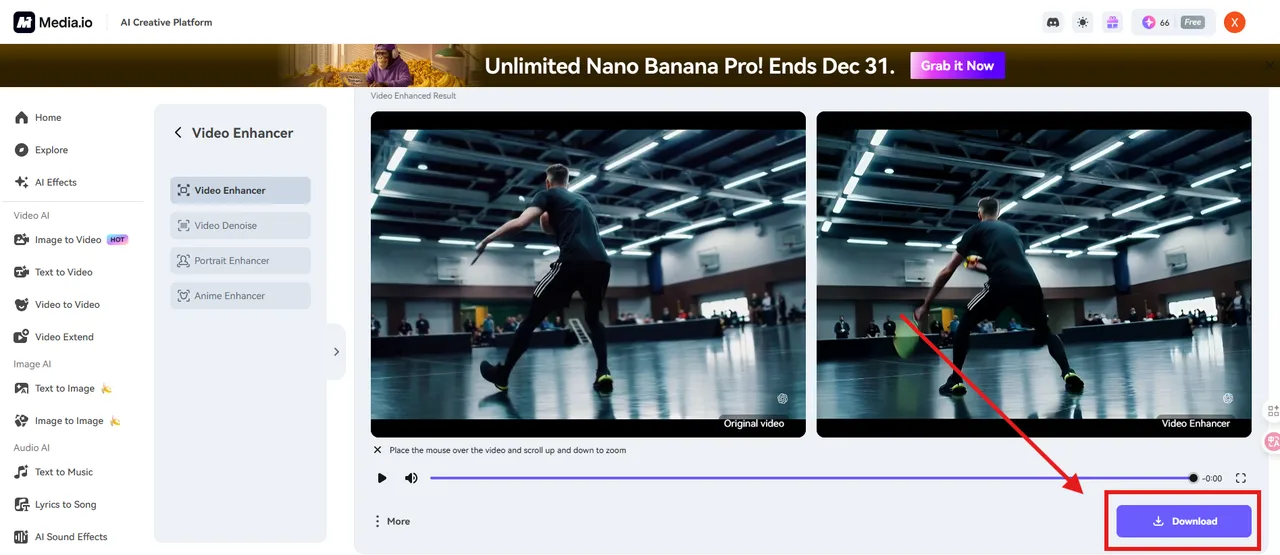
Step 3. Generate and Download Your Video
Click the “Generate” button to start AI processing. After completion, preview the enhanced video by comparing it side-by-side with the original. Finally, download your upgraded video in high-quality HD or 4K resolution.
Conclusion: The Enhancer That Understands the Next Step
The Media.io AI Video Enhancer succeeds by fundamentally rethinking the goal of enhancement. It is not designed to produce a perfect file for a professional editor, but to produce a perfect starting point for a busy creator. Its greatest strength is its awareness of what comes after the pixels are improved.
For social media managers, marketers, educators, and solo creators who need to go from raw, flawed footage to polished, published content in the shortest time possible, Media.io presents a compelling and intelligent solution. It combines competent, AI-driven video quality enhancement with an ecosystem that actively helps you use those improved assets. In a market of isolated tools, it offers a connected, creative pipeline—making it a smart choice for anyone looking to enhance not just their video quality, but their entire content creation workflow.