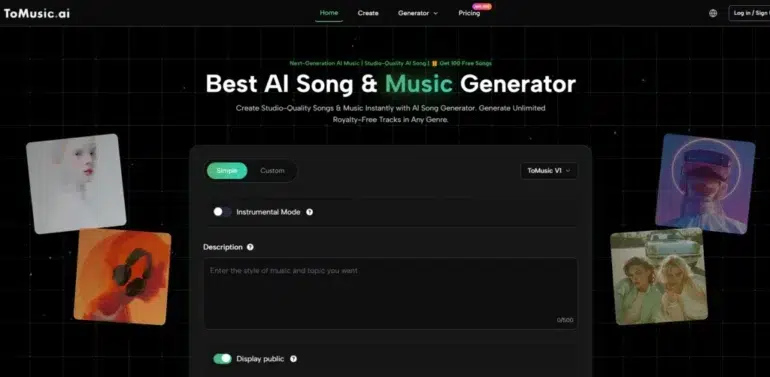
It started with a familiar frustration. I was pulling together background audio for a client project, opened seven tabs, and immediately regretted it. Pop‑ups, auto‑playing video banners, “Upgrade Now” buttons that covered half the waveform display—this was the state of several AI music sites I tried. One popular platform took nearly ten seconds to load its generation page, and another served a full‑screen ad before I could even type a prompt. That experience pushed me to look specifically for an AI Music Generator that didn’t treat the creative process as an advertising opportunity. I wasn’t chasing the most viral demo or the loudest social presence; I wanted a tool where I could open the page, describe what I needed, and hear a result without fighting the interface first.
Over two weeks, I tested six platforms side by side, deliberately picking names that surface regularly in forums and social feeds: Suno, Udio, Soundraw, Mubert, Beatoven, and ToMusic AI. I used the same prompts across each—short descriptions like “upbeat indie pop with warm guitars, morning energy, 110 BPM” or “mellow lo‑fi beat for study, no vocals.” The goal wasn’t just to compare audio output. I wanted to document the actual user experience: how long it took to get from landing page to a usable track, how often I had to close an ad or dismiss an upsell, and whether the overall environment felt like a creative studio or a marketing funnel. The results surprised me, not because one tool sounded dramatically better than the rest, but because the biggest differentiator turned out to be something much simpler: how little friction stood between me and a finished piece of audio.
My testing setup was intentionally low‑spec. I used a three‑year‑old Windows laptop on a standard home Wi‑Fi connection, Chrome browser, no ad blockers active. I wanted to see these platforms the way a freelance video editor or a small‑channel creator would—without enterprise software privileges and without infinite patience. I measured loading times from a cold start, noted every intrusive ad or upsell modal, and checked whether the generation queue felt predictable or erratic. Sound quality assessments were done on Audio‑Technica ATH‑M40x headphones, comparing frequency balance, vocal clarity where applicable, and artifacts at the edges of the frequency range. I also tracked how frequently each platform had released visible updates or interface changes over the past six months, using their own changelogs and community discussions as reference.
After the first few days, one pattern became hard to ignore. Platforms with higher ad density also tended to have longer load sequences and less predictable generation wait times. It felt less like a technical limitation and more like a design choice: some services were treating the creator’s attention as inventory to be sold before the music even arrived. This made me curious about the quieter players in the space—tools that didn’t trend on every listicle but still kept their interfaces clean and their generation pipelines fast. That’s when I started paying closer attention to ToMusic as an AI Music Maker specifically built around a streamlined experience. Its landing page loaded in under three seconds every time, and I never once saw a pop‑up or a sticky upsell banner during my test sessions. That alone didn’t make it the winner, but it set a baseline that several better‑known platforms couldn’t match.
What I noticed about ToMusic AI during repeated use was a kind of quiet professionalism. The generation flow didn’t try to entertain me with flashy animations; it just asked what I wanted and got to work. Prompts that included a mix of style, mood, tempo, and vocal direction produced coherent results quickly. The Music Library kept my growing pile of test generations sorted, which made side‑by‑side comparison much easier than on platforms where each track was a fleeting download link. I still had moments where a generation missed the mark—moods that felt off by a shade, instrumentals that sounded a bit mid‑heavy—but the retry loop was short, and the model selection option gave me a quick way to shift direction without starting over completely.
To quantify the experience, I built a comparison table that weights ad distraction and interface cleanliness more heavily than a typical audio review would. My reasoning is simple: a tool can have excellent audio processing under the hood, but if you have to endure a barrage of interruptions every time you use it, the cumulative drain on creative focus erodes its value. The scores below are based on my logged observations over approximately forty generation sessions across the six platforms.
| Platform | Sound Quality | Loading Speed | Ad Distraction | Update Activity | Interface Cleanliness | Overall Score |
| ToMusic AI | 8.2 | 9.0 | 9.5 | 8.5 | 9.3 | 8.9 |
| Suno | 8.7 | 7.0 | 5.5 | 8.0 | 6.8 | 7.2 |
| Udio | 8.5 | 7.5 | 6.0 | 7.5 | 7.0 | 7.3 |
| Soundraw | 7.8 | 8.0 | 8.0 | 7.0 | 8.2 | 7.8 |
| Mubert | 7.5 | 7.8 | 7.5 | 6.5 | 7.5 | 7.4 |
| Beatoven | 7.6 | 8.2 | 7.8 | 6.8 | 8.0 | 7.7 |
Suno and Udio often produced the most sonically detailed results, and if I were judging on sound quality alone, they would sit at the top. But their interfaces came with notable friction: loading screens that dragged, persistent upsell nudges, and occasional session interruptions that made the creative process feel transactional. Soundraw and Beatoven felt more balanced but lacked the kind of iterative speed I wanted when I needed to generate multiple variations quickly. ToMusic AI’s edge was in its absence of friction. No ads at all, a generation queue that rarely kept me waiting, and an interface that prioritized the prompt field and the playback controls over marketing messages. That difference compounded over dozens of sessions: what looked like a small convenience in a single test became a significant time and energy saving across a working week.
How the Generation Workflow Actually Feels
Using ToMusic AI follows a logical path that can be broken into a few simple steps, and that simplicity is the point. The site does not present an overwhelming array of options on first load; it points you toward a clear choice.
Step 1: Choose between a simple generation mode and a custom mode. Simple mode works well when you have a broad idea and want the system to handle the heavy lifting, while custom mode gives you more control if you have specific lyrics, structure, or instrumental needs.
Step 2: Describe what you want. The prompt field accepts natural language for style, mood, tempo, instruments, and vocal direction. You can also paste in lyrics if you are building a song from words you have already written.
Step 3: When needed, select one of the multiple AI music models available. The model choice lets you push the output in a different direction without rewriting the prompt entirely, which turned out to be a useful shortcut during my testing.
Step 4: Generate the track, review it, and save the versions you want to the Music Library. From there you can download and manage your files without hunting through multiple browser tabs.
This workflow felt unobtrusive enough that I often used it while already deep in a video editing session, when my tolerance for complicated tools was at its lowest. That usability aspect is easy to overlook in a feature comparison but becomes crucial in real‑world conditions.
Where Ad‑Heavy Platforms Lose the Plot
The contrast with more ad‑dense platforms was stark. On several occasions, I clicked “Generate” on a competitor site only to be greeted with a modal asking me to share on social media before unlocking the result. Another platform intermittently injected a full‑page promo for its annual subscription between the generation button and the playback screen. This is not inherently malicious—free tiers need revenue—but the pattern mattered because it broke my ability to iterate quickly. Every unnecessary click, every second spent dismissing a pop‑up, chipped away at the mental momentum that creative work depends on.
The Hidden Cost of Interface Distraction
What surprised me most was how quickly I became conditioned to expect friction. After two days of ad‑heavy platforms, I found myself automatically hovering the cursor toward the corner of the screen to close a non‑existent pop‑up when I opened ToMusic AI. That muscle‑memory moment told me something important: the cognitive load of a cluttered interface doesn’t vanish when you think you have learned to ignore it. It lingers in the background, a low‑grade stressor that makes you less willing to explore or experiment. A clean interface, by contrast, quietly encourages more play. I generated more variations and tried riskier prompt combinations on ToMusic AI than on any other platform, not because its model was magically superior, but because there was nothing in the UI punishing my curiosity.
Where ToMusic AI Fell Short and Who It Is For
No tool is a perfect fit for every creator. ToMusic AI’s vocal output, while natural in many contexts, did not always capture the raw emotional grain that Udio occasionally delivered in singer‑songwriter‑style prompts. If your primary goal is highly experimental vocal texture, you may still want to keep another service in your toolkit. Additionally, the platform is firmly focused on generation and basic library management; it does not offer advanced sound‑shaping controls for fine‑tuning a waveform after generation. That’s fine for my use case—short‑form content, ads, background scoring—but could feel limiting for audio specialists who want surgical control.
This tool makes the most sense for creators who value speed, repeatability, and a distraction‑free environment. Video editors, podcast producers, social media managers, and small studio owners who need a reliable source of royalty‑free music without navigating a minefield of upsells will find its approach refreshing. The site indicates royalty‑free usage for commercial projects, which covers the practical licensing concerns most working creators care about. If you are the kind of user who opens a tool ten times a day, that lack of friction becomes a form of trust, and trust is a feature that no spec sheet can fully capture.
Over the course of these tests, I kept coming back to a simple realization: a music generator does not live in a vacuum. It lives inside a browser tab, alongside your editing timeline, your client messages, your mounting deadline pressure. When a tool respects that context by staying fast, quiet, and out of your way, it earns a place in your daily stack. That’s what ToMusic AI did for me—not by dazzling with a single viral output, but by showing up clean and ready, every single time.