
For IT teams and network professionals, content verification and data extraction workflows have quietly become part of the broader security and operations conversation. Verifying whether an image circulating internally or externally is authentic, and efficiently extracting information from video sources for documentation or research purposes, are both tasks that increasingly fall — directly or indirectly — under IT’s purview.
Lynote, an AI productivity platform, has built tools addressing both of these needs, and the technical approach behind each is worth a closer look for IT and security-adjacent teams evaluating whether they’re worth adding to existing workflows.
How the Image Detection Actually Works
Unlike simpler detection tools that return a single probability score, Lynote’s AI image detector performs a multi-layered analysis of uploaded images. It checks C2PA metadata — the Coalition for Content Provenance and Authenticity standard increasingly adopted across the industry for tracking content origin — alongside EXIF data typically embedded by cameras and editing software, and digital watermarks left behind by generative AI image models.
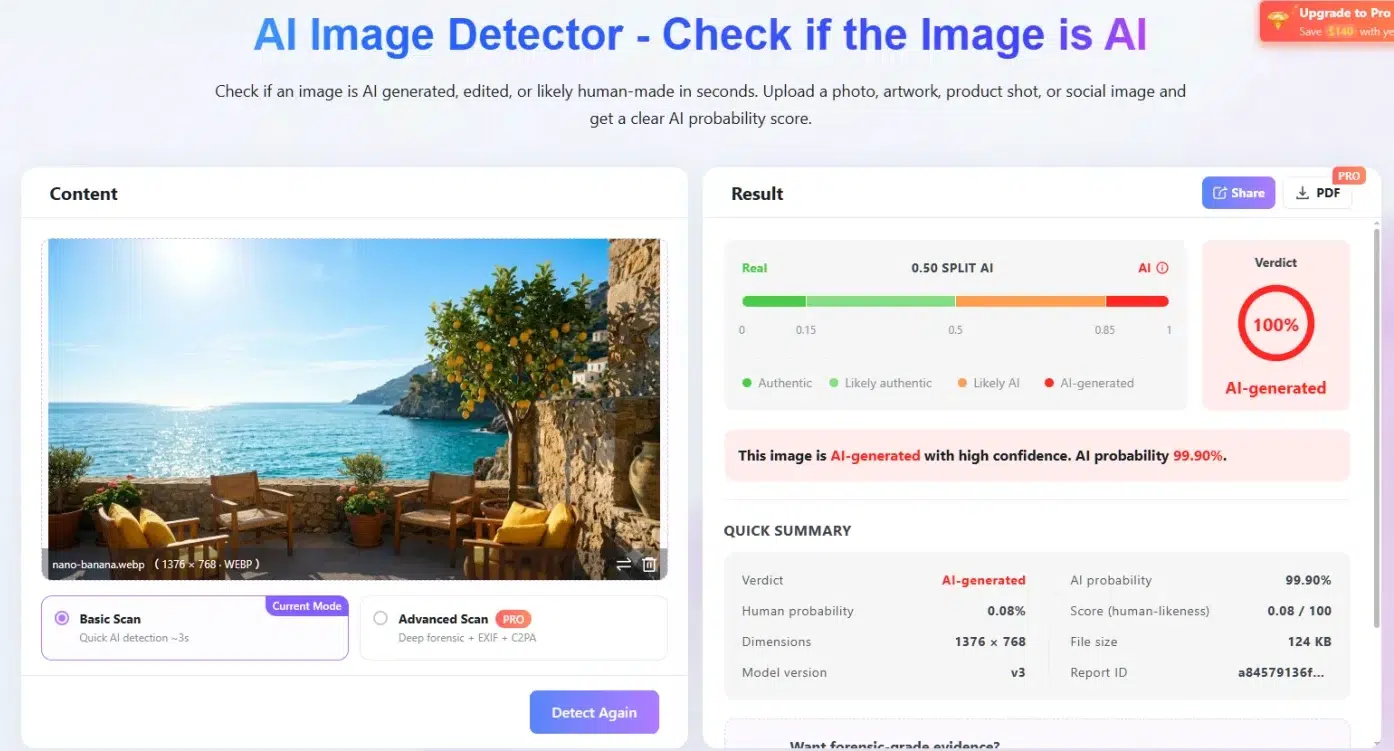
From a technical standpoint, what distinguishes this from many competing tools is the explainability layer: each detected signal comes with a plain-language explanation of what it actually indicates, rather than leaving interpretation entirely to the end user. This matters in practice for teams that need to document their findings for compliance, legal, or security review purposes, rather than simply flagging “likely AI” without supporting evidence.
For cases requiring a more rigorous audit trail, the tool generates a verifiable PDF report that includes a SHA-256 file hash of the analyzed image along with a unique report ID, enabling independent verification by a third party at a later date — a detail relevant for any team that needs to maintain a defensible record of its analysis. Access allows for several free scans without requiring account creation, which is a meaningful difference from competitors that gate access behind mandatory registration after the first use.
Bulk Video Transcription for Technical Teams
On the video side, Lynote’s YouTube transcript generator is built around a workflow that goes beyond single-video transcription. Users can submit multiple YouTube URLs in a single batch, import an entire playlist directly by URL, or use a keyword search feature to locate relevant videos on a topic before selecting which ones to transcribe — useful for teams researching technical tutorials, conference talks, or documentation-style content spread across multiple sources.
The tool includes a batch queue with progress tracking, which matters for larger research projects where users need visibility into which videos have completed processing rather than working blind. Output includes timestamped transcripts, allowing users to jump to a specific moment to verify a quote, technical detail, or command shown in a tutorial, and transcripts can be exported as plain text, translated, or further processed inside the platform.
Practical Applications for IT and Technical Teams
For IT departments, the combination of these two tools covers a reasonably specific but real set of use cases: verifying whether an image shared internally or by a vendor is authentic before it’s used in documentation or communications, and efficiently extracting searchable, timestamped text from technical video content such as conference sessions, product demos, or training material — without manually transcribing hours of footage.
Neither tool requires a paid subscription for standard use, which lowers the barrier for teams to test them against existing workflows before considering any broader adoption.
A Reasonable Addition to the Technical Toolkit
Both tools address specific, well-defined problems rather than attempting to be all-purpose platforms, which is generally a good sign for tools intended to slot into existing technical workflows rather than replace them. For IT and network teams dealing with content verification or video-based documentation on a regular basis, Lynote’s image detector and transcript generator are worth evaluating against current processes.