
A basic JavaScript file upload works fine when files are small, connections are stable, and traffic is light. None of those conditions holds reliably in production.
Real users upload video files, high-resolution images, and multi-document archives from mobile devices on variable-quality networks. A single dropped connection on a 200MB upload, with no resumability, means the user loses all progress and has to start again.
At scale, where thousands of users are uploading simultaneously, the infrastructure challenges compound further: concurrent upload pressure on servers, retry storms after network incidents, and the complexity of managing partial upload state across distributed systems.
The engineering patterns that address these challenges: streaming, chunking, and resumable transfers, are well understood, but often underestimated in the work required to implement them correctly.
This article covers how each pattern works, where they fit into modern upload architectures, and what developers need to consider when building or choosing a JavaScript upload solution for production.
Key Takeaways
- Traditional <input type=”file”> uploads break at scale: Monolithic requests fail entirely on connection drops, have no partial recovery, and put excessive pressure on backend infrastructure.
- Chunking and streaming are the foundation of reliable upload systems: Dividing files into independently tracked segments means failures are isolated, retries are cheap, and progress is real.
- Resumability is a user experience requirement, not an advanced feature: Mobile users on variable-quality connections need uploads that survive interruptions without starting over.
- Direct-to-cloud and CDN-accelerated architectures reduce backend load significantly: Keeping large file payloads off your application servers is a scalability multiplier.
- Building resumable upload infrastructure from scratch is expensive: Session tracking, chunk ordering, retry logic, and state persistence represent weeks of engineering work that managed SDKs provide out of the box.
Why Traditional JavaScript File Uploads Break at Scale
Most upload failures in production aren’t caused by bad code; they’re caused by infrastructure assumptions that only hold under ideal conditions. Here’s where those assumptions break down.
Large Files Cause Network Failures
Standard browser file uploads send the entire file as a single HTTP request body. For small files on fast connections, this is unnoticeable. For large files, anything from a few dozen megabytes upward, it creates real exposure.
Upload timeouts occur when the transfer time exceeds server or proxy limits. Browser memory limitations become relevant when large files are loaded into memory before transfer begins. Mobile connections, which may switch between networks or experience signal drops mid-transfer, interrupt single-request uploads with no recovery path.
The user faces a complete restart, and the correlation between failed uploads and user abandonment is direct.
Monolithic Upload Requests Create Performance Bottlenecks
When an upload is a single atomic request, failure is binary: it either completes or it fails entirely. There’s no partial progress to preserve, no opportunity to retry a failed segment, and no way to deliver incremental feedback to the user while the transfer is in flight.
On the backend, large single-payload requests put pressure on application servers that weren’t designed to act as file transfer proxies. Receiving a 500MB file through a Node.js or Python web application server ties up resources that should be serving application logic, and under concurrent upload load, this constraint becomes a scalability ceiling.
Concurrent Uploads Increase Infrastructure Complexity
Individual upload reliability is one problem; aggregate upload behaviour under load is another. Traffic spikes, product launches, campaign events, and end-of-period submission deadlines create bursts of concurrent uploads that can overwhelm servers configured for average load.
Storage systems experience I/O bottlenecks as multiple large writes compete for throughput. And upload retry handling, when not designed carefully, creates retry storms: failed uploads retrying simultaneously, amplifying the original traffic spike.
These failure modes aren’t edge cases; they’re normal conditions for any upload system handling real users at real scale. The patterns that address them are streaming, chunking, and resumability.
Understanding Streaming Uploads in JavaScript
Streaming is the foundational concept behind more reliable upload architectures, and it’s worth understanding precisely before moving to the implementation patterns built on top of it.
Before you can implement chunking or resumability effectively, you need to understand streaming, the lower-level mechanism that makes progressive, memory-efficient file transfer possible in the browser.
What Is Streaming?
Streaming transfers data progressively rather than loading it entirely into memory before sending. Instead of reading a 400MB file into a browser buffer and dispatching a single request, a streaming upload reads and transmits the file in sequential segments, allowing transfer to begin before the entire file has been processed, reducing peak memory usage, and enabling the upload to be interrupted and resumed more gracefully.
In modern browsers, the Streams API and the ReadableStream interface provide the primitives for streaming file data. Service Workers can intercept and transform streams. The fetch API supports streaming request bodies in supported environments. These tools are the substrate on which chunked and resumable upload patterns are built.
Benefits of Streaming Uploads
The practical benefits of streaming over monolithic transfers are significant. Reduced memory usage means large files don’t exhaust browser memory limits during processing. Improved upload efficiency means transfer can begin while the file is still being read.
Better handling of large media files, video especially, is a direct consequence of not requiring the entire file in memory before transmission. Faster perceived upload performance follows from the ability to report incremental progress accurately from the first bytes transferred.
Common Streaming Architectures
Streaming uploads can be structured in several ways depending on the application’s infrastructure model. Browser-to-cloud uploads stream data directly from the client to a storage provider using presigned URLs or multipart upload APIs, keeping application servers out of the data path.
Direct-to-storage uploads use similar patterns but target specific storage backends. Edge upload optimisation routes streams through CDN points of presence closest to the user before forwarding to origin storage. Serverless upload workflows use streaming to feed into function-based processing pipelines without maintaining persistent server connections.
How Chunked Uploads Improve Reliability
Streaming gives you progressive transfer. Chunking gives you fault isolation, and that distinction is what makes large-file uploads actually dependable in production.
Chunking takes the streaming concept and applies explicit structure to it, dividing a file into numbered, independently trackable segments before transfer.
What Is Chunking?
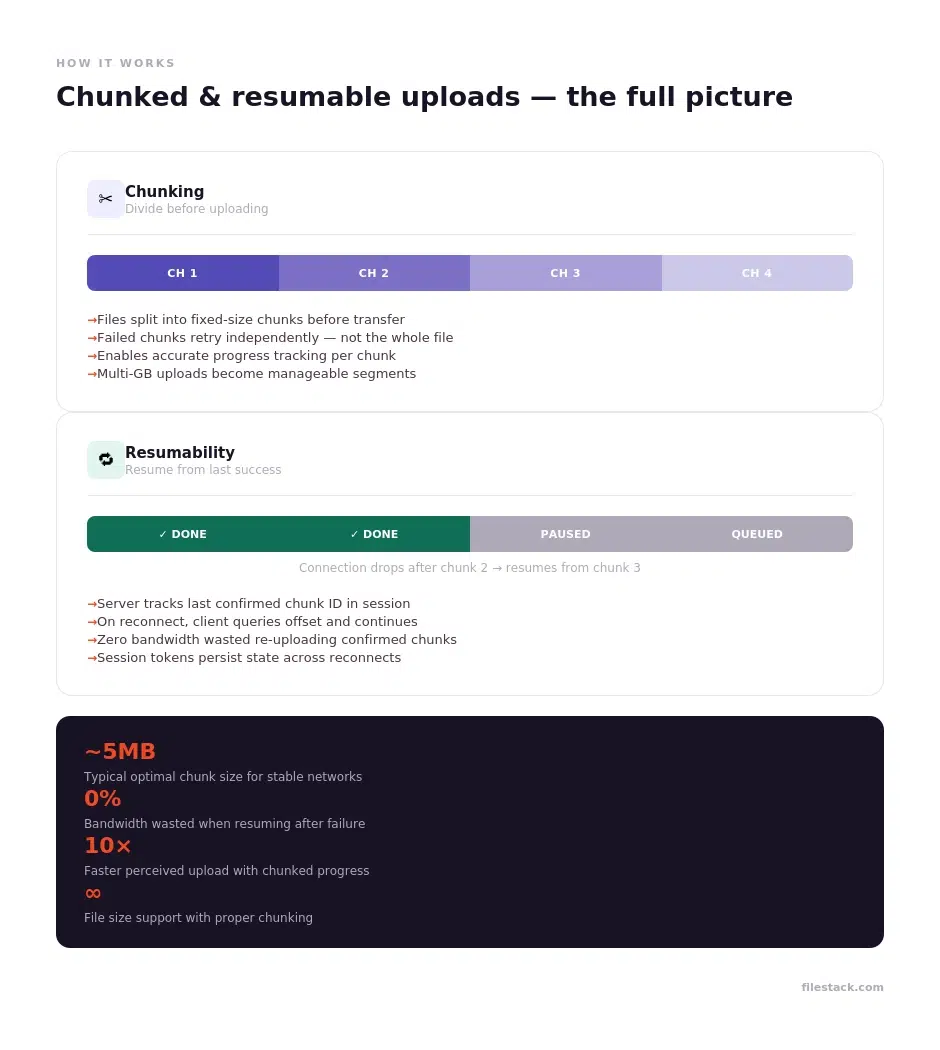
A chunked upload divides a file into fixed-size pieces, typically between 1MB and 10MB each, with the optimal size depending on network conditions and file characteristics, and uploads each chunk as a separate request. The server receives and stores each chunk individually, then reassembles them into the complete file once all chunks have been confirmed.
In JavaScript, the File.slice() method is the primary tool for dividing a file object into byte-range segments. Each slice is a Blob that can be sent as a separate fetch or XMLHttpRequest call, with its own error handling and retry logic.
Why Chunking Matters for Large Files
The core advantage of chunking is fault isolation. When a single-request upload fails, the entire transfer is lost. When a chunked upload fails, only the in-flight chunk is lost; previously confirmed chunks don’t need to be retransmitted.
This makes chunking particularly valuable for large files. A 2GB video upload divided into 400 chunks of 5MB each might encounter one or two failed chunks across a typical transfer. With proper retry logic, those individual failures are transparent to the user. Without chunking, the same network instability would cause a complete failure.
Chunking also improves upload stability on weak connections by reducing the window of exposure for any single transfer segment, enables proper progress reporting (percentage complete based on confirmed chunks, not just bytes sent), and makes multi-GB uploads tractable for mobile clients that would otherwise time out on single large requests.
Challenges Developers Face With Chunked Uploads
Chunking introduces complexity that monolithic uploads avoid. Chunk ordering and reassembly on the server requires each chunk to carry metadata: file identifier, chunk index, total chunk count, and the server must verify that all chunks are received before reassembly.
Upload state management requires tracking which chunks have been confirmed and which are in flight or failed. Parallel chunk handling, sending multiple chunks simultaneously to maximise throughput, introduces concurrency considerations around ordering and race conditions.
And backend synchronisation complexity grows with the number of concurrent uploads multiplied by the number of chunks per upload.
These are solvable problems, but they represent genuine engineering investment, which is part of why many teams reach for managed solutions rather than implementing chunked upload infrastructure from scratch.
Resumable Uploads and Fault Tolerance
Chunking handles isolated failures gracefully. Resumability goes further; it ensures that even a complete connection loss doesn’t force the user back to square one.
Resumable uploads extend the chunking model with persistent session state, allowing an upload to continue from its last confirmed position after any interruption.
What Are Resumable Uploads?
A resumable upload system maintains server-side state about the progress of each upload session. When a client connects to upload a file, it receives a session token. As each chunk is confirmed, the server records the last confirmed chunk offset.
If the connection is interrupted: network drop, browser tab close, or device sleep, the session state persists on the server. When the client reconnects with the same session token, it queries the server for the current offset and resumes from the next unconfirmed chunk.
The tus open protocol defines a standard interface for resumable uploads, and several managed upload platforms implement compatible endpoints. The core principle is simple: the server is the source of truth for upload progress, and the client should always query that state rather than assuming continuity.
Why Resumability Is Critical for User Experience
Resumability is what separates upload infrastructure designed for desktop users on stable connections from infrastructure designed for real-world users. Mobile users frequently experience network transitions: switching between Wi-Fi and cellular, entering areas with poor signal, or simply locking their phone mid-upload. Without resumability, any of these events triggers a complete restart on reconnect.
The user experience impact is direct: lower upload abandonment on mobile, reduced user frustration from lost progress, lower bandwidth waste from unnecessary retransmission, and meaningfully improved reliability for large file transfers. For applications where file upload is a core workflow: document management, media production, and data collection, these improvements translate into measurable retention and satisfaction improvements.
Technical Considerations for Resumable Upload Systems
Building a production-quality resumable upload system requires explicitly addressing several technical concerns. Session tracking means generating and storing unique upload identifiers that persist across client reconnections.
Upload state persistence requires durable server-side storage for chunk completion state; in-memory storage is insufficient for any serious implementation. Chunk verification requires the server to confirm receipt of each chunk’s complete and correct content before advancing the session offset.
And retry logic needs to handle the difference between transient network failures (retry immediately with backoff) and permanent failures (surface an error to the user rather than retrying indefinitely).
Here’s a visual diagram to explain chunked and resumable uploads quickly:
Key Architecture Patterns for Scalable JavaScript Uploads
With chunking and resumability as your foundation, the next question is how to structure the upload pipeline itself. These four patterns represent the most common approaches in production JavaScript applications.
The combination of streaming, chunking, and resumability can be deployed in several architectural patterns, each with different tradeoffs for backend complexity, scalability, and cost.
Direct-to-Cloud Uploads
Direct-to-cloud uploads bypass the application backend entirely. The client requests a short-lived presigned URL or multipart upload session from the application server, then uploads file chunks directly to the cloud storage provider (S3, GCS, Azure Blob) using that credential. The application server never handles the file data, only the coordination.
This architecture has significant scalability advantages: application servers are not burdened with file transfer payloads, storage provider infrastructure handles upload throughput directly, and the pattern scales horizontally without requiring application-layer changes. The main engineering consideration is correctly managing presigned URL expiry and coordinating multipart upload completion across a session.
CDN-Accelerated Upload Workflows
CDN-accelerated uploads route file transfer through edge nodes positioned geographically close to the uploading user, reducing the round-trip latency between client and upload endpoint. For international users, the difference between uploading to a distant origin server and uploading to a nearby edge node can be substantial, particularly for the initial connection establishment phases that precede actual data transfer.
CDN acceleration also provides regional failover: if one PoP (point of presence) experiences issues, the CDN can route to an adjacent node without client-side changes. For upload-heavy applications with a global user base, CDN-accelerated upload infrastructure is a meaningful reliability and performance improvement.
API-Driven Upload Pipelines
API-driven architectures treat file upload as the trigger for a downstream processing workflow rather than as an end state. When an upload completes, a webhook fires to initiate processing: image optimisation, video transcoding, metadata extraction, and notification delivery.
This event-driven model decouples upload completion from processing, allows retries of individual pipeline stages independently, and is compatible with serverless execution environments that don’t maintain persistent connections.
In JavaScript applications, this pattern works naturally with modern event-driven backends. The upload SDK fires a completion callback, the application emits an event, and processing workers consume the queue asynchronously.
Multi-Source File Imports
Multi-source imports allow users to bring files from existing cloud storage: Dropbox, Google Drive, OneDrive, Box, directly into an upload workflow, without routing those files through the client device or the application backend.
The upload service fetches the file server-to-server from the external source, processes it through the same pipeline as a direct upload, and delivers it to the application’s storage destination.
This pattern is particularly valuable for users who store their working files in cloud services, which is increasingly the common case, and significantly improves the upload experience for large files that would otherwise require download-then-reupload cycles.
Common Production Challenges With JavaScript File Uploads
Even with the right architecture in place, production upload systems surface a category of challenges that don’t appear in development environments. These are the ones teams most often encounter after launch.
Browser Compatibility Issues
The JavaScript File API is broadly supported, but edge cases exist. File.slice() behaviour, ReadableStream support, and the ability to stream request bodies via fetch vary across browser versions and particularly across mobile browsers.
Cross-browser testing for upload flows is more involved than for most UI components; the failure modes are often silent (uploads that appear to succeed but deliver corrupt data) rather than visible (obvious errors). Mobile browser limitations, particularly around background tab behaviour and connection handling during device sleep, require explicit testing against real-device conditions.
Security Risks
File uploads are a primary attack vector in web applications. Malicious file uploads: executables, scripts, and polyglot files that exploit rendering or parsing behaviour, require server-side MIME type validation, not just client-side extension checking.
File validation requirements extend to size limits, dimension constraints for images, and content-based type detection. Access control handling must ensure that upload endpoints require authentication and that presigned URLs carry appropriate expiry and scope constraints.
Signed upload policies: cryptographically verified constraints on what a client is permitted to upload are the server-side enforcement mechanism that closes the gap between client-side validation and actual security.
Performance Optimisation
Upload speed tuning for chunked uploads involves several variables: chunk size selection (larger chunks have less per-chunk overhead but higher failure cost; smaller chunks enable finer progress reporting but add request overhead), parallel chunk count (sending multiple chunks simultaneously improves throughput on high-latency connections), and connection reuse. Compression strategies apply differently across file types. Already-compressed formats like JPEG, MP4, and ZIP see minimal benefit from transfer compression, while raw formats can compress significantly.
Media optimisation workflows, converting to efficient formats before upload, can reduce both transfer time and storage costs.
Build vs Buy for JavaScript File Upload Infrastructure
Once you understand what production-grade upload infrastructure requires, the build-vs-buy question becomes easier to answer honestly. Here’s how the two paths compare across the criteria that matter most.
Challenges of DIY Upload Systems
Implementing a production-quality chunked, resumable upload system in JavaScript is a substantial engineering project. Infrastructure maintenance includes the upload backend, session state storage, chunk reassembly service, and CDN configuration, each with its own operational requirements.
Retry and resumability engineering requires careful implementation of the tus protocol or a comparable spec, plus extensive testing under adverse network conditions that are difficult to reproduce in development environments.
Scaling complexity grows with concurrent upload volume. Security responsibilities: MIME validation, malware scanning, access control, signed policies, and add further surface area. The compounding result is an infrastructure investment that rarely looks cheap when measured against its true ongoing cost.
Advantages of Managed Upload Platforms
Managed JavaScript upload platforms provide the same production-grade capabilities: resumable uploads, chunked transfers, retry logic, large file support, CDN delivery, multi-source imports, as a pre-integrated SDK.
Integration is measured in hours rather than weeks. Processing pipelines for image and video are available without additional infrastructure. The operational overhead of running the upload infrastructure is transferred to the provider. For development teams building products where upload is a necessary feature but not a core competency, managed platforms consistently deliver better ROI than in-house implementations.
What Developers Should Look for in a JavaScript Upload SDK
Not all JavaScript upload SDKs are built to the same standard. These are the three dimensions that separate SDKs ready for production from those that work well in demos.
Reliability Features
The reliability checklist for a JavaScript upload SDK starts with chunked uploads, without them, large file reliability is limited by single-request constraints. Resumability must be built in rather than optional, with proper session persistence.
Retry logic should handle transient failures with configurable backoff without requiring application-layer coordination. Large file support should have explicit, tested limits well into the multi-gigabyte range. Upload state persistence should survive browser refreshes and tab restores, not just brief network interruptions.
Developer Experience
Documentation quality is a proxy for SDK maturity. Well-documented SDKs with working examples, clear error references, and migration guides between versions are the result of sustained engineering investment.
Framework compatibility should be confirmed against React, Vue, Angular, and any other frameworks your team uses, with maintained component libraries rather than generic JavaScript examples. API flexibility determines how much of your upload workflow you can customise, source selection, validation rules, progress handling, completion callbacks, without forking the library.
Easy frontend integration means a working upload in a development environment within hours of starting, not days.
Scalability and Performance
CDN integration determines whether the SDK routes uploads through edge infrastructure or requires direct connections to origin storage. Cloud storage support should cover the providers your architecture uses: S3, GCS, Azure, with direct integration rather than proxying through the SDK provider’s infrastructure.
Edge acceleration for global users requires the SDK to have genuine geographic distribution, not a single-region backend. Concurrent upload handling should be configurable; the ability to tune parallelism based on network conditions and server capacity is important for high-throughput use cases.
How Filestack Simplifies JavaScript File Uploads at Scale
Filestack is designed to give JavaScript developers production-ready upload infrastructure without the overhead of building it themselves, so the focus stays on the product, not the pipeline.
Production-Ready Upload Infrastructure
Filestack’s JavaScript SDK implements chunked, resumable uploads as the default, not an optional configuration. Large file handling, upload state persistence, and automatic retry with backoff are standard behaviours.
The infrastructure behind the SDK is designed for concurrent upload volume at scale, with multi-region routing and CDN-accelerated transfer built into the upload pipeline. Developers don’t need to implement session tracking, chunk ordering, or reassembly logic; those are handled by the platform.
Developer-Friendly SDKs and APIs
Filestack provides a JavaScript SDK with dedicated React, Vue, and Angular integrations. The file picker widget handles the frontend upload experience: drag-and-drop, multi-source selection, progress UI, error handling, and can be customised to match application design systems.
The REST API exposes the full upload and transformation pipeline for server-side and custom frontend integrations. Presigned upload policies, signed URL delivery, and multi-cloud storage routing are all accessible through the same SDK surface.
Built-In Performance Optimisation
CDN-backed uploads route each transfer to the nearest edge location, reducing latency for global users without requiring additional configuration. Media processing: image optimisation, format conversion, video transcoding, and watermarking are available as a post-upload pipeline step without separate infrastructure.
Cloud storage integrations support direct delivery to S3, Google Cloud, Azure, and other providers. For teams that need production-grade upload performance without the engineering overhead of building it themselves, Filestack provides the complete stack through a single integration point.
Conclusion
The gap between a basic file input and a production-grade upload system is wider than most developers expect, not because any individual component is especially complex, but because reliability, resumability, security, and scale require solving several interconnected problems simultaneously.
Streaming reduces memory pressure and enables progressive transfer. Chunking isolates failures and makes large files tractable. Resumability turns interrupted uploads from failures into pauses. CDN acceleration and direct-to-cloud architectures distribute the load and reduce latency. Together, these patterns form the foundation of an upload infrastructure that works for real users in real conditions.
Filestack’s JavaScript SDK implements all of these patterns as standard, so development teams can integrate production-ready upload infrastructure in hours rather than building it over weeks. Whether you’re evaluating Filestack or implementing your own solution, the technical patterns in this article define the minimum standard for upload infrastructure that scales.
Building reliable JavaScript file uploads takes more than a basic file input. Filestack helps teams add chunked uploads, resumable transfers, CDN-backed delivery, cloud storage integrations, and developer-friendly SDKs without taking on the full upload pipeline themselves.
Frequently Asked Questions
What is a JavaScript file upload?
A JavaScript file upload is the process of transferring a file from a user’s browser to a server or cloud storage destination using JavaScript APIs, typically the File API, fetch or XMLHttpRequest, and associated browser primitives. Modern JavaScript upload implementations extend this basic mechanism with chunking, streaming, resumability, and progress tracking.
What are chunked uploads?
Chunked uploads divide a file into fixed-size segments that are uploaded as separate requests. Each chunk is independently tracked and confirmed by the server. If a chunk fails, only that chunk is retried, not the entire file. This approach dramatically improves upload reliability for large files and unstable network conditions.
How do resumable uploads work?
Resumable uploads maintain server-side session state, recording the last confirmed chunk offset. When a connection is interrupted, the session persists. On reconnect, the client queries the server for the current offset and resumes from the next unconfirmed chunk, without retransmitting previously confirmed data.
Why do large file uploads fail in browsers?
Large single-request uploads fail for several reasons: HTTP timeout limits on servers and proxies, browser memory constraints when loading large files into memory before transfer, mobile network instability interrupting long-duration requests, and the absence of recovery mechanisms when the connection drops mid-transfer.
What is the difference between streaming and chunked uploads?
Streaming is the general technique of transferring data progressively rather than all at once, reducing memory usage and enabling incremental progress. Chunking is a specific implementation that divides a file into numbered segments for independent tracking and retry. All chunked uploads use streaming, but not all streaming uploads implement explicit chunking with session state.
How can developers improve upload reliability?
The most impactful improvements are implementing chunked transfers with independent retry per chunk, adding resumable upload support with persistent session state, routing uploads through CDN edge nodes to reduce latency, validating file types server-side rather than relying on client-side checks, and testing upload flows under adverse network conditions, throttled connections, connection drops mid-transfer, and concurrent upload load.
What are direct-to-cloud uploads?
Direct-to-cloud uploads use short-lived presigned credentials to allow the client to upload files directly to cloud storage (S3, GCS, Azure Blob) without routing the file data through the application server. The application server handles credential issuance and completion confirmation, but never handles the file payload, reducing backend load and simplifying scalability.
How do CDN-backed uploads improve performance?
CDN-backed upload infrastructure routes transfers to edge nodes geographically close to the uploading user, reducing the round-trip latency of the initial connection and each chunk transfer. For international users, this can significantly improve upload speeds. The same CDN infrastructure also provides regional failover and serves the uploaded files for delivery after transfer.
Should developers build or buy upload infrastructure?
For most product teams, a managed upload platform provides better total value than a DIY implementation. Building production-quality chunked, resumable upload infrastructure takes weeks of engineering time and ongoing maintenance investment. The tradeoffs favour self-built infrastructure only when requirements are genuinely unusual, proprietary storage systems, air-gapped environments, or deeply custom processing pipelines that managed platforms cannot accommodate.
What features should a JavaScript upload SDK include?
A production-ready JavaScript upload SDK should include: chunked and resumable uploads, automatic retry with backoff, large file support (multi-GB), framework-specific components for React, Vue, and Angular, CDN-backed upload routing, multi-cloud storage integrations, signed upload policy support, and comprehensive documentation with working examples across common use cases.