
In the quest for offline listening, “YouTube Music MP3 download” is one of the most searched phrases on the web. We have all been there: you find an exclusive remix, a live acoustic session, or a rare track not available on Spotify or Apple Music, and you desperately want to save it to your hard drive.
However, the landscape of online audio is changing. Between legal crackdowns on “stream-ripping” sites and the inherent poor quality of most free converters, users are looking for a solution that is both reliable and powerful. Enter ViWizard Streaming Audio Recorder—a professional tool that redefines how you capture streaming audio from one of the world’s largest streaming music platforms.
The Problem with Standard YouTube Music to MP3 Sites
If you search for a “YouTube Music to MP3 converter,” you will find dozens of free websites. While they seem convenient, they come with three major risks and limitations:
1. Legal and Safety Risks
Recent legal actions, such as the Delhi High Court blocking numerous stream-ripping sites, highlight the volatility of these services. These platforms blatantly violate YouTube’s Terms of Service and often expose users to malware or intrusive ads.
2. Abysmal Audio Quality
Free online converters often cap bitrates at 128kbps. For music lovers, this results in flat bass and muffled highs. You aren’t really saving the song; you are saving a ghost of it. Furthermore, many of these tools strip away essential ID3 tags (Artist, Album, Cover Art), leaving your local music library a mess of untitled files.
3. The “Free Trial” Trap
Many converters claim to be free but only convert the first minute of a song, leaving you stranded halfway through your favorite chorus.
Why ViWizard is the Ultimate Solution for YouTube Music
For users who demand pristine audio quality and a seamless library, free web tools simply don’t cut it. ViWizard Streaming Audio Recorder offers a desktop-grade solution that bypasses all the usual pitfalls. Here is why it dominates the competition:

1. Record in True High-Fidelity (MP3, FLAC, WAV)
Unlike standard online rippers that compress audio into tiny, low-quality files, ViWizard captures the streaming audio in its original quality. You can save your YouTube Music tracks directly into MP3, FLAC, WAV, or AIFF.
- For Audiophiles: Choose FLAC or WAV to preserve every frequency.
- For Portability: Choose MP3 for universal compatibility across all phones, cars, and tablets.
2. Intelligent ID3 Tag Preservation
One of the most frustrating aspects of manually downloading songs is sorting them. ViWizard automatically retrieves and saves the ID3 tags, including track numbers, artists, album art, and genre. When you drag your new MP3s into iTunes, Windows Media Player, or your Android phone, they will appear with perfect album covers and metadata.
3. The Built-in Browser Experience
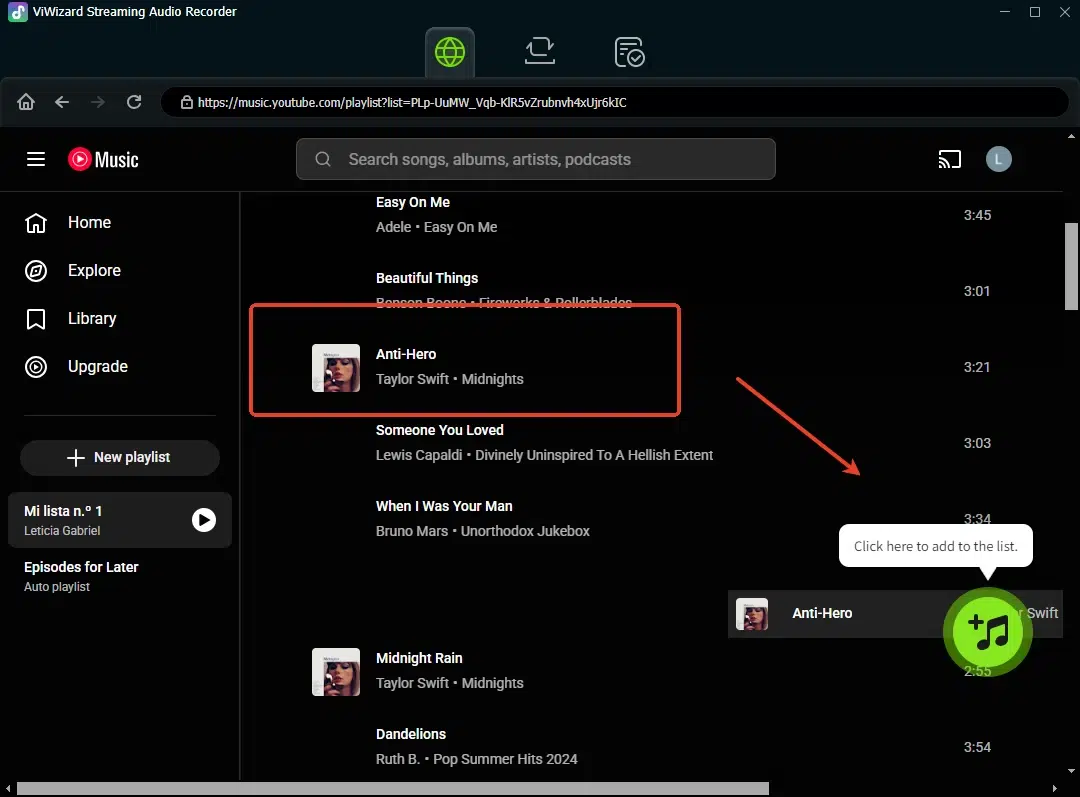
Forget copying and pasting URLs from your main browser into a sketchy website. ViWizard features a built-in web browser. This allows you to log into YouTube Music directly within the app, search for songs, and build a recording queue without ever switching windows. It is a streamlined workflow designed for heavy users.
4. Batch Recording and Speed
If you want to download an entire playlist of 50 songs, doing that manually is torture. ViWizard supports batch processing and offers up to 15x faster recording speeds than real-time audio capture tools. You can set it to record an entire album, walk away, and come back to perfectly named, high-quality MP3 files.
How to Download YouTube Music to MP3 with ViWizard (Step-by-Step)
Ready to build your offline MP3 library? Follow these four simple steps. Don’t worry—the process is designed to be intuitive, even for first-time users.
Step 1: Download and Install ViWizard Streaming Audio Recorder
First, visit the official ViWizard website and download the version compatible with your operating system (Windows or macOS). Run the installer and follow the on-screen instructions. The installation takes less than a minute.
Step 2: Set MP3 as Your Output Format
Launch ViWizard. Click the Menu icon (three horizontal lines) in the top-right corner and select Preferences (or Settings). Navigate to the Convert or Output section. Here, you will see a list of audio formats. Select MP3 as your output format. You can also customize the bitrate—we recommend 320kbps for the best sound quality. If you prefer lossless audio, you can choose WAV or FLAC instead.
Step 3: Access YouTube Music via the Built-in Browser
On the main interface, click on YouTube Music from the available music platforms. You will be directed to the integrated YouTube Music web player; sign in to your account.
Step 4: Add YouTube Music Songs and Convert
In the music library, select the songs you want to download and click the “+” button to import them into ViWizard. Then, in the “Converting” panel, click the “Convert” button to start the download. Simply wait a moment for the conversion to complete.
Step 5: Locate Your Downloaded MP3s
By default, all your downloading are saved in the ViWizard output folder (usually Music/ViWizard/). You can change this location in the Settings menu. From there, drag your MP3 files into iTunes, Windows Media Player, VLC, or any music app on your phone. Enjoy your YouTube Music library offline, anytime, anywhere.
The Verdict
If you are tired of chasing broken links on shady websites or listening to music that sounds like it is playing through a pillow, ViWizard Streaming Audio Recorder is the investment you need. It bridges the gap between the vast library of YouTube Music and the freedom of a local MP3 collection.
Don’t settle for low-quality rips. Take control of your music library with ViWizard.