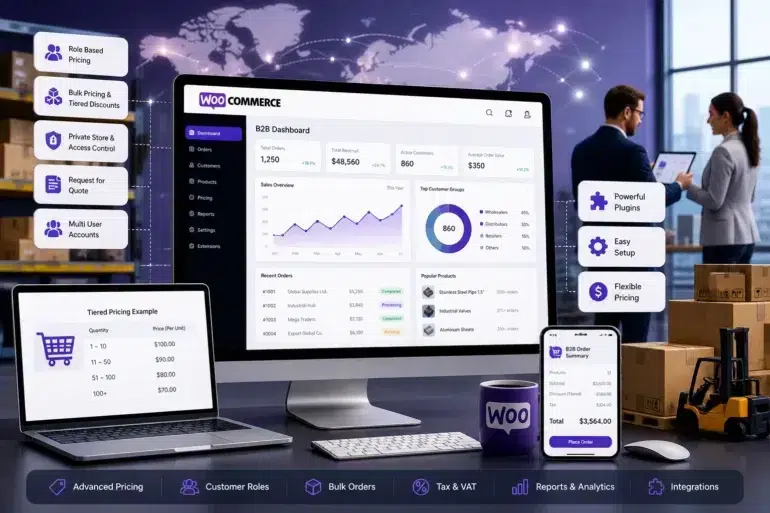
B2B buying has changed. Catalog PDFs and emailed quote sheets aren’t enough anymore. Wholesalers, manufacturers, and distributors now expect something close to the Amazon experience, just with role specific pricing, MOQs, and credit terms baked in.
That’s where WooCommerce earns a serious second look.
It’s flexible. It’s affordable. It runs on WordPress, which most teams already know how to manage. And with the right plugins and WooCommerce Development Services, it handles everything from tiered pricing to multi user accounts without the cost of an enterprise platform.
This guide walks through what WooCommerce can actually do for B2B, how to set it up, which plugins are worth the money in 2026, and where it fits compared to Shopify Plus or Adobe Commerce.
What is WooCommerce B2B?
Quick answer: WooCommerce B2B is the standard WooCommerce plugin for WordPress, extended with B2B specific plugins and custom logic to support business to business selling. It enables wholesale pricing, MOQs, private catalogs, quote workflows, and credit term checkouts.
There’s no separate “B2B” product to install. You take WooCommerce core, layer plugins like B2BKing or Wholesale Suite on top, configure roles and pricing rules, and you’ve got a wholesale storefront.
Real B2B selling means logged in only catalogs. Negotiated rates. Bulk discounts that adjust automatically based on quantity. Quote requests instead of instant checkout. Net 30 payment terms. Approval workflows. The kind of stuff a wholesale buyer expects when they place a $40,000 order.
B2B vs B2C at a glance
| Aspect | B2B | B2C |
|---|---|---|
| Pricing | Custom or tiered | Fixed |
| Orders | Bulk volumes | Individual items |
| Customers | Companies and buyers | Individuals |
| Sales cycle | Weeks to months | Minutes |
| Payment | Invoicing, credit terms | Card or wallet |
Honestly, the technical stack matters less than buyer behavior. B2B buyers compare specs, request samples, ask for quotes, and rarely buy on impulse. According to Gartner, B2B buyers spend roughly 27 percent of their purchase journey researching independently online, well before they ever talk to a rep. Your store has to support that research mode.
Why Choose WooCommerce for B2B eCommerce?
Quick answer: WooCommerce is the top choice for B2B brands that want flexibility, full data ownership, and lower total cost. It avoids the platform fees, customization limits, and lock in that come with hosted platforms.
It’s open source. No per transaction fees. No platform tax eating into margins. You own the code and can host anywhere.
The plugin ecosystem is enormous. Payment gateways, ERP sync, custom catalog logic, multi vendor setups, someone has already built it. And if not, building it isn’t expensive.
Cost is the other big factor. A mid sized B2B store on Shopify Plus starts around $2,300 a month. A similar setup on WooCommerce, depending on hosting and plugins, often lands closer to $200 to $500 a month. That gap funds a lot of marketing.
You also avoid lock in. With WooCommerce, you control your data, your storefront, and your customizations. That matters when you’re building for the long haul.
Best fit industries
- Manufacturers selling to retailers and resellers
- Export brands shipping to international distributors
- Wholesalers running tiered dealer networks
- Specialty suppliers with restricted catalog access
- Industrial parts and MRO suppliers with large SKU counts
What Features Does a WooCommerce B2B Store Need?
Quick answer: A complete WooCommerce B2B store needs role based pricing, tiered bulk discounts, MOQ rules, private catalog access, custom checkout flows, request for quote, credit terms, multi user accounts, and ERP or CRM integration.
Core Features
Role based pricing. Different customer groups (gold, silver, distributor, reseller) see different prices on the same products.
Tiered and bulk pricing. Volume discounts apply automatically. Buy 50 units at one rate, 500 at another. The math runs without spreadsheets.
Minimum order quantity rules. Set MOQs per product, per category, or per customer group to keep small orders from clogging the warehouse.
Private store access. Hide pricing, or the entire catalog, behind a login. Wholesale buyers see numbers. Random visitors see nothing.
Tax and VAT management. Critical once you sell across borders. WooCommerce handles complex EU and UK tax rules through extensions.
Custom checkout flows. Saved addresses, PO number fields, quick reorder buttons. B2B buyers don’t want to retype the same shipping info every order.
Advanced Features
- Request for quote: replaces instant checkout when products don’t have a fixed price
- Credit limits and net terms: approved customers buy on account
- Multi user business accounts: buyers place orders, managers approve them
- ERP and CRM sync: keeps inventory, customers, and invoices flowing between WooCommerce and tools like Zoho, SAP, NetSuite, or HubSpot
How Do You Set Up a WooCommerce B2B Store?
Quick answer: Set up a WooCommerce B2B store in seven steps: pick the right host, install WooCommerce, choose a B2B plugin, configure user roles, define pricing tiers, optimize checkout, and test before launch.
- Choose a WooCommerce friendly host. Cloudways, Kinsta, and SiteGround all perform well. Avoid cheap shared hosting. It chokes under any real B2B traffic.
- Install WordPress and WooCommerce. Use a clean theme like Astra or Storefront. Skip bloated multipurpose themes — they slow everything down.
- Install your B2B plugin. Don’t try to build everything custom on day one. Pick a plugin that covers 80 percent of your needs. Customize the rest later.
- Configure user roles and permissions. Create at minimum a wholesale role and a retail role. Larger operations might need distributor, dealer, sub dealer, and so on. Each role gets its own pricing, access, and checkout behavior.
- Define your pricing structure. Map out tiers before you touch the admin. Bulk thresholds, customer specific overrides, MOQs, all of it. Configuring as you go usually creates a mess.
- Optimize checkout for bulk buying. Add quick order forms. Allow CSV upload for large orders. Skip multi step checkout if the buyer is already logged in. Friction kills B2B conversion just like it does B2C.
- Test and launch. Test every role. Place real orders. Run a soft launch with a few trusted customers first. Find bugs before your full customer base does.
If parts of this feel out of scope, working with an experienced WooCommerce development team can shave weeks off the timeline and prevent expensive rebuilds.
Which Plugins Are Best for WooCommerce B2B?
Quick answer: The best WooCommerce B2B plugins in 2026 are B2BKing for full B2B builds, Wholesale Suite for simpler wholesale stores, and WooCommerce Wholesale Prices for basic single tier wholesale needs.
| Plugin | Best For | Starting Price |
|---|---|---|
| B2BKing | Full B2B builds with RFQ, roles, tax exemptions | ~$149 per year |
| Wholesale Suite (Rymera) | Wholesale pricing and ordering | ~$99 per year |
| WooCommerce Wholesale Prices | Simple, single tier wholesale | Free / ~$99 premium |
| WooCommerce Memberships and Subscriptions | Gated catalogs and recurring orders | ~$199 per year |
How to evaluate a B2B plugin
- Active install count. Anything under 5,000 active installs is a risk.
- Recent updates. If the last release was over a year ago, skip it.
- Support quality. Response times tell you everything.
- Compatibility. Some plugins clash. Always test on a staging environment first.
How Does Pricing Work in WooCommerce B2B?
Quick answer: WooCommerce B2B supports three main pricing models: tiered pricing for volume discounts, dynamic pricing for rule based adjustments, and customer specific pricing for negotiated rates with major accounts.
A typical tiered structure looks like this:
| Quantity | Price per unit |
|---|---|
| 1 to 10 | $100 |
| 11 to 50 | $90 |
| 51 to 200 | $80 |
| 201 and above | Quote required |
Most buyers respond well to clear breaks. Hidden discounts feel sneaky. Visible ones build trust and make negotiation cleaner.
For accounts on negotiated terms, pair tiered pricing with role based overrides. Gold tier customers get rates X, silver tier gets rates Y, and one off enterprise deals get a custom rate that overrides everything else.
How Do You Optimize WooCommerce B2B for SEO and AI Overviews?
Quick answer: Optimize WooCommerce B2B for search by matching buyer intent to page type, building topical clusters, adding FAQ and product schema, fixing Core Web Vitals, and strengthening E-E-A-T signals through real case studies and author bios.
A few things matter most:
- Match search intent precisely. A buyer searching “industrial valve supplier in Texas” wants a supplier page, not a blog post.
- Build topical clusters. One pillar page per category, several supporting articles around it. Topical depth beats scattered keyword targeting every time.
- Add structured data. FAQ, product, and Article schema help with AI Overviews and featured snippets, where a growing share of B2B research now starts.
- Fix Core Web Vitals. WooCommerce can get heavy. Caching, image compression, and a tuned host fix most speed issues.
- Strengthen E-E-A-T signals. Author bios, real case studies, certifications, partnerships. B2B buyers actually check.
For deeper technical tuning, this guide on WooCommerce performance optimization covers caching, hosting, and database tweaks that matter for high traffic stores.
What Are Common WooCommerce B2B Challenges?
Quick answer: The most common WooCommerce B2B challenges are complex pricing rules, tangled user roles, slow page loads, ERP and CRM integration headaches, and tax compliance across regions.
| Challenge | Solution |
|---|---|
| Complex pricing rules | Use dynamic pricing plugins, not spreadsheets |
| Multiple roles getting tangled | Document a clean role hierarchy, review quarterly |
| Slow page loads | Caching, image compression, tuned host |
| Integration headaches | Use middleware (Zapier, Make, custom API layer) |
| Tax compliance | Use Avalara, TaxJar, or similar automation tools |
None of these are dealbreakers. They’re just things to plan for upfront, not patch later.
WooCommerce B2B vs Shopify Plus vs Adobe Commerce
Quick answer: WooCommerce wins on flexibility and cost. Shopify Plus wins on ease of launch. Adobe Commerce (Magento) wins on enterprise scale and built in B2B features. Pick based on budget, technical resources, and complexity of workflows.
| Platform | Strengths | Limitations | Typical Cost |
|---|---|---|---|
| WooCommerce | Flexible, affordable, open source, full ownership | Needs technical setup and ongoing maintenance | $200 to $500 per month |
| Shopify Plus | Easy to launch, hosted, scales well | Higher cost, harder to customize deeply | From ~$2,300 per month |
| Adobe Commerce | Enterprise grade B2B features, mature ecosystem | Expensive, heavy infrastructure, steep learning curve | $22,000+ per year licensing |
Verdict: Shopify Plus is the path of least resistance if you’ve got the budget and don’t need much customization. Adobe Commerce makes sense for enterprises with complex catalogs and large IT teams. WooCommerce sits in the middle, flexible enough for almost anything, affordable enough for growing brands.
For a fuller side by side breakdown, this WooCommerce vs Shopify Plus comparison goes deeper into the tradeoffs.
Real World Use Cases
A few patterns we see often:
A specialty foods exporter using WooCommerce to manage pricing for distributors across 14 countries, each with its own VAT rules.
A furniture manufacturer running a dealer portal with role based pricing for three reseller tiers, plus a separate retail storefront on the same install.
An industrial parts wholesaler handling 600 plus SKUs with MOQs and credit terms tied to each account.
These aren’t edge cases. They’re typical builds. WooCommerce handles them comfortably with the right architecture from day one.
Is WooCommerce Right for Your B2B Business?
Quick answer: WooCommerce is the right fit for B2B brands wanting flexibility, lower cost, and full data ownership, with at least some technical capability or budget for a partner. It’s not the right fit for businesses needing zero touch enterprise automation with no internal tech support.
Choose WooCommerce if:
- You want flexibility and full ownership of your store
- Your budget is tight to mid range
- You have, or can hire, technical support
- You’re scaling steadily and need room to customize
Skip it if:
- Your workflows are extremely complex with multiple ERPs and global tax automation built in
- You have zero internal technical capability and no budget for a partner
- You need enterprise procurement integrations like Ariba or Coupa out of the box
In those cases, Adobe Commerce or a hosted enterprise solution might save more headaches than they cost.
Frequently Asked Questions
What is WooCommerce B2B?
WooCommerce B2B is the standard WooCommerce plugin for WordPress extended with B2B specific plugins and configurations to support wholesale selling, including role based pricing, MOQs, credit terms, and quote workflows. It runs on the same WooCommerce core that powers retail stores.
Can WooCommerce really handle wholesale operations?
Yes. With the right plugins and a tuned host, WooCommerce scales to thousands of SKUs, multiple customer roles, and complex pricing rules. Stores doing seven and eight figures in annual B2B revenue run on WooCommerce without trouble.
Which plugin is best for WooCommerce B2B?
B2BKing covers the most ground for full B2B builds with RFQ, roles, group management, and tax exemptions. Wholesale Suite is great for simpler wholesale only stores. WooCommerce Wholesale Prices works for single tier needs. Pick based on actual workflow, not feature lists.
How much does a WooCommerce B2B store cost?
A typical WooCommerce B2B store runs $200 to $500 per month for hosting and plugins, plus a one time development cost between $5,000 and $40,000 depending on integrations and complexity. Compare that to Shopify Plus at roughly $2,300 per month minimum.
How does bulk pricing work in WooCommerce?
You set quantity tiers per product or category through a B2B plugin. The plugin applies the right rate automatically based on cart contents at checkout, so buyers see correct pricing without manual calculation.
Is WooCommerce scalable for large B2B operations?
Yes, with proper hosting, caching, and architecture. WooCommerce stores process millions of dollars in B2B orders annually. Performance depends almost entirely on infrastructure and clean code, not the platform itself.
Final Thoughts
WooCommerce isn’t the easiest B2B platform to launch. It rewards planning. But for businesses that want flexibility, affordability, and full control over their store, it’s hard to beat in 2026.
The right plugins handle the hard parts. The open source foundation keeps costs predictable. And the ecosystem keeps growing every year.
If you’re sizing up WooCommerce for your wholesale operation, the next step isn’t another article. It’s a real conversation about your catalog, your customer types, and the integrations you’ll need on day one when you hire WooCommerce developer experts.