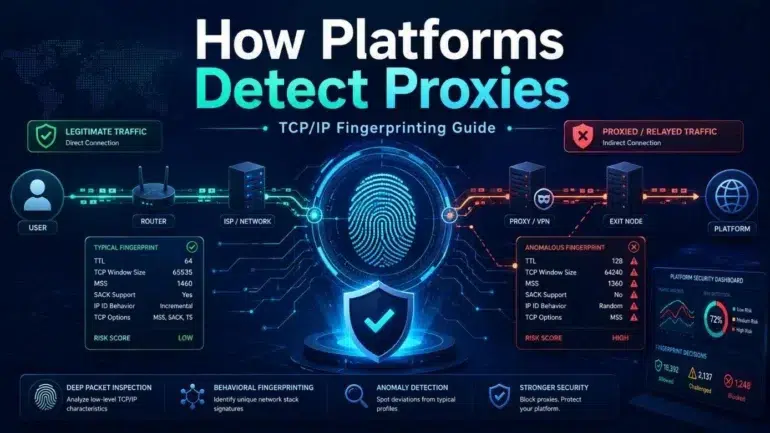
Platforms that need to reduce fraud, abuse, account takeovers, scraping, spam, or policy evasion often try to determine whether a connection is coming from a normal user device or from a proxy, VPN, datacenter server, automation stack, or relay. One important method is TCP/IP fingerprinting: analyzing low-level network behavior to infer what kind of system is making the connection.
This guide explains the concept from a defensive and educational perspective.
What Is TCP/IP Fingerprinting?
TCP/IP fingerprinting is the practice of identifying characteristics of a client’s operating system, network stack, or connection path by observing details in its network packets.
Every device that connects to the internet uses TCP/IP, but different operating systems, kernels, network libraries, VPNs, proxies, and middleboxes may implement TCP/IP slightly differently. These small differences can create a recognizable “fingerprint.”
A platform may not know the user’s exact device, but it can often infer patterns such as:
- The connection appears to come from Linux, Windows, macOS, iOS, or Android.
- The traffic is routed through a datacenter network.
- The TCP behavior does not match the claimed browser or device.
- The connection path includes a proxy, VPN, NAT gateway, or load balancer.
- Multiple accounts appear to share the same infrastructure pattern.
TCP/IP fingerprinting is usually one signal among many, not a final decision by itself.
Why Platforms Look for Proxies
Platforms may detect proxies for several reasons:
Fraud prevention is one of the biggest drivers. Attackers often use proxies to hide their origin, rotate IP addresses, or operate many accounts at scale.
Security teams also monitor proxies to detect credential stuffing, fake registrations, payment abuse, scraping, bot traffic, spam, or attempts to bypass geographic or rate limits.
Not all proxy use is malicious. Many people use VPNs for privacy, corporate access, censorship avoidance, or security on public Wi-Fi. Because of that, mature platforms usually combine proxy detection with behavior, account history, device signals, and risk scoring.
Passive vs. Active Fingerprinting
There are two broad approaches.
Passive fingerprinting observes the connection as it naturally happens. The server looks at packet-level details such as TCP options, window sizes, TTL values, and handshake behavior. This is quiet and does not require sending unusual probes.
Active fingerprinting sends special packets or performs tests to see how the client or network path responds. This can reveal more detail, but it is noisier and less commonly used by large web platforms for ordinary user traffic.
Most commercial platforms rely primarily on passive signals because they scale well and avoid disrupting legitimate users.
Key TCP/IP Signals Used in Fingerprinting
TCP Options
During the TCP handshake, clients advertise TCP options such as:
- Maximum Segment Size, or MSS
- Window Scale
- Selective Acknowledgment support, or SACK
- Timestamps
- Option ordering
- NOP padding
Different operating systems often use different combinations and ordering of these options. For example, a Linux server, a Windows desktop, and a mobile device may present different TCP handshake patterns.
The order of TCP options is especially useful because it often reflects how a network stack constructs packets internally.
Initial TTL
TTL, or Time To Live, is a packet field that decreases by one at each router hop. Operating systems commonly start with default TTL values such as 64, 128, or 255.
A platform does not usually see the original TTL. It sees the remaining TTL after the packet reaches the server. By estimating hop count, the platform may infer the original value.
For example:
- A packet arriving with TTL 115 may have started at 128.
- A packet arriving with TTL 52 may have started at 64.
TTL can help identify the likely OS family or reveal unusual routing paths, but it is not reliable by itself.
TCP Window Size
The TCP window size controls how much data can be sent before acknowledgment. Different systems and network stacks may choose different initial window sizes or scaling behavior.
A proxy, VPN gateway, or cloud server may expose a window profile that looks different from a typical residential phone or laptop.
MSS and MTU Clues
MSS, or Maximum Segment Size, is related to MTU, the maximum packet size on a network path.
Typical Ethernet connections often produce an MSS around 1460 bytes. VPNs, tunnels, mobile networks, and proxies may produce different values because encapsulation reduces available packet size.
An unusual MSS can suggest that traffic is passing through a tunnel or relay.
TCP Timestamp Behavior
TCP timestamps can reveal subtle information about a host’s uptime, clock behavior, or network stack implementation.
Some systems enable timestamps by default, while others do not. Some middleboxes modify or normalize timestamp behavior. Inconsistent timestamp behavior can suggest that traffic is being proxied or altered in transit.
Packet Timing and Latency
Platforms may also observe timing behavior:
- Round-trip time
- Jitter
- Connection setup delay
- TLS handshake timing
- Request pacing
- Differences between network latency and claimed geography
A user claiming to be in one location while consistently showing latency patterns associated with another region may raise suspicion.
However, timing is noisy. Mobile networks, satellite internet, congestion, and corporate VPNs can all affect latency.
5. IP Reputation and Network Context
TCP/IP fingerprinting is often combined with IP intelligence.
Platforms may check whether an IP belongs to:
- Residential ISP space
- Mobile carrier networks
- Datacenter hosting providers
- Known VPN providers
- Cloud platforms
- Tor exit nodes
- Public proxy lists
- Corporate networks
- Recently abused IP ranges
A clean TCP fingerprint may still be considered risky if the IP belongs to a datacenter commonly used for automation. Conversely, a proxy-like connection may be allowed if the user has a strong account history and normal behavior.
6. Mismatch Detection
One of the most powerful uses of TCP/IP fingerprinting is mismatch detection.
A platform may compare multiple layers of information:
- TCP/IP fingerprint
- TLS fingerprint
- HTTP headers
- Browser user agent
- JavaScript/browser fingerprint
- Device type
- Account history
- IP geolocation
- Time zone
- Language settings
- Login behavior
For example, a request may claim to come from a mobile Safari browser on iOS, but the TCP/IP fingerprint may look like a Linux datacenter server. That mismatch does not prove abuse, but it increases risk.
This is why platforms rarely rely on one signal. The suspicious part is often not a single attribute, but the inconsistency across layers.
7. TLS and HTTP Fingerprints
Although this article focuses on TCP/IP, modern proxy detection often includes TLS and HTTP fingerprinting.
TLS fingerprinting looks at details in the TLS handshake, such as supported cipher suites, extensions, elliptic curves, ALPN values, and ordering. Tools and libraries often produce different TLS fingerprints than real browsers.
HTTP fingerprinting looks at headers, header order, compression behavior, protocol versions, and request patterns.
Together, these signals can reveal whether traffic is coming from a real browser, a headless browser, an automation framework, a mobile app, or a proxy service.
8. Why Proxies Are Detectable
A proxy can hide the original client IP from the destination server, but it cannot always hide the behavior of the proxy endpoint itself.
The destination platform sees the connection from the proxy server. That means the visible TCP/IP fingerprint often belongs to the proxy infrastructure, not the original user device.
This can reveal:
- A datacenter Linux network stack
- Shared proxy infrastructure
- Reused TCP behavior across many accounts
- Unusual routing or tunnel MTU values
- TLS fingerprints from automation libraries
- Geographic inconsistencies
- IP ranges linked to proxy services
Even when the proxy is technically functional, it may not look like normal consumer traffic.
9. Limitations of TCP/IP Fingerprinting
TCP/IP fingerprinting is useful, but imperfect.
It can be affected by NAT, firewalls, load balancers, VPNs, mobile carriers, operating system updates, browser changes, and enterprise security products.
False positives are possible. A legitimate user on a corporate VPN may look similar to a proxy user. A traveler may show unusual geolocation changes. A privacy-conscious user may use a VPN without any malicious intent.
For this reason, responsible platforms treat TCP/IP fingerprinting as part of a broader risk model rather than as a standalone ban reason.
10. Defensive Uses
For security teams, TCP/IP fingerprinting can help with:
- Bot detection
- Credential stuffing prevention
- Account takeover defense
- Abuse investigation
- Rate-limit enforcement
- Fraud scoring
- Scraper detection
- Anomaly detection
- Infrastructure clustering
It is especially useful when combined with behavioral analytics. For example, hundreds of accounts logging in with similar TCP fingerprints, similar timing, and nearby IP ranges may indicate coordinated automation.
11. Privacy and Ethical Considerations
Network fingerprinting can improve security, but it also raises privacy concerns.
Platforms should be transparent where possible, avoid unnecessary data retention, minimize collection, and use these signals proportionally. Security systems should distinguish between privacy-protective behavior and malicious behavior.
A VPN user should not automatically be treated as abusive. The better approach is risk-based: combine network signals with account trust, user behavior, and the sensitivity of the action being performed.
Conclusion
TCP/IP fingerprinting helps platforms understand the nature of a connection beyond the visible IP address. By analyzing TCP options, TTL, window size, MSS, timestamp behavior, latency, and routing clues, platforms can infer whether traffic resembles a normal user device, a proxy, a VPN, a datacenter server, or automated infrastructure.
However, TCP/IP fingerprinting is not a magic detector. It is most effective when combined with TLS fingerprints, HTTP behavior, browser signals, IP reputation, and user behavior. Used responsibly, it is a valuable tool for defending platforms against fraud and abuse while minimizing unnecessary friction for legitimate users.