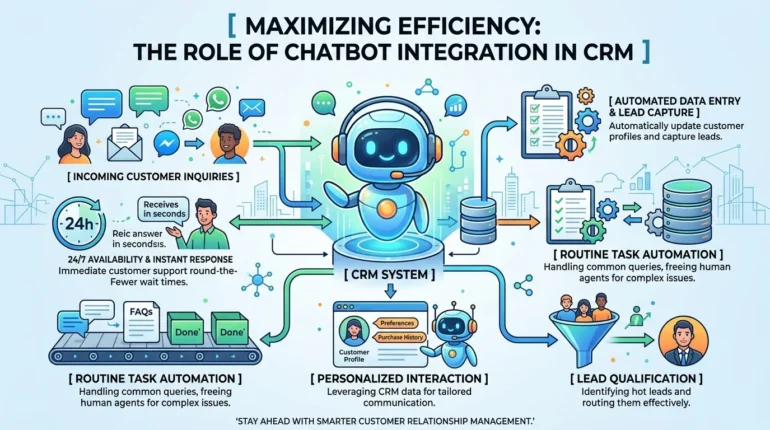
In today’s fast-paced business environment, companies are continually seeking innovative ways to enhance efficiency and improve customer engagement. One of the most effective strategies for achieving these goals is through chatbot integration with CRM (Customer Relationship Management) systems. This integration allows businesses to automate customer interactions, streamline processes, and provide a seamless experience for both customers and employees. In this article, we will explore the benefits of chatbot integration with CRM, the implementation process, and how tools like Mindrind can play a vital role in this transformation.
Understanding the Benefits of Chatbot Integration with CRM
The integration of chatbots into CRM systems presents numerous advantages for businesses aiming to optimize their operations. Here are some of the most significant benefits:
Enhanced Customer Support
One of the primary functions of chatbots is to provide immediate assistance to customers, offering 24/7 support without the need for human intervention. This round-the-clock service ensures that customers receive timely responses to their inquiries, leading to higher satisfaction rates. With chatbot integration, typical customer queries can be handled efficiently, allowing human agents to focus on more complex issues that require personalized attention.
Data Collection and Analysis
Chatbots can gather valuable customer data during interactions, which can be stored in the CRM system. This data includes preferences, purchase history, and feedback, enabling businesses to build a comprehensive view of their clients. Analytics derived from this data can inform decision-making and drive marketing strategies tailored to specific customer segments.
Improved Lead Management
Chatbots can help identify potential leads by engaging website visitors in real-time. They can qualify leads by asking targeted questions and directing them toward relevant content or solutions. Once leads are identified, chatbots can automatically enter them into the CRM system, ensuring that sales teams have access to fresh opportunities as they arise.
Cost and Time Efficiency
Integrating chatbots with a CRM system significantly reduces the operational costs associated with customer support. By automating routine inquiries and tasks, businesses can minimize the need for additional human resources. Additionally, chatbots can handle multiple interactions simultaneously, dramatically increasing response times and allowing for more efficient issue resolution.
Implementing Chatbot Integration with CRM
To successfully implement chatbot integration with CRM, businesses need to follow a systematic approach. Here are the key steps involved:
Define Objectives
Before integrating a chatbot with CRM, it’s essential to identify the objectives of the chatbot implementation. Are you looking to improve customer service, enhance lead generation, or gather insights? Clearly defining your goals will help in selecting the right technology and designing the chatbot’s functionalities.
Choose the Right Chatbot Technology
Selecting the appropriate chatbot platform is crucial for successful integration. It’s essential to choose a technology that can seamlessly connect with your existing CRM system. Look for platforms that offer flexibility, scalability, and an easy-to-use interface. Solutions like Mindrind are designed to facilitate easy integration with popular CRM systems while offering customization options to align with specific business needs.
Design Conversational Flows
Creating effective conversational flows is key to a successful chatbot experience. Outline the types of interactions the chatbot will handle and script the conversations accordingly. This should include common customer inquiries, responses, and actions the chatbot will take. Employing natural language processing (NLP) techniques can enhance the chatbot’s ability to understand and respond appropriately to user input.
Integrate with CRM
With the right technology and conversational flows defined, the next step is to integrate the chatbot with the CRM system. Ensure that the chatbot can access relevant customer data and be programmed to log interactions, update customer profiles, and track leads effectively. Proper integration will facilitate smooth communication between the chatbot and the CRM, leading to better data management.
Test the System
Before going live, conduct extensive testing of the chatbot’s functionalities to identify any issues or bottlenecks. This involves simulating various customer interactions to ensure the chatbot performs as intended. Testing allows you to refine the conversational flows and improve user experience.
Monitor and Optimize
Once the chatbot is live, continuous monitoring is essential to assess its performance. Analyze conversations, measure customer satisfaction levels, and track key performance indicators (KPIs) to identify areas for improvement. Regularly updating the chatbot’s knowledge base and refining its responses will ensure it remains effective over time.
The Future of Chatbot Integration in CRM
As technology advances, the role of chatbots in CRM systems will continue to evolve. Emerging technologies such as artificial intelligence (AI) and machine learning (ML) will enhance chatbot capabilities, allowing for more personalized customer interactions. As businesses increasingly recognize the importance of efficient customer engagement, the integration of chatbots within CRM is set to become a standard practice across various industries.
Case Studies of Successful Implementations
1. E-commerce
A leading e-commerce platform integrated a chatbot with its CRM to streamline customer support and upsell products. The chatbot effectively managed inquiries about order statuses and product recommendations, resulting in a 30% increase in sales. Integrated data provided by the chatbot allowed the sales team to follow up with customers based on preferences, improving overall satisfaction and loyalty.
2. Financial Services
A financial services company utilized chatbot integration with its CRM to enhance customer service. By automating responses to frequently asked questions, they reduced wait times and increased engagement rates. The CRM data collected through chatbot interactions also enabled the company to tailor financial products to individual clients, resulting in increased sales and customer retention.
Best Practices for Maximizing Efficiency
To maximize the efficiency of chatbot integration with CRM, consider the following best practices:
- Regular Training: Continuously updating and training the chatbot ensures it stays informed about your product offerings and services, leading to more relevant interactions.
- Customer Feedback: Regularly solicit feedback from customers regarding their experiences with the chatbot. Use this information to make necessary adjustments and improvements.
- Human Handover: Implement protocols for transferring complex issues to human agents. Ensure that the chatbot can identify situations where human intervention is required and facilitate a smooth transition.
- Integration with Other Tools: Explore opportunities to integrate the chatbot with other business tools, such as marketing automation, project management, and scheduling software. This holistic approach enables better data sharing and a more cohesive operation.
Conclusion
The integration of chatbots into CRM systems is revolutionizing how businesses interact with their customers, driving efficiency and enhancing operational effectiveness. By leveraging tools such as Mindrind, organizations can implement this technology seamlessly, leading to improved customer support, data management, and lead generation.
As the demand for immediate customer support continues to rise, integrating chatbots with CRM not only meets this demand but also paves the way for future growth. By embracing this technology, businesses can maximize their efficiency, gain a competitive edge, and foster deeper, more meaningful relationships with their customers.
Frequently Asked Questions
Q: How does chatbot integration benefit customer support?
A: Chatbot integration allows for 24/7 customer support, automating responses to common queries and freeing up human agents for more complex issues.
Q: Can chatbots collect data from CRM systems?
A: Yes, integrated chatbots can collect customer data during interactions, which can be stored and analyzed within the CRM for better decision-making.
Q: Do I need technical expertise to integrate a chatbot with CRM?
A: While some technical knowledge is beneficial, many chatbot platforms offer user-friendly interfaces and support, making it easier for non-technical users to implement.
Q: How do I measure the success of my chatbot?
A: You can measure success through KPIs such as response time, customer satisfaction scores, and conversion rates from chatbot interactions.
Q: Is chatbot integration suitable for all types of businesses?
A: Yes, chatbot integration can benefit businesses of all sizes and industries by enhancing customer engagement and improving operational efficiency.