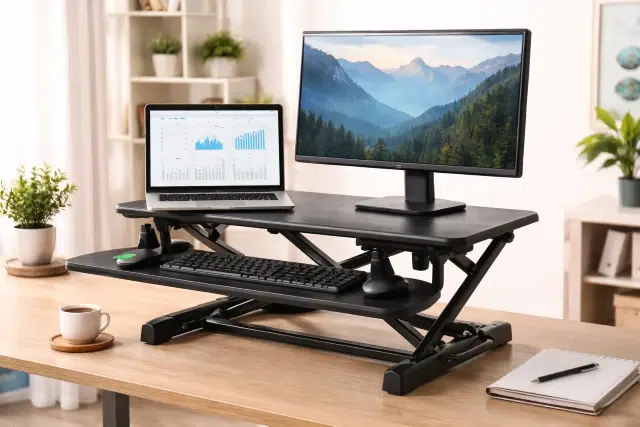
If you’ve ever finished a long work session and felt your lower back tighten, shoulders creep up, or energy dip hard around mid afternoon, you’re not alone. A lot of modern work is simply more sitting than our bodies love. That’s usually where people start asking, What is a Riser Desk, and whether it can make desk life feel less stiff and more comfortable without replacing the whole workstation.
A riser desk is one of those upgrades that seems small until you use it daily. It changes how your desk functions, how you move, and how your setup fits your body, especially if your current desk height is not ideal.
What is a Riser Desk, exactly?
A riser desk (often called a desk riser or desk converter) is a unit that sits on top of your existing desk and raises your work surface so you can work at a higher height, usually for standing. Think of it as a “desk on a desk.”
Instead of buying a full height adjustable desk, a riser desk lets you keep your current desk and still shift between sitting and standing. Many models are adjustable, so you can set it to a seated position, raise it for standing, or move between both during the day.
People ask What is a Riser Desk because it sounds like a full desk, but most of the time it’s a desktop add-on that converts your regular desk into a sit-stand style workstation.
Riser desk vs standing desk vs sit-stand desk
A quick clarification helps because these terms get mixed up:
- Riser desk (desk riser / desk converter): sits on top of your existing desk and lifts your keyboard and monitor higher
- Standing desk: a desk that is fixed at standing height (not meant to sit at)
- Sit-stand desk (height adjustable desk): the whole desk surface moves up and down, usually electric or crank-based
Here’s an easy comparison:
| Feature | Riser Desk (Converter) | Standing Desk (Fixed) | Sit-Stand Desk (Full Desk) |
|---|---|---|---|
| Uses your existing desk | Yes | No | No |
| Adjusts between sit and stand | Often yes | No | Yes |
| Typical cost | Low to mid | Mid | Mid to high |
| Setup effort | Easy | Medium | Medium to high |
| Workspace footprint | Adds height + depth on top | Replaces desk | Replaces desk |
| Best for | Renters, shared offices, tight budgets | Standing-first setups | Daily sit-stand users |
Why riser desks became so popular
The short version: people are trying to sit less and move more, but not everyone wants to replace furniture.
Health organizations and ergonomics guidance often emphasize reducing discomfort and avoiding staying in one posture for too long. For example, NIOSH notes that workers shouldn’t have to sit or stand for too long and that short breaks can reduce discomfort for people working on computers.
At the same time, research on “too much sitting” has pushed the topic into the mainstream. Mayo Clinic points out that long periods of sitting are linked with health concerns, and suggests breaking up sitting time and adding movement, including using a standing desk some of the time.
So when someone asks What is a Riser Desk, they’re often really asking: “How do I change my day at the computer without turning my whole office upside down?”
Types of riser desks and how they work
Not all riser desks feel the same. The mechanism matters because it affects stability, adjustability, and how annoying (or smooth) it is to change positions.
1) Fixed risers (simple monitor risers)
These are basic platforms that lift your monitor higher. They’re great if your monitor is too low, but they do not convert your setup for standing unless paired with other solutions.
Best for:
- fixing a monitor that sits too low
- creating storage space under the monitor
2) Adjustable sit-stand converters (most common “riser desks”)
These raise the monitor and keyboard together. You lift the platform up when you want to stand, and lower it back down to sit.
Common lift styles:
- Spring assisted / gas lift: smoother up and down
- Scissor lift: stable and common, but can take desk depth
- Pneumatic: tends to feel easy and controlled
3) Post-and-arm risers (monitor arm style converters)
These often use a vertical post with adjustable arms for monitors and a keyboard tray. They can save space and allow fine-tuning, but feel different than a single flat platform.
Best for:
- multi-monitor setups
- people who want lots of adjustability
The real benefits of a riser desk (and what it won’t fix)
A riser desk can be genuinely helpful, but it’s not magic. The goal is not to stand all day. The goal is to change positions, reduce discomfort triggers, and make movement easier to add.
What it can improve
1) More posture variety, less “locked in” feeling
Ergonomics guidance emphasizes neutral working positions and proper setup rather than forcing your body into awkward angles. OSHA’s computer workstation guidance discusses neutral body positioning and workstation setup concepts that help reduce strain.
2) Less prolonged sitting time
Evidence reviews have found sit-stand workstations can reduce sitting time at work, even if health outcomes vary and depend on overall movement and behavior.
3) Easier “micro breaks” that actually happen
NIOSH specifically mentions that taking short breaks every hour can reduce discomfort for computer work. A riser desk makes those breaks simpler because changing position becomes part of the workflow.
What it won’t do on its own
1) It won’t cancel out inactivity
Large research efforts suggest that movement and physical activity matter a lot, and standing alone is not a full solution. For example, a harmonised meta-analysis in The Lancet explores how physical activity can attenuate the risk associated with high sitting time.
2) It won’t automatically remove pain if your setup is wrong
If your keyboard is too high, monitor too low, or you’re craning your neck, you can still feel rough after work. Setup matters as much as the furniture.
How to set up a riser desk the right way
If you buy a riser desk and set it up randomly, you might end up with raised shoulders, bent wrists, or a monitor that’s still too low. Let’s avoid that.
A practical ergonomic target is:
- shoulders relaxed
- elbows around 90 degrees (roughly)
- wrists straight (neutral)
- top of screen at or slightly below eye level
These ideas show up across workstation ergonomics guidance, including university and safety office guidelines that recommend elbows near 90 degrees and screen height around eye level.
Standing position checklist
When your riser desk is raised:
- Monitor: top of the screen near eye level, at a comfortable viewing distance
- Keyboard: elbows close to your sides, wrists not bent upward
- Mouse: close enough that you’re not reaching
- Feet: flat and stable (use a footrest if you need it)
- Shoulders: if you notice them creeping upward, your keyboard height is likely too high
Sitting position checklist
When your riser desk is lowered:
- keep the keyboard at a height where your elbows stay relaxed
- avoid perching on the edge of your chair
- keep the monitor from forcing you to look downward sharply
Choosing the right riser desk: what to look for
When someone asks What is a Riser Desk, the follow-up question is usually: “Which one should I get?” Instead of pushing brands, here’s a buyer checklist that works in the real world.
Key features that actually matter
1) Height range
Make sure it goes low enough for comfortable sitting and high enough for comfortable standing.
2) Keyboard tray vs no tray
- A tray can help keep keyboard height correct
- But trays can feel cramped if you type wide or use a large mousepad
3) Stability at full height
Wobble is a deal-breaker. If you’re typing and the screen shakes, you’ll hate it.
4) Weight capacity
Add up:
- monitor(s)
- laptop
- keyboard
- accessories
Then choose a riser desk that comfortably exceeds that.
5) Desk depth impact
Some risers take a surprising amount of desk space. Measure your available depth before buying.
A quick “fit” guide by user type
- Laptop-only user: compact riser or a converter with enough platform space
- Dual monitor user: stronger, wider converter or post-and-arm riser
- Small desk / home setup: space-saving arm style
- Shared workstation: quick-adjust gas lift models tend to be easiest
How to use a riser desk without overdoing it
Standing all day can create its own issues. The sweet spot is usually a rhythm of switching, plus short walking breaks when possible.
Mayo Clinic suggests breaking up sitting time and trying standing some of the time rather than treating standing as a total replacement.
Also, not all “more standing” is automatically better. Research coverage of UK Biobank analysis has suggested prolonged standing may not reduce certain cardiovascular risks and could be associated with circulatory issues when standing time gets too high, reinforcing the idea that movement breaks matter.
A practical approach many people can stick to:
- start with 15 to 30 minutes standing per hour (or even less)
- sit when you need focus or rest
- add a 2 to 5 minute movement break regularly
NIOSH’s point about short breaks reducing discomfort is worth taking seriously because it’s doable.
Common mistakes people make with riser desks
- Raising the monitor but leaving the keyboard too high
This leads to shoulder tension fast. - Standing with locked knees
Shift weight, soften knees, and consider a small footrest. - Using standing as a punishment
If you hate it, you won’t do it. Make it comfortable and flexible. - No plan for cables
Monitor and laptop cables can pull when the riser moves. A simple cable loop or extra slack prevents that annoyance.
FAQs people search when they ask “What is a Riser Desk”
Is a riser desk worth it?
If you already have a desk you like and you want the option to stand sometimes, a riser desk is often the most cost-effective upgrade. It also works well in rentals, shared spaces, and small home offices.
Can a riser desk help back pain?
It can help if it improves your posture variety and workstation fit, but it depends on correct setup and regular movement. Ergonomics guidance focuses on avoiding awkward postures and not staying in one position too long.
Do I need an anti-fatigue mat?
Many people find it more comfortable for standing periods, especially if your floor is hard. It’s not mandatory, but it can make standing feel less tiring and more sustainable.
How high should my monitor be?
A common guideline is keeping the top of the screen at or near eye level so you’re not bending your neck down for long periods.
Is a riser desk the same as a sit-stand desk?
Not exactly. A riser desk typically sits on top of your desk and raises your setup. A sit-stand desk is usually a full desk frame that moves the entire work surface up and down.
A realistic example: how a riser desk changes a day
Imagine a developer working on a .NET project, heads down in Visual Studio, meetings on Zoom, and long debugging sessions.
Without changing anything, the day becomes:
- hours of sitting
- minimal movement
- neck and wrist tension by late afternoon
With a riser desk:
- first stand session happens during email triage
- another stand session during a meeting
- sitting for deep work remains comfortable
- movement breaks are easier to “trigger” because switching modes becomes normal
This is the kind of small workflow change that actually sticks, not because it’s trendy, but because it fits how people work.
Conclusion: What is a Riser Desk and who is it best for?
So, What is a Riser Desk in plain terms? It’s a practical desk-top tool that turns your existing desk into a more flexible workstation by raising your monitor and keyboard so you can work higher, often while standing. If you want posture variety, a better ergonomic fit, and an easier way to break up long sitting stretches, it’s one of the simplest upgrades you can make.
Just keep the goal realistic: switch positions, set it up correctly, and build in small movement habits. That combination is far more helpful than trying to stand all day. If you deal with recurring aches, it can also help to understand broader topics like musculoskeletal disorders and how repetitive work setups contribute over time.