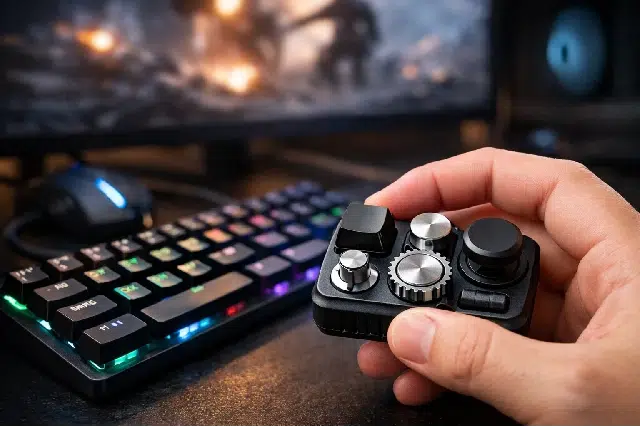
If you’ve ever thrown a match and instantly felt your mood drop, you already know what “tilt” feels like. One bad round turns into rushed decisions, shaky aim, and that annoying voice in your head that won’t let the mistake go. The tricky part is that tilt doesn’t always start with rage. Sometimes it starts with restlessness, tension in your hands, and that jittery need to do something between queues or rounds.
That’s where a Keyboard Fidget Toy fits into a gamer’s routine. It’s small, simple, and surprisingly useful: a tactile way to keep your hands busy without sabotaging your focus. Think of it like a mini “reset button” for your fingers and your brain, especially during downtime when your mind wants to spiral.
This article breaks down what a keyboard fidget toy is, why gamers are using it, how it can help you recover from tilt faster, and how to choose the right one for your setup.
What is a Keyboard Fidget Toy (and why gamers care)?
A Keyboard Fidget Toy is a handheld fidget device designed to mimic the feel of keyboard switches, keypresses, or satisfying clicks. Some are built from real mechanical keyboard switches and keycaps. Others use sliders, springs, magnets, or tactile buttons to create that same “press, click, reset” sensation.
Gamers care because gaming is already a high hand and brain workload:
- Your hands repeat the same micro movements constantly.
- Your brain stays in decision mode for long stretches.
- Between matches, your nervous system doesn’t always settle down quickly.
Competitive gaming psychology research describes “tilt” as an emotional state that can harm decision-making and performance, and recent esports-specific work shows it’s a real phenomenon with practical implications for athletes and coaches.
A keyboard fidget toy doesn’t magically fix tilt, but it can support a calmer routine by giving your hands a controlled outlet instead of letting your mind drift into frustration.
Tilt isn’t just “anger” it’s momentum
Most gamers describe tilt like a mood swing, but it behaves more like momentum. One mistake makes you tense. Tension makes you play faster. Playing faster creates more mistakes. Now you’re not just losing, you’re chasing a win while your brain is overheating.
Research in esports and gaming psychology highlights that tilt links to emotional spiraling, and protective factors include experience and adaptive emotion regulation strategies.
Here’s the practical takeaway: if you can interrupt the spiral early, you usually recover faster. And tiny physical routines can be surprisingly good at creating that interruption.
Why keeping your hands busy can calm your brain
Gamers are “hand thinkers.” Even when you’re not actively playing, your hands want to do something. When they don’t, you might start doom-scrolling, overthinking a misplay, or obsessing over your rank.
A fidget tool can act like a controlled channel for that extra energy. Some research and reviews suggest fidgeting and sensory tools may help with emotional regulation or stress in certain contexts, even though results depend heavily on the person, the setting, and the type of fidget.
Also, not every fidget is equal. Loud, flashy, high motion fidgets can become distractions, while quieter tactile options tend to be easier to use “in the background.”
For gamers, the sweet spot is a fidget you can use without stealing your attention, especially between rounds or during queues.
When a Keyboard Fidget Toy helps gamers the most
A keyboard fidget toy is most useful in short gaps, not mid fight. If you try to fidget while actively playing, you’ll probably just mess up your inputs. But in downtime, it can be perfect.
Best moments to use it
- Queue time: Keeps your hands busy so your brain doesn’t wander into tilt stories.
- Loading screens: Quick tactile reset before the next round.
- After a throw: Gives you something to do for 10 to 20 seconds instead of snapping at teammates.
- Between scrims: Helps you stay relaxed without picking up your phone.
- VOD reviews: Keeps you engaged while watching mistakes without spiraling emotionally.
A simple “tilt reset” routine (30 seconds)
Try this exactly once after a frustrating moment:
- Put your headset down for 5 seconds.
- Take one slow breath in, one slow breath out.
- Use your keyboard fidget toy for 10 to 15 presses or slides, steady rhythm.
- Say one neutral line to yourself: “Next play.”
- Rejoin with one clear goal: “Play slower,” or “Hold crosshair,” or “Track cooldowns.”
This works because it gives your brain a short, repeatable pattern. Tilt hates patterns. Tilt loves chaos.
The hand strain side of gaming (why your fingers feel cooked)
Even if you don’t feel pain, long gaming sessions can create fatigue. Extended gaming sessions have been associated with increased reports of physical problems including hand or wrist pain, and other negative physical symptoms.
Esports-specific reporting also points to repetitive wrist use and muscle fatigue concerns.
Now, a keyboard fidget toy is not a medical device. But it can encourage micro breaks. And micro breaks matter, because they interrupt constant tension.
If you’re already dealing with soreness, it’s smarter to pair any fidget habit with basic hand care guidance from reputable medical sources. Cleveland Clinic, for example, discusses repetitive stress concerns and suggests hand and wrist stretches for gamers.
H2: Keyboard Fidget Toy types gamers actually use
Not all keyboard fidget toys feel the same. For gamers, the best ones are usually tactile, consistent, and easy to use quietly.
1) Switch and keycap style fidgets
These are built from real mechanical switches with a keycap on top, often mounted in a small frame. They feel like pressing a keyboard key, because they basically are.
Why gamers like them:
- The press is familiar and satisfying.
- You can choose a switch type similar to your keyboard.
- Easy to keep on your desk without taking space.
2) Slider fidgets (mechanical or magnetic)
Sliders are great if you like a smooth “back and forth” movement. Many gamers prefer sliders because they feel calming without needing repeated tapping.
Why they work well:
- Low effort movement.
- Easy rhythm that doesn’t spike adrenaline.
- Good for calming down between rounds.
3) Clicker style fidgets
These are for gamers who love click feedback. They can be fun, but if they’re loud, they might annoy teammates in voice chat or people around you.
4) Silent tactile fidgets
If you stream, share a room, or play late at night, silent tactile fidgets are a lifesaver. Your brain still gets the tactile feedback without the noise.
Quick comparison table: what to pick for your playstyle
| Gamer situation | Best Keyboard Fidget Toy style | Why it fits |
|---|---|---|
| You tilt fast after mistakes | Slider or silent tactile | Smooth motion helps reduce agitation |
| You miss “key press” feel | Switch and keycap | Familiar muscle memory feel |
| You stream or share a room | Silent tactile or dampened switch | Less noise, less distraction |
| You play aim heavy FPS | Switch style or small slider | Easy reset between rounds |
| You grind ranked for hours | Slider + scheduled micro breaks | Supports consistent routine |
How to choose the right Keyboard Fidget Toy for gaming
This is where most people mess up: they buy the loudest, flashiest thing, then wonder why it’s distracting.
Use these gamer-focused criteria.
Feel: tactile vs smooth
- Tactile press: Great if you want a clean “click and return.”
- Smooth slide: Great if you want calming motion and less stimulation.
If you’re a high energy player who gets frustrated easily, smooth is often better. If you’re a restless player who needs physical feedback, tactile is often better.
Noise level: don’t sabotage your own focus
A fidget shouldn’t become a new problem. If it’s loud, it can pull your attention away or irritate people around you.
If you use voice chat, keep it quiet. If you stream, quiet is almost mandatory.
Resistance: match your mood
High resistance can feel satisfying, but it can also keep your body in a “fight mode” state. If tilt is your issue, medium or low resistance is usually more calming.
Build quality: avoid cheap wobble
A wobbly fidget feels bad. It also encourages you to fiddle with it in a way that’s more distracting than calming.
Size and placement: keep it where it belongs
Place it in the same spot every time. Seriously. On the right side of your keyboard, above your mousepad, whatever works. The goal is to make your “reset habit” automatic.
How to use it without becoming distracted
A fidget only helps if it stays in the background. Here’s a simple rule:
Use it when your game is paused, not when your character is moving.
Set boundaries that work
- Use it only in queue, loading, or after death.
- Limit use to 10 to 30 seconds at a time.
- Pair it with one breath to prevent compulsive tapping.
Make it part of a performance routine
Competitive gamers already use routines: warmups, sensitivity checks, aim trainers. Treat your keyboard fidget toy like a micro routine tool, not a toy you spam when bored.
Real scenarios: what it looks like in actual games
Scenario 1: FPS ranked (Valorant, CS2, Apex)
You whiff an easy spray and get instantly annoyed. You respawn and start swinging too wide, trying to “make up” for it.
Reset play:
- During buy phase, do 15 steady presses.
- Breathe once.
- Set one focus cue: “Hold angle, no ego peeks.”
Result: you’re less likely to sprint into the next mistake.
Scenario 2: MOBA tilt (League, Dota)
You lose lane and your brain starts writing a tragic story about your teammates. You flame, they tilt, now it’s a collapse.
Reset play:
- While walking back to lane, fidget for 10 seconds.
- Say one neutral line: “Play for objectives.”
- Type nothing unless it’s useful.
This matters because research links tilt with anger and time spent playing, and highlights adaptive emotion regulation as a protective factor.
Scenario 3: Long grind session (MMO raids, ranked grinds)
After 3 to 6 hours, your hands feel tense, your posture drifts, and your focus drops. Research shows long sessions relate to increased negative physical symptoms, including hand or wrist pain.
Reset play:
- Every 2 matches or every 30 minutes, stand up.
- Do quick hand stretches (finger extension, wrist circles).
- Use the fidget for 15 seconds after stretching to keep your hands relaxed.
If pain is persistent, don’t push through it. Repetitive stress issues can escalate, and reputable medical guidance emphasizes prevention and sensible breaks.
Common questions gamers ask
Does a Keyboard Fidget Toy actually reduce tilt?
It can help interrupt the spiral, especially if you use it as part of a consistent reset routine. Tilt is partly emotional momentum, so anything that helps you pause and reset can be valuable. Esports research treats tilt as a meaningful performance issue and points to emotion regulation strategies as protective.
Will it improve my aim or mechanics?
Not directly. But if it helps you calm down and stop rushing, your mechanics can look better simply because your decisions become cleaner.
Is it distracting?
It can be if you pick a loud one or if you use it while actively playing. The goal is controlled use in downtime.
Is it good for hand health?
It’s not a treatment. But it can support micro breaks and encourage you to stop clenching your hands between games. For actual hand care, follow credible medical advice and consider simple stretching and rest strategies.
What if fidgets don’t help me focus?
That’s normal. Evidence on fidgets is mixed and depends on context and individual differences. If you find it distracting, switch to a quieter, simpler option or skip it.
Pro tips to get the most value (without overdoing it)
- Pair it with breathing: One slow breath makes it a reset tool, not just a habit.
- Use a timer for breaks: If you grind for hours, use scheduled micro breaks. Long sessions correlate with more reported physical symptoms.
- Choose calm over hype: The best gamer fidget is the one that reduces stimulation, not increases it.
- Keep it off camera audio: If you stream, test noise level first. Your viewers will thank you.
- Use it to stop doom scrolling: Queue time plus social media is tilt fuel. Give your hands something else to do.
Conclusion: a small tool that supports a bigger mindset
A Keyboard Fidget Toy isn’t a miracle gadget. It won’t carry your rank. It won’t fix bad positioning. But it can do something genuinely useful: give your hands a calm, controlled outlet during the exact moments when tilt likes to take over.
If you’re the kind of gamer whose performance drops after one mistake, or you feel your hands tightening up mid session, a small fidget routine can become part of your competitive hygiene. You’re not just keeping your hands busy. You’re practicing a reset. And over time, that reset becomes part of your muscle memory when the pressure hits.