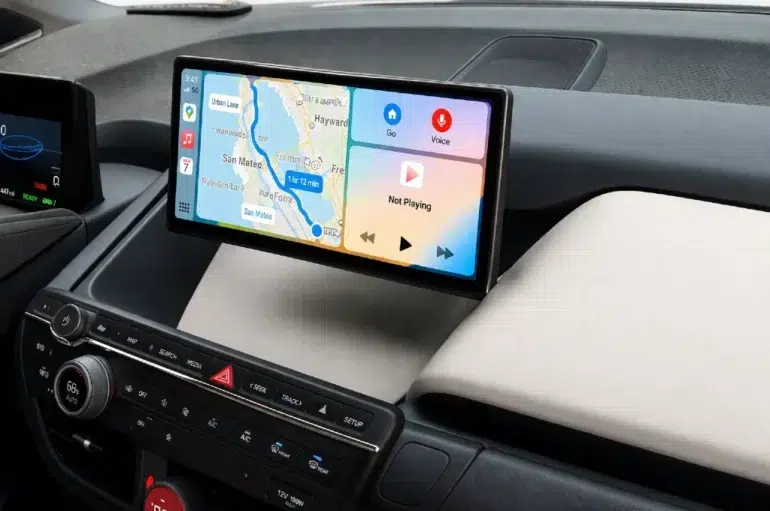
You settle into your BMW X5, ready for the drive ahead, only to be greeted by a clunky infotainment interface that feels like it belongs in a different era. No Apple Maps, no seamless Spotify streaming, no Siri to handle your calls hands-free — just a system that struggles to keep pace with your smartphone. If you own an older BMW X5, this frustration is all too familiar.
Modern drivers expect their vehicles to work in harmony with their digital lives, and Apple CarPlay has become the gold standard for that connection. The good news is that missing CarPlay from the factory doesn’t mean you’re stuck without it. Retrofit solutions have matured significantly, offering BMW X5 owners a realistic and surprisingly accessible path to a full infotainment upgrade — without replacing the entire vehicle.
Whether you’re drawn to a clean plug-and-play CarPlay module or a more expansive Android Linux Screen system, this guide walks you through everything you need to know. From understanding your options and selecting the right kit to completing a successful installation, you’ll have the knowledge to transform your BMW X5’s technology and reclaim the driving experience it deserves.
Understanding the Need for a BMW Infotainment Upgrade
BMW X5 models produced before the widespread adoption of Apple CarPlay — particularly those running older iDrive generations — shipped with infotainment systems that were considered cutting-edge at the time. Today, those same systems feel like relics. Slow processors, resistive touchscreens, and navigation maps that require paid disc updates have left many owners feeling stranded in the past while their smartphones grow more capable by the year. The gap between what your phone can do and what your car’s screen offers has never been wider.
Automotive enthusiasts are increasingly unwilling to accept that disconnect. Smartphone integration has shifted from a luxury feature to a baseline expectation, and Apple CarPlay sits at the top of that demand. It mirrors your iPhone’s interface directly onto the vehicle’s display, giving you access to familiar apps, voice commands through Siri, and real-time data — all without fumbling with a separate device. For daily commuters and long-distance drivers alike, that level of integration isn’t just convenient; it genuinely changes how you interact with your vehicle.
Aftermarket retrofit solutions have stepped in to fill this gap, and the technology has matured to the point where the upgrade feels factory-fitted rather than bolted on. Beyond simply adding BMW CarPlay, a quality infotainment retrofit can breathe new life into an aging cabin, improving everything from audio performance to overall usability. For BMW X5 owners who want their vehicle’s technology to match its mechanical excellence, an upgrade isn’t an indulgence — it’s a practical investment.
Key Benefits of Integrating CarPlay in Your BMW
The most immediate benefit is navigation. Apple Maps and Google Maps via CarPlay deliver live traffic updates, lane guidance, and rerouting that the factory BMW system simply cannot match without costly map subscriptions. Beyond directions, CarPlay hands control of your music, podcasts, and audiobooks to apps like Spotify, Apple Music, and Audible — all displayed cleanly on the screen with album art and playback controls. Siri integration means you can send messages, make calls, and set reminders without taking your eyes off the road, which directly reduces distraction-related risk. For enthusiasts who spend significant time behind the wheel, these features collectively create a calmer, more connected, and genuinely safer driving environment.
Common Shortcomings of Stock BMW Systems
Older iDrive systems suffer from several compounding frustrations. The software interface, while functional, lacks the intuitive responsiveness that smartphone users now expect — menus require multiple inputs to navigate, and the logic isn’t always obvious. Wireless connectivity is either absent or limited to Bluetooth audio, with no support for wireless phone mirroring. App support is essentially nonexistent beyond BMW’s own ecosystem, meaning third-party services you rely on daily are completely inaccessible through the screen. Over time, these limitations don’t just feel inconvenient — they actively detract from the premium experience the X5 is built to deliver.
Exploring BMW CarPlay Retrofit Solutions and Options
The aftermarket has responded to BMW’s infotainment gap with a surprisingly diverse range of retrofit solutions, each targeting a different type of owner and budget. At the most straightforward end of the spectrum sit dedicated CarPlay modules — compact devices that integrate directly with your existing iDrive system and add Apple CarPlay functionality without replacing the factory screen or head unit. These modules communicate through the vehicle’s existing harness, preserving the OEM look while layering modern smartphone connectivity on top. For owners who love their current display but simply want CarPlay access, this approach offers the cleanest result.
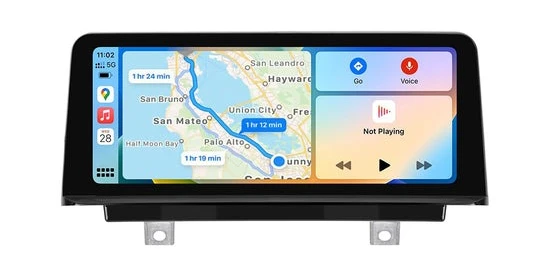
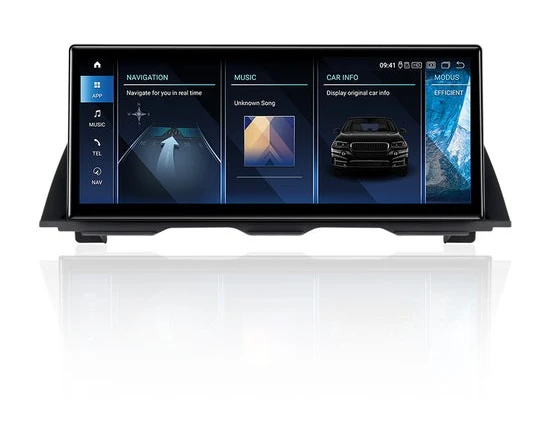
On the more expansive end, Android Linux Screen systems replace the factory display entirely with a larger, higher-resolution unit running a custom Android-based operating system. These systems don’t just add CarPlay — they fundamentally transform the infotainment experience, opening access to a broader app ecosystem, customizable interfaces, and multimedia capabilities that go well beyond what Apple CarPlay alone provides. Tech-savvy enthusiasts who want a truly modern cockpit tend to gravitate toward this category, particularly when the factory screen is aging or undersized.
Wireless connectivity has become a key differentiator across both categories. Early retrofit kits required a physical Lightning or USB-C cable to establish the CarPlay connection, which works reliably but introduces cable management considerations. Newer modules support wireless CarPlay, allowing your iPhone to connect automatically the moment you enter the vehicle — no plugging in required. Compatibility varies depending on your X5’s model year and iDrive generation, so confirming that the kit you choose is explicitly validated for your specific configuration is essential before purchasing. Specialists in the car audio space, such as PEMP Car Audio, emphasize that quality product documentation and active customer support are reliable indicators that a manufacturer understands BMW’s ecosystem deeply enough to deliver a dependable result.
Wireless and Wired CarPlay Options: Pros and Cons
Wired CarPlay connections remain the most stable option available. The physical cable eliminates latency, maintains a consistent data stream, and sidesteps potential wireless interference — making it the preferred choice for drivers who prioritize reliability over convenience. The trade-off is the cable itself: it needs to be routed cleanly through the center console or dashboard, and you’ll need to plug in every time you enter the vehicle. For BMW X5 models running iDrive 4 or 5, wired CarPlay modules are often the most compatible retrofit path, as older system architectures may not support the wireless handshake protocol reliably. Wireless CarPlay, by contrast, delivers genuine convenience — your iPhone pairs automatically via Wi-Fi and Bluetooth without any physical connection. The experience feels seamlessly integrated, much like a factory-fitted system. The potential downside is occasional connectivity lag during initial pairing, though modern wireless modules have largely addressed this through improved firmware. BMW X5 models from 2014 onward with NBT or EVO iDrive units tend to handle wireless retrofits most effectively.
Android Linux Screen Solutions: Beyond CarPlay
Android Linux Screen systems represent a fundamentally different philosophy toward the infotainment upgrade. Rather than grafting CarPlay onto the existing system, these units replace the factory display with a custom screen running a hybrid Android environment that supports both Apple CarPlay and Android Auto simultaneously. The practical upside is significant: you gain access to the Google Play Store for third-party app installation, full YouTube and streaming media playback, split-screen multitasking, and deep customization of the interface layout and themes. For enthusiasts who spend extended time in their X5 and want the cabin to function as a connected hub rather than just a navigation terminal, the Android Linux Screen approach delivers a level of flexibility that a simple CarPlay module cannot match. These systems also typically feature larger displays with higher resolution panels, which noticeably improves the visual quality of maps, media artwork, and general UI elements. The installation is more involved than a plug-and-play module, but the resulting experience justifies the additional effort for owners who want the most capable infotainment setup available.
Step-by-Step Guide to Installing CarPlay in Your BMW X5
Installing a CarPlay retrofit in your BMW X5 is well within reach for a mechanically confident owner, provided you approach the process methodically. Before touching a single panel, confirm that your chosen kit is explicitly compatible with your X5’s model year and iDrive generation — NBT, EVO, or CIC systems each have distinct connection architectures. Download any available installation documentation from the manufacturer, watch model-specific installation videos if available, and lay out all kit components to verify nothing is missing. Rushing past this preparation stage is the most common reason retrofits go wrong.
Tools and Preparation for a Smooth Installation
Gather your tools before starting: a set of plastic trim removal pry tools, a Torx screwdriver set (T10, T20, T25 are most common in BMW interiors), a panel popper, and a multimeter for verifying connections if needed. Disconnect the negative terminal of your battery and wait at least 15 minutes before working near any wiring — this prevents accidental airbag deployment and protects the iDrive system from voltage spikes during connection. Take photos of the dashboard area before disassembly; these reference shots are invaluable during reassembly. Check that your iPhone’s iOS version meets the kit’s minimum requirement, and ensure the CarPlay module’s firmware is updated to the latest version before installation begins.
Installation Process: Connecting the Retrofit Module
Start by carefully removing the trim surround around the iDrive screen using your plastic pry tools, working from the edges inward to avoid cracking the panel. BMW trim clips release with firm, even pressure — avoid levering aggressively against a single point. Once the head unit is accessible, locate the factory video and data harnesses running to the back of the screen. Most CarPlay retrofit kits use an inline connection method: you unplug the factory connector, plug it into the module’s input harness, then run the module’s output connector into the head unit. This preserves the OEM connection while inserting the CarPlay interface between the two. Route the module’s USB or antenna cable through the center console to a discreet but accessible location — ideally inside the armrest storage compartment. Secure the module itself in a ventilated cavity behind the dashboard using the provided adhesive mounts or cable ties, ensuring it won’t shift during driving. Reconnect the battery, power on the system, and verify the iDrive initializes normally before proceeding to reassemble the trim panels.
Testing and Troubleshooting Your BMW CarPlay Setup
With the system powered on, navigate to the CarPlay input source within your iDrive menu — the retrofit module typically adds a new input option labeled CarPlay or Media. For wired connections, plug your iPhone in via the routed USB cable and confirm the CarPlay interface launches within 10 seconds. For wireless setups, enable Bluetooth and Wi-Fi on your iPhone, then follow the one-time pairing prompt that appears on screen. If CarPlay fails to launch, the most common culprits are a loose harness connection at the module or an iPhone that hasn’t been authorized for CarPlay in Settings. Connectivity drops during driving usually indicate the module isn’t receiving stable power — check that the power tap is secured to a switched 12V source rather than a constant feed. Software glitches that cause the iDrive to freeze or reboot can typically be resolved by updating the module’s firmware via USB. Once everything functions correctly, test both navigation and audio output at highway speeds to confirm the wireless signal holds without interruption before signing off on the installation.
Choosing the Right Retrofit Kit for Your BMW X5
With the installation process understood, the critical decision becomes selecting a kit that actually delivers on its promises. The aftermarket is flooded with options ranging from polished, well-supported products to cheap modules that fail within months. For BMW X5 owners, the stakes are higher than average — a poorly designed kit can conflict with iDrive’s CAN bus communication, trigger warning lights, or cause system instability that’s difficult to diagnose and reverse. Prioritizing quality over price isn’t just a preference; it’s genuinely practical advice that saves time, money, and frustration down the road.
Start by verifying that any kit you consider explicitly lists your X5’s model year and iDrive generation in its compatibility documentation. Vague claims of “universal BMW compatibility” are a red flag. Reputable manufacturers publish detailed fitment guides, often broken down by chassis code and iDrive version, because they’ve done the engineering work to validate their product against specific vehicle architectures. User reviews on automotive forums — particularly BMW-specific communities — are an invaluable resource here, as real-world feedback from owners with identical configurations reveals compatibility issues that product listings never mention. Brand reputation within the enthusiast community carries significant weight, and manufacturers who actively participate in forum discussions and provide responsive technical support demonstrate a genuine investment in their customers’ success.
Essential Features in a BMW Infotainment Upgrade Kit
OEM-like integration should be your baseline requirement. The best kits connect through the factory harness without splicing or permanent modification, preserving your vehicle’s resale value and making removal straightforward if needed. Regular over-the-air or USB firmware updates are a strong indicator that the manufacturer actively maintains the product — CarPlay itself receives periodic Apple updates, and a kit that can’t keep pace will degrade in functionality over time. Wireless CarPlay capability, seamless iDrive menu integration, and retention of factory features like reverse camera input and steering wheel controls separate genuinely engineered products from bargain alternatives. Customer support availability — whether through direct email, live chat, or active forum presence — matters considerably when you encounter an installation question at 9pm on a Saturday.
Top Recommended Products for Reliable Performance
Among wireless CarPlay modules, products from established brands like Bimmertech, Fiscon, and CarPlay2Air have earned consistent praise in the BMW community for their stable connections and clean iDrive integration. For Android Linux Screen replacements, brands such as PEMP Car Audio, Seicane, and Joying produce BMW-specific units with validated NBT and EVO compatibility that deliver the full Android ecosystem alongside native CarPlay support. When evaluating any product, prioritize units with active firmware update histories, clear installation documentation, and verified reviews from X5 owners specifically — not just generic BMW buyers. A slightly higher upfront investment in a reputable kit pays dividends in reliability, longevity, and the confidence that your upgrade will perform consistently for years rather than months.
Upgrade Your BMW X5 Infotainment and Drive Smarter
Upgrading your BMW X5 with Apple CarPlay is one of the most impactful improvements you can make to a vehicle that already excels in nearly every other dimension. The factory infotainment gap is real, but it’s entirely solvable — and the retrofit solutions available today are polished enough that the result feels like it should have come from the factory in the first place.
The path forward is straightforward. Understand what your current iDrive system lacks, choose between a focused CarPlay module or a full Android Linux Screen replacement based on how deeply you want to transform the experience, and follow a methodical installation process that protects both your vehicle and your investment. Selecting a reputable kit with verified BMW X5 compatibility, active firmware support, and real user backing makes the difference between an upgrade that lasts years and one that disappoints within months.
Your BMW X5 was built to deliver a premium driving experience — and your infotainment system should match that standard. The technology to make it happen is accessible, the installation is achievable, and the daily benefit is immediate. Stop settling for a screen that can’t keep up with your phone. Take action, make the upgrade, and rediscover what it feels like when every part of your drive works exactly as it should.