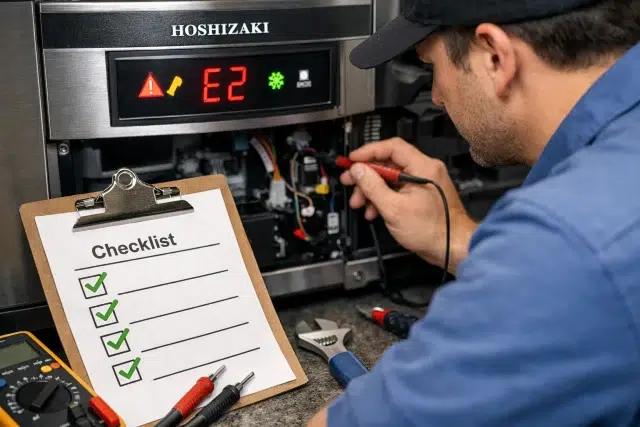
When a Hoshizaki unit throws an error code, it usually feels urgent because no ice (or unsafe ice) can turn into a real problem fast. The good news is that many alarms are triggered by simple conditions like a dirty condenser, restricted airflow, low water flow, or a bin sensor that is just doing its job. This guide is a practical, real world checklist you can run before you panic, while still knowing when it’s time to hand things over to hoshizaki tech support or an authorized service tech.
One important note up front: Hoshizaki codes and alarms can vary by model family, control board, and region. Hoshizaki publishes manuals and reference documents by model, and that is always the final source for your specific unit.
What error codes are telling you
Think of error codes as your machine’s way of protecting itself. If the control board detects a condition that could damage components or create unsafe operating temps, it may stop the cycle and display an alarm, code, or beep pattern.
Common triggers include:
- High or unstable temperatures around the unit (poor ventilation, dirty condenser)
- Water supply problems (clogged filter, partially closed valve, scale buildup)
- Sensors reading out of range (thermistors, bin controls)
- Harvest issues (ice not releasing cleanly)
- Electrical supply problems (low voltage events)
If you only remember one rule: write down the exact code, then do the simplest checks first. Many “serious looking” alarms are actually caused by airflow or water flow.
Safety first
Before you open panels or touch anything:
- If you smell burning, see smoke, or hear arcing, shut power off at the disconnect and stop.
- Keep hands clear of moving fans and hot surfaces.
- If water is leaking near electrical components, shut off power and water.
If you’re not comfortable, skip straight to service. The checklist below focuses on safe, owner friendly checks.
Quick Fix Checklist for Common Error Codes
Use this order. It’s designed to catch the most common causes with the least effort.
1) Capture the basics in 60 seconds
- Exact code or beep count
- When it happens (startup, freeze cycle, harvest, after cleaning)
- Ambient room temperature
- Whether the bin is full
- Any recent changes (new filter, moved unit, cleaning, plumbing work)
Those details make hoshizaki tech support and service techs dramatically faster and more accurate.
2) Power and voltage sanity check
A surprising number of nuisance alarms are power quality issues.
- Confirm the unit is on a dedicated circuit if required for your model.
- Check for loose plugs (if applicable) and obvious breaker issues.
- If your building has known brownouts, note the timing.
Some Hoshizaki alarm patterns are tied to low voltage events (the unit may shut down to protect itself).
3) Airflow and condenser check
If your unit is air cooled, restricted airflow is one of the most common reasons for temperature related alarms and long cycles.
- Make sure the front, side, or rear vents are not blocked by boxes, towels, or walls.
- Inspect the condenser coil for dust, grease, or lint.
- Clean per manufacturer guidance for your model.
A dirty condenser forces the machine to run hotter and longer, which can trigger thermistor and long cycle alarms.
4) Water supply check
Water problems can look like “mysterious” sensor faults.
- Confirm the shutoff valve is fully open.
- Look for a kinked line.
- If you have a filter, check if it’s overdue or clogged.
- Verify water pressure is within the range specified in your manual.
Low flow can cause incomplete freeze cycles, weak harvest, and repeated shutdowns.
5) Drain and overflow check
Drain issues can cause backup, odd behavior, and shutdowns.
- Check for slow drains or blockage in the drain line.
- Inspect for standing water where it shouldn’t be.
- Make sure drain routing matches installation requirements for your model.
6) Clean vs sanitize (and why it matters)
Owners often say “we cleaned it,” but they mean a quick wipe. For ice machines, you typically need both cleaning (removing scale and soil) and sanitizing (reducing germs to safe levels). The CDC distinguishes cleaning from sanitizing and notes you clean before you sanitize.
If your unit is overdue for a full cleaning and sanitizing cycle, you may see more errors, slower ice, odd smells, and biofilm buildup.
Common Hoshizaki error codes and what to check first
Because Hoshizaki models differ, think of the items below as the “most likely causes” that are worth checking before escalation. Always confirm your exact code meaning in the model manual.
hoshizaki tech support: Temperature and sensor related alarms
These often show up as thermistor faults or “high temp” style alarms on some units.
Fast checks:
- Clean the condenser and confirm airflow (see checklist steps 3 and 4).
- Confirm room temperature is not extreme for the unit’s rated conditions.
- Check the fan is spinning freely and not blocked (visual only).
Third party guides often list examples like “E1 high temperature thermistor fault” or similar patterns on certain units, but the exact labels vary by board and series.
When it’s time to stop DIY:
If airflow and cleaning are solid and the code returns quickly, that can indicate a failing thermistor, board issue, or sealed system problem. That is a service call.
Bin control and “bin full” confusion
Sometimes the machine is doing exactly what it should do. A full bin, stuck float, or bin sensor issue can look like a fault.
Fast checks:
- Empty or level the ice in the bin and ensure the sensor area is clear.
- Verify nothing is blocking the bin control components.
- If your model uses a mechanical bin control circuit, some alarms are tied to open or closed circuits and appear as beep patterns.
Real world scenario:
A café staff member keeps “resetting the error,” but the bin is packed solid. The machine stops to prevent overflow and the “problem” is simply a full bin.
Long harvest cycle alarms (ice won’t release)
Harvest problems are common when scale, water chemistry, or airflow are off.
Fast checks:
- Confirm water supply and flow are stable (step 4).
- Check for heavy mineral scale during inspection (white crust, rough surfaces).
- Verify condenser cleanliness and ventilation (step 3).
Some lists describe examples like “long harvest cycle” alarms (often triggered when harvest takes too long repeatedly).
Why it happens:
Ice can “stick” when the evaporator surface is scaled, water distribution is uneven, or temperatures are unstable.
Low voltage and power events
Some boards will alarm and shut down when voltage drops below a threshold, and may recover once power stabilizes.
Fast checks:
- Note whether the alarm coincides with other equipment starting (compressors, HVAC).
- Check building power quality if it happens often.
- Avoid extension cords or shared circuits where not allowed.
When it’s time to escalate:
Recurring low voltage is rarely fixed at the machine. It’s an electrical supply issue that needs attention.
One table you can screenshot and keep near the unit
| What you see | What it usually means | Quick checks (5 to 10 minutes) | If it keeps happening |
|---|---|---|---|
| High temp / thermistor style error | Unit running too hot or sensor reading out of range | Clean condenser, improve airflow, check fan, confirm room temp | Sensor, control board, or refrigeration issue |
| Bin related alarm / beeps | Bin sensor circuit issue or bin full condition | Clear sensor area, confirm bin not overfull, inspect obvious obstructions | Bin control components, wiring, board |
| Long harvest / ice not releasing | Ice sticking, scale, water flow or heat rejection issues | Water valve open, filter ok, descale and sanitize per manual, clean condenser | Water system, hot gas valve, sealed system, control |
| Low voltage alarm | Power supply dipped below safe threshold | Note timing, check circuit load, confirm proper supply | Electrician or facility power correction |
| Random shutdown after cleaning | Residual chemicals, misassembled parts, water flow changed | Rinse thoroughly, recheck water lines, confirm panels seated | Deeper diagnosis needed |
When to contact hoshizaki tech support (and what to have ready)
If the code returns after you complete airflow, water, and basic checks, you’re past the “quick fix” zone. At that point, you’ll save time by calling with the right info.
Have this ready:
- Model number and serial number
- Exact code or alarm pattern
- What you already checked (airflow, filter, water valve, cleaning)
- Ambient temperature and installation notes (tight cabinet, hot kitchen line, etc.)
Hoshizaki provides official support resources and manuals by model.
Hoshizaki also publishes technical support contact information in service documentation (for example, phone and email details for their technical support department).
Cleaning, safety, and why error codes spike when maintenance slips
A lot of “mystery errors” appear when the machine is overdue for cleaning, or when cleaning is done halfway.
Two points matter most:
1) Ice machines are a hygiene risk if neglected
Ice machines can develop deposits, mold, and biologic buildup if not maintained. The Joint Commission has noted that ice machines carry infection control risk and need regularly scheduled cleaning, disinfection, and maintenance based on manufacturer instructions.
2) Clean first, then sanitize
Cleaning removes soil and buildup. Sanitizing reduces germs to safer levels. The CDC emphasizes cleaning before sanitizing or disinfecting for best results.
If your staff cleans only the bin and ignores internal water pathways, the machine may still struggle with flow, sensors, and harvest performance.
FAQs
Why does my Hoshizaki show an error code right after a filter change?
A new filter can restrict flow if it’s the wrong micron rating, installed backward, or not flushed. Low flow can trigger long cycles or harvest issues. Confirm correct installation and water pressure, then recheck the code meaning in your model manual.
Can I reset the machine and keep running?
A reset may clear an alarm temporarily, but if the underlying condition remains (dirty condenser, low water, bin full, voltage dips), the code usually returns. Use the checklist once. If it repeats, escalate.
Do Hoshizaki error codes mean something is “broken”?
Not always. Many alarms are protective and are triggered by conditions, not failed parts. Airflow restriction, water restriction, and missed cleaning are common real world causes.
How often should an ice machine be cleaned and sanitized?
Follow the schedule and procedure in your model documentation first. In food service and regulated environments, organizations commonly align maintenance intervals with manufacturer instructions and facility risk assessments, especially because ice machines can harbor buildup if ignored.
Conclusion
Error codes feel intimidating, but a lot of them are your unit asking for basics: stable power, clean airflow, steady water, and proper cleaning. If you run the checklist and the problem returns, don’t waste hours repeating resets. Capture the code, note the conditions, and contact hoshizaki tech support with the model, serial, and your observations so the fix is faster and more precise. Hoshizaki’s manuals and official support resources are the right starting point for model specific meanings and procedures.
In the long run, treating the machine like mission critical equipment instead of an appliance pays off. A simple routine, logged checks, and preventive maintenance reduce surprise shutdowns, improve ice quality, and help you avoid the most common alarms.