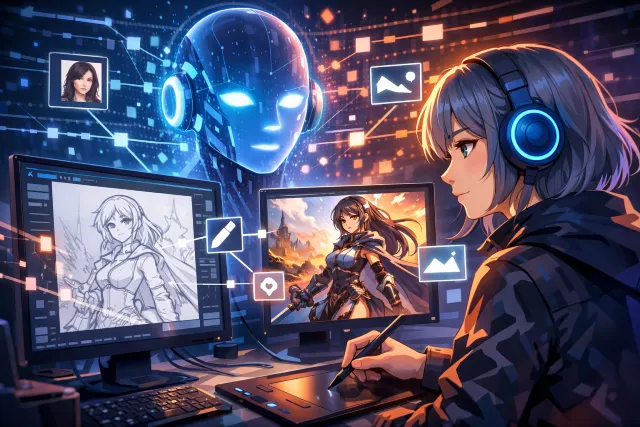
If you have ever typed a short prompt like “a cozy cafe in the rain, watercolor style” and watched a brand-new image appear in seconds, you have already experienced the core magic of AI イラスト 生成. It feels a bit like instant imagination, but under the hood it is a very structured pipeline: data, text understanding, image understanding, and a generation engine that turns noise into pixels step by step.
This article breaks down how AI イラスト 生成 works in plain language, without skipping the important technical ideas. By the end, you will understand what a model is actually doing when it “listens” to your prompt, why some prompts produce clean hands and others produce horror-fingers, and what changes when you use different styles, settings, or training approaches.
What “AI Illustration Generation” Really Means
At its simplest, AI illustration generation is a system that learns patterns from a huge number of image examples and then creates new images that match a text request. The system is not copying a single picture like a collage tool. Instead, it learns statistical relationships between:
- Words and visual concepts (cat, neon lighting, ukiyo-e, cinematic, soft shadows)
- Composition patterns (foreground subject, background depth, perspective)
- Texture and color behavior (oil paint strokes, flat anime shading, pencil grain)
- Common object structures (faces, eyes, buildings, clothing folds)
Most modern AI イラスト 生成 tools use “text-to-image diffusion models,” a family of models that generate an image by starting with random noise and gradually refining it into something that matches the prompt. The diffusion approach became popular because it produces high quality results and is relatively stable to train compared to earlier methods.
The Big Picture Pipeline of AI イラスト 生成
Even though different tools have different UI and features, a typical AI イラスト 生成 system follows a similar flow:
- You write a prompt (text input).
- A text encoder turns your words into numbers (embeddings).
- A generator model creates an image in steps, guided by those embeddings.
- A decoder converts internal representation into pixels (for latent diffusion).
- Optional steps refine or correct the image, like upscaling or inpainting.
It helps to think of it like ordering food in a busy kitchen. Your prompt is the order, the text encoder is the waiter translating it into a structured ticket, the diffusion model is the cooking process, and the decoder is plating it into a final dish.
The Foundation: Training Data and Why It Matters
To understand AI イラスト 生成, you need to understand training. These models learn from very large datasets of images paired with text descriptions. Some datasets are built from public sources, often at massive scale. For example, LAION-5B is described as containing 5.85 billion CLIP-filtered image-text pairs (with a subset in English), intended for training large vision-language systems.
This matters because the dataset influences:
- What styles the model can imitate well
- How it handles different subjects, cultures, and design conventions
- What biases appear in outputs
- Whether the model struggles with rare concepts
- How often it produces artifacts (odd anatomy, unreadable text)
It also matters ethically and legally. Large scraped datasets can include personal data or copyrighted material, which is one reason AI image generation remains a highly debated topic in the creator community and in policy discussions.
Step 1: How the Model “Reads” Your Prompt
Text encoders and embeddings
Your prompt is converted into a numerical representation called an embedding. Many popular systems rely on transformer-based language models for this representation, built on the attention mechanism that became widely known through the Transformer architecture.
For a lot of AI イラスト 生成 systems, a key idea is that text and images can be mapped into a shared space, so the model can learn that “golden retriever” is closer to “dog” than “sports car.” CLIP (Contrastive Language-Image Pretraining) is one influential approach that learns joint representations of images and text.
Why phrasing and order matter
The model does not “understand” like a human, but embeddings capture patterns. Subtle prompt choices often shift the embedding:
- “portrait photo” vs “illustration” changes texture expectations
- “flat colors” reduces shading complexity
- “wide angle” pushes perspective cues
- “studio lighting” suggests crisp highlights and controlled shadows
In AI イラスト 生成, prompt wording is less like giving instructions to a person and more like shaping a search-and-assemble process inside a learned visual grammar.
Step 2: Diffusion Models in Plain English
Diffusion models became mainstream for AI イラスト 生成 because they produce sharp, detailed images and handle many styles well. The core idea is surprisingly simple:
- During training, the model learns to take a real image and gradually add noise to it.
- It also learns the reverse: how to remove noise step by step to recover the image.
- During generation, it starts from pure noise and runs the reverse process to “discover” an image.
A foundational reference for this approach is Denoising Diffusion Probabilistic Models (DDPM).
A quick mental model
Imagine an old TV static screen. A diffusion model starts with that static, then repeatedly “nudges” it toward shapes that match your prompt. Early steps decide big structure. Later steps fill in detail like edges, textures, and tiny lighting cues.
Why it takes “steps”
Diffusion generation is iterative. More steps generally mean:
- Better detail
- Fewer weird artifacts
- More stable structure
But more steps also cost time. Research such as DDIM explored faster sampling methods that can reduce the number of steps significantly while keeping quality decent.
Step 3: The Guidance Trick That Makes Prompts Work Better
If diffusion is “denoise toward something realistic,” guidance is “denoise toward something realistic that matches the prompt strongly.”
A popular technique is classifier-free guidance, which blends a conditional model (prompt-aware) and an unconditional model (prompt-free) to control how strongly the prompt influences the image.
In practical terms, guidance is why:
- Weak prompts can still produce coherent results
- Adding style words changes the output noticeably
- Overly strong settings can make images look unnatural or overly sharpened
Many UI sliders in AI イラスト 生成 tools are essentially exposing guidance strength under a friendly name.
Step 4: Why Latent Diffusion Made AI イラスト 生成 So Accessible
A major practical breakthrough was generating images in a compressed latent space rather than directly in pixel space. This is the idea behind latent diffusion models, described in the “High-Resolution Image Synthesis with Latent Diffusion Models” paper.
What is “latent space” here?
Instead of working on a 512×512 RGB image directly (which is heavy), the system:
- Uses an autoencoder to compress the image into a smaller latent representation.
- Runs diffusion in that smaller latent space.
- Decodes back to pixels.
This makes generation faster and cheaper while keeping good visual quality. It is one reason modern AI イラスト 生成 tools can run on consumer hardware or at large scale in the cloud.
The Core Architecture Pieces (Without the Math)
A modern text-to-image system often includes these building blocks:
1) U-Net backbone
Many diffusion systems use a U-Net style architecture, originally popularized for segmentation tasks, because it handles multi-scale features well.
Why it helps: U-Net can track both global structure (big shapes) and local detail (edges, textures) at the same time.
2) Cross-attention to inject text into image features
Text embeddings are injected into the image generation process through attention layers, so the model can align words with parts of the developing image. This is a big reason prompt words like “red scarf” can influence a specific region rather than the whole image equally.
3) Decoder to turn latent into pixels
In latent diffusion, the decoder reconstructs the final image from the latent representation. This decoder heavily impacts how clean the final image looks, especially for fine patterns.
Why Hands, Text, and Logos Are Still Hard
If AI イラスト 生成 is so advanced, why do hands still break and text still become nonsense?
Common reasons:
- Hands are structurally complex: many valid poses, occlusions, finger counts, and angles.
- Training captions rarely describe finger geometry: the model sees hands often, but not with precise labels.
- Text is a special case: text in images is not just texture; it must follow exact symbol rules.
- Logos require accuracy: brand marks demand exact geometry, and “close enough” is not acceptable.
This is why many tools recommend using inpainting or separate text tools for posters, product packaging, and UI mockups.
A Simple Table: How Diffusion Compares to Older Generators
| Approach | How it generates | Strengths | Weaknesses |
|---|---|---|---|
| GANs | Compete generator vs discriminator | Fast output, sharp images | Can be unstable to train, mode collapse |
| VAEs | Encode and decode through latent space | Smooth latent control | Can look blurry without extra tricks |
| Diffusion | Denoise noise step by step | High quality, stable training, great detail | Slower without acceleration tricks |
Diffusion became the default for mainstream AI イラスト 生成 because its quality and reliability scaled well with data and compute.
How Fine-Tuning and Style Customization Work
A base model learns general visual knowledge. Customization happens by adapting that base model to new styles or concepts.
Fine-tuning
Full fine-tuning updates many model weights to specialize outputs (for example, a consistent character style).
LoRA and lightweight adaptation
LoRA (Low-Rank Adaptation) is a method that adds small trainable layers instead of retraining everything, making customization cheaper and faster. While it was introduced for language models, the same idea is widely used in image model customization workflows.
Why this matters for AI イラスト 生成
Customization changes the balance between:
- General creativity (variety)
- Specific consistency (same face, same outfit, same art style)
If you are building a brand mascot or a recurring comic character, consistency becomes the priority, and adaptation methods become the practical route.
Conditioning Beyond Text: Sketch, Pose, and Layout Control
A common frustration with AI イラスト 生成 is getting the exact pose or composition you want. That is where “control” methods come in.
One well-known approach is ControlNet, which adds extra conditioning signals (like edge maps, pose skeletons, depth maps) to guide the diffusion process.
This is how creators can do things like:
- Draw a rough sketch and ask the model to render it in a specific style
- Lock a pose and change clothing, lighting, and background
- Preserve layout while changing art direction
It is still generative, but with guardrails.
A Practical Scenario: What Happens When You Type a Prompt
Let’s walk through a real-world flow, like you might do in a typical generator UI.
Prompt example:
“cute robot barista, pastel illustration, soft lighting, minimal background”
What happens internally:
- The text encoder turns that into embeddings representing “robot,” “barista,” “pastel illustration,” “soft lighting,” “minimal background.”
- The model starts from noise.
- Early denoising steps shape the main silhouette (robot body, head placement).
- Mid steps refine the scene (cup, counter, background emptiness).
- Later steps refine style and texture (pastel palette, soft edges).
- A decoder converts the latent into pixels.
- Optional post-processing sharpens details or increases resolution.
That is the engine of AI イラスト 生成 in action: repeated alignment between your prompt and the evolving image.
Common Questions People Ask About AI イラスト 生成
Does the AI “copy” images from the internet?
In general, diffusion models generate by sampling from learned patterns, not by retrieving a single matching image and editing it. However, training data strongly influences what the model can reproduce, and researchers and creators still debate where “learning style” ends and “memorizing examples” begins. Dataset composition and filtering matter a lot.
Why do two runs with the same prompt look different?
Most generators include randomness through a “seed.” Different seeds start from different noise patterns, so the model finds different valid solutions. Using the same seed with the same settings tends to reproduce very similar results.
Why do negative prompts work?
A negative prompt is essentially extra conditioning that pushes the model away from certain features. It can reduce common artifacts like extra limbs, muddy lighting, or unwanted styles. In many systems, this interacts with guidance behavior.
Why do some styles look better than others?
Because training data is uneven. Some styles appear frequently online and are well-represented in the dataset. Others are rare, niche, or poorly captioned, so the model struggles to capture them reliably.
What “Quality” Means in AI Image Generation
When people compare AI イラスト 生成 tools, they are often mixing several different quality dimensions:
- Prompt adherence: does it follow the request?
- Composition: is the scene arranged well?
- Anatomy and structure: do faces and hands make sense?
- Texture realism: does it look like the intended medium?
- Artifact control: fewer odd distortions, fewer hallucinated details
- Consistency: can it reproduce a character across multiple images?
Researchers also use quantitative metrics, but creators mostly feel quality through these practical outcomes.
The Real Cost Behind the Magic
It is easy to forget how resource-intensive this is. Training large generative models requires serious compute, and running them at scale costs money. Market forecasts and research reports regularly highlight that generative AI spending and economic impact are rising quickly. For example, Gartner forecasted worldwide generative AI spending reaching hundreds of billions of dollars, and McKinsey discussed multi-trillion-dollar potential across use cases.
This is part of why many tools offer tiers, limits, or paid plans: generation is not just software, it is compute.
Using AI イラスト 生成 More Effectively Without Overcomplicating It
Even if you never touch advanced settings, a few habits tend to produce cleaner results:
- Describe the subject first, then style, then environment
- Add one or two style anchors (watercolor, ink lineart, pixel art) instead of ten
- Be clear about camera or framing (close-up, full body, wide shot)
- Use simple composition cues (centered subject, plain background, top-down view)
- Iterate with small edits rather than rewriting the entire prompt each time
These are not “secret hacks.” They are simply ways to reduce ambiguity, which makes the model’s job easier.
Conclusion: What You Now Know About AI イラスト 生成
Under the hood, AI イラスト 生成 is not mysterious at all, it is an engineering pipeline that combines text understanding with an iterative image generator. Your prompt becomes embeddings. Those embeddings guide a diffusion process that turns noise into structure, then structure into detail. Latent diffusion makes it efficient enough to run at scale. Guidance methods amplify prompt control. Fine-tuning and adapters help build consistent styles and characters. And control techniques add structure when pure text is not enough.
If you view it as “guided denoising powered by learned visual patterns,” a lot of the confusing behavior starts to make sense, including why certain prompts are easier, why hands fail, and why composition control tools became popular.
In the last stretch of learning this topic, it is also useful to recognize how widely this ecosystem has spread, from research papers to consumer tools to community workflows built around settings and checkpoints. A good example of how fast this space evolves can be seen in discussions around Stable Diffusion as a broader family of releases and techniques.