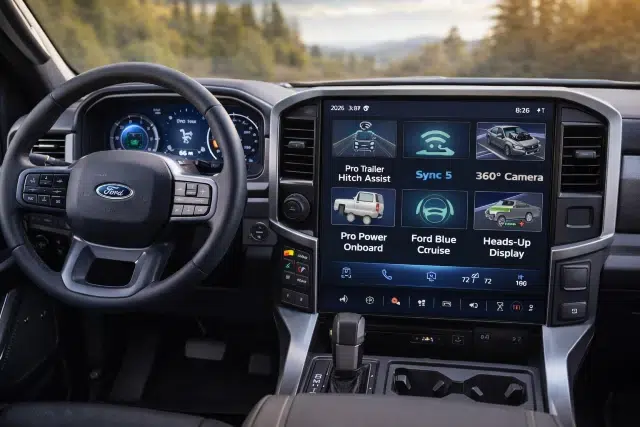
If you’re shopping trucks this year, the 2026 F-150 Smart Tech Features are probably high on your checklist — and honestly, they should be. The F-150 has always been about capability, but in 2026 the “smart” part matters just as much as towing numbers. We’re talking hands-free highway help, trailering tech that reduces stress, in-cab screens that feel more like a modern device, and connected services that can genuinely make ownership easier (and safer).
Below is a real-world, buyer-focused breakdown of the tech that’s worth knowing — what it does, who it’s for, and what to watch out for — so you don’t overpay for features you’ll never use (or skip something you’ll wish you had).
Quick definition
2026 F-150 Smart Tech Features are the driver-assist, connectivity, infotainment, trailering, power, and security technologies built into the 2026 Ford F-150 — designed to make driving, towing, working, and owning the truck easier through software, sensors, cameras, and connected services.
1) SYNC 4 + the big touchscreen: the tech you’ll touch every day
On many 2026 F-150 trims, the center of your daily experience is the big touchscreen running SYNC 4 —and Ford highlights a 12-inch center display on models like the XLT.
Why it matters: the screen isn’t just for music. In modern trucks, it’s the “command center” for navigation, trailering pages, camera views, settings, and connected features. If you’re coming from an older truck, this is the upgrade that feels most immediate.
What to look for when test-driving:
- How quickly the system responds to taps and swipes
- Whether the menu layout feels intuitive to you (not to the salesperson)
- How easily you can jump between audio, maps, and towing screens without hunting
Buyer tip: If you tow even a few times a year, spend extra time in the trailering menus. That’s where good software pays off.
2) BlueCruise hands-free highway driving: cool, helpful… and not magic
One of the headline 2026 F-150 Smart Tech Features is available Ford BlueCruise, which Ford describes as a hands-free highway driving assistant on compatible roads.
In plain English: on certain mapped highways, BlueCruise can help with steering, lane centering, and pace — while monitoring that you’re still paying attention. It can make long highway runs feel noticeably less tiring.
What BlueCruise is best at
- Long, straight highway stretches
- Stop-and-go highway traffic (where supported)
- Reducing “micro-fatigue” from constant lane corrections
What to be realistic about
Hands-free driving systems can confuse drivers about what the truck can and can’t do. The Wall Street Journal has reported on driver confusion and federal scrutiny surrounding hands-free systems, including BlueCruise, in the context of crashes and investigations.
Practical advice before you pay for it:
- Ask exactly what’s included with the trim/package you’re buying (and any subscription details)
- Do a demo drive on the kind of highway you actually use
- Treat it like a driver-assist tool, not an autopilot
3) Trailering tech that actually reduces stress (and arguments)
If you’ve ever backed a trailer into a tight spot while someone “helps” by waving their arms like they’re landing a plane… you’ll appreciate the F-150’s towing tools.
Pro Trailer Backup Assist™
Ford’s support materials describe Pro Trailer Backup Assist as letting you steer the trailer direction via a knob — helping take the mental gymnastics out of reversing with a trailer.
Pro Trailer Hitch Assist™ (and related hitching help)
On the 2026 F-150 XLT page, Ford specifically calls out Pro Trailer Backup Assist™ and Pro Trailer Hitch Assist™ as available features to help line up and back up for hitching.
Real-world scenario:
You’re solo at a storage lot trying to hook up a boat trailer. Instead of hopping in and out repeatedly to check alignment (and still missing), hitch assist features can reduce the trial-and-error time.
Buyer tip: If towing is even a “sometimes” thing for you, prioritize trailering tech over luxury add-ons. Heated seats are nice; not jackknifing is nicer.
4) Pro Power Onboard: the feature people underestimate — until they own it
One of the most useful “smart” features is power output. On the 2026 F-150 XLT page, Ford notes available Pro Power Onboard options and highlights that the PowerBoost hybrid can deliver up to 7.2 kW, described as the highest available output for Pro Power Onboard.
Who benefits most
- Contractors running tools at a jobsite
- Campers powering gear (coffee makers included)
- Tailgaters who want outlets without bringing a generator
- Anyone who’s dealt with a blackout and wanted a mobile power source
What to check before buying:
- Which kW level is on your build (400W vs 2kW vs 2.4kW vs 7.2kW options are listed as available)
- Where the outlets are located and whether they fit your use case
- Whether you truly need the top output — or just want it
5) The Ford Connectivity Package: Wi-Fi, apps, and the “it’s a truck, but it’s also a device” era
Ford is pushing a simpler “bundle” approach to connected services through the Ford Connectivity Package. Ford’s own description includes a Wi-Fi hotspot that can connect up to 10 devices and also mentions in-car entertainment apps like Prime Video and YouTube (where supported).
This matters because connected tech is quickly becoming part of the ownership cost equation — like phones. Some features are included for a trial period, but you’ll want to understand what happens afterward.
Simple checklist:
- Does your trim come with the modem/connectivity hardware you need?
- How long is the included trial on your specific vehicle?
- Which features stop working if you don’t renew?
(If you’re the type who uses your truck for road trips with family, in-cab Wi-Fi is one of those “why didn’t we do this sooner?” features.)
6) Ford app (FordPass) remote controls: convenience that’s now table stakes
Ford’s support info for the Ford app (the new FordPass experience) explains you can remotely lock, unlock, and start your vehicle (when equipped and set up), with notes about requiring modem activation and that remote features can vary by model.
Everyday wins
- Warm up or cool down the cabin before you get in
- Quick lock confirmation when you’re halfway across a parking lot
- Basic vehicle status checks without walking back outside
Buyer tip: When you pick up the truck, make the dealership help you set this up before you leave. Most “the app doesn’t work” frustration is just setup, permissions, or modem activation.
7) Anti-theft tech is getting smarter (because thieves did, too)
This is one category that’s not flashy — but it’s a big deal in the real world.
The Associated Press reported Ford’s push to enhance anti-theft technology in F-150 pickups, including features like Start Inhibit (allowing owners to disable the engine remotely via the app as part of stolen vehicle services) and broader implementation planned for 2026. The same report cites large-scale auto theft numbers — over 850,000 vehicles stolen in 2024 and about $8 billion in losses.
Why you should care even if you “live in a safe area”
Pickups get targeted not only for the truck, but also for what’s in the bed or cab — tools, equipment, and expensive accessories.
Actionable tip: Ask what security package/services are available on the specific trim you’re buying — and whether any parts require an active subscription.
8) Screens vs. analog gauges: know what your trim actually includes
Not every 2026 F-150 is “all screens, all the time.” Ford-focused reporting indicates that some trims bring back an analog gauge cluster (with a smaller digital display) instead of a full 12-inch digital cluster on certain configurations.
Why that matters:
If you want a full digital cluster, you should confirm it on your exact build sheet — not assume. On the flip side, if you prefer simpler analog gauges, you might actually like those trims more.
Which smart tech features matter most (by buyer type)
| Buyer type | Best-fit smart tech | Why it’s worth it |
|---|---|---|
| Daily commuter | BlueCruise (if your highways support it), SYNC 4 | Less fatigue, better daily usability |
| Frequent tower | Pro Trailer Backup Assist, Pro Trailer Hitch Assist | Less stress, easier solo towing |
| Contractor / jobsite | Pro Power Onboard (higher kW), connectivity | Power tools + “mobile office” vibes |
| Road-trip family | Wi-Fi hotspot / Connectivity Package | Keeps passengers connected, fewer complaints |
| Theft-conscious owner | Security services + Start Inhibit | Adds a serious layer of protection |
Smart shopping tips (so you don’t overpay)
1) Build your “tech must-haves” before you look at trims
Make two lists:
- Must-have (example: trailering assist, Pro Power Onboard)
- Nice-to-have (example: hands-free driving)
Then find the lowest trim/package combo that covers your must-haves.
2) Ask about subscriptions upfront
Connectivity and hands-free features can involve trials or paid services. Confirm what’s included and for how long before you sign.
3) Test the tech the way you’ll use it
- Try the camera and towing menus in a tight lot
- Pair your phone and run a navigation route
- If BlueCruise is on your shortlist, try it on a nearby compatible highway
FAQs
Are the 2026 F-150 Smart Tech Features worth paying for?
Yes — if you choose based on how you use the truck. Towing tech and Pro Power Onboard tend to deliver the most day-to-day value for owners who actually tow or work from the truck.
Does the 2026 F-150 have hands-free driving?
It can, depending on trim and equipment. Ford lists available BlueCruise hands-free highway driving on the 2026 F-150 model page.
Can the 2026 F-150 power tools or camping gear?
Yes — when equipped with Pro Power Onboard, including options up to 7.2 kW on certain configurations like the available PowerBoost hybrid setup.
Can I remote start the 2026 F-150 with my phone?
Often, yes — remote start/lock/unlock is supported through the Ford app when the vehicle is equipped, added to the app, and the modem is activated (features vary by model).
What’s the most underrated smart tech feature on the 2026 F-150?
Pro Power Onboard. A lot of people don’t think they need it — until the first time they’re running tools onsite or dealing with a power outage.
Conclusion: the tech that matters most before you buy
The 2026 F-150 Smart Tech Features story isn’t about gimmicks. It’s about reducing friction — less stress while towing, fewer headaches on long drives, more capability when you’re working, and more protection when you’re parked. For most buyers, the “big three” to prioritize are:
- Trailering assists (if you tow at all)
- Pro Power Onboard (if you work/camp/tailgate or want backup power)
- Connectivity + app features (if you value remote control, Wi-Fi, and modern ownership convenience)
And if you’re considering hands-free driving, go in with clear expectations: it can be genuinely helpful, but it’s still driver assistance, not a substitute for attention.